
Exotic Blocks
Fancy and novel building blocks for Minecraft
About this Mod
Exotic Blocks
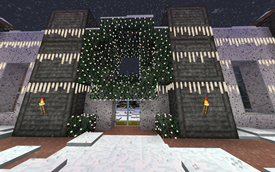
Exotic Blocks is a work-in-progress building mod. The mod is still in early stages, with many new blocks and other features still to be added.
REI is recommended to see recipes.
In version for 1.14 and 1.15 it requires Exotic Matter Library. Starting with 1.16, XM is included and you do not need to download it.
Mod ID and block names changed starting in the 1.16 version; Existing pre-1.16 worlds should convert, but please back up your world before trying and log an issue if you have problems.
Current Features
Connected glass and stained glass blocks.
- Crafted 1:1 from regular glass blocks and also crafted back.
Omni-Directional Stairs and Wedges.
- Included for all stone-type blocks that already have stairs, plus concrete and terracotta
- Inside and outside corners are separate blocks and can be placed independently of stairs/wedges
- Craft in a Stonecutter
- To place horizontally based on look direction, hold Windows/Command button while placing
- To place horizontally based on relative face position, hold Control button while placing
Stone columns
- Several round and square variants, some with illumination
- Craft in a Stonecutter
- Craft with glowstone dust or prismarine to create luminous or light-source variants
Illuminated panels
- Craft full blocks with glowstone dust or prismarine to create luminous or light-source variants
Portable Stonecutter
Available Versions
How to Install Exotic Blocks on Your Server
Order Server
Order a Minecraft Java server with at least 3 GB RAM (4 GB recommended).
Set fabric Loader
In the panel under "Egg", select the fabric loader and matching Minecraft version (1.19.2).
Install Mod
Open the mod browser in the dashboard and search for "Exotic Blocks". Click "Install" – done! Alternatively, upload the .jar via SFTP to the /mods folder.
Compatibility
Mod Loaders
Minecraft Versions
1.19.2, 1.19, 1.18.2 (+1 more)
Server-side
✓ RequiredRecommended RAM
4 GB(min. 3 GB)Frequently Asked Questions
Exotic Blocks server crashes on startup – what to do?
Most common cause: wrong fabric version or insufficient RAM. Check the server log (latest.log) for "OutOfMemoryError" or "Mixin" errors. With Mado Hosting: ensure at least 3 GB RAM is allocated and the loader matches the mod version (1.19.2). You can switch loaders with one click in the panel.
Is Exotic Blocks compatible with fabric?
Exotic Blocks officially supports fabric for Minecraft 1.19.2, 1.19, 1.18.2. The Mado dashboard automatically detects incompatible loader combinations.
Server lagging with Exotic Blocks – how to optimize performance?
Recommended RAM: 4 GB (per 8 players). Use /spark profiler to check if Exotic Blocks consumes the most tick time. Common fixes: reduce server view-distance to 8-10, install "performant" or "starlight" as supplementary mods on Forge. With Mado Hosting, your server runs on NVMe SSDs with dedicated CPU cores for minimal latency.
Similar Mods

![[ETF] Entity Texture Features](https://cdn.modrinth.com/data/BVzZfTc1/af683d206d50b05258d865b0d6e4aa2f2cee12f2_96.webp)
![[EMF] Entity Model Features](https://cdn.modrinth.com/data/4I1XuqiY/6e5bbd0d06b1741bfdab6c0cfab6de8fdaf0064c_96.webp)



Rent Modded Server
Install Exotic Blocks with just one click on your server.