
Explosion Control & Rebalance
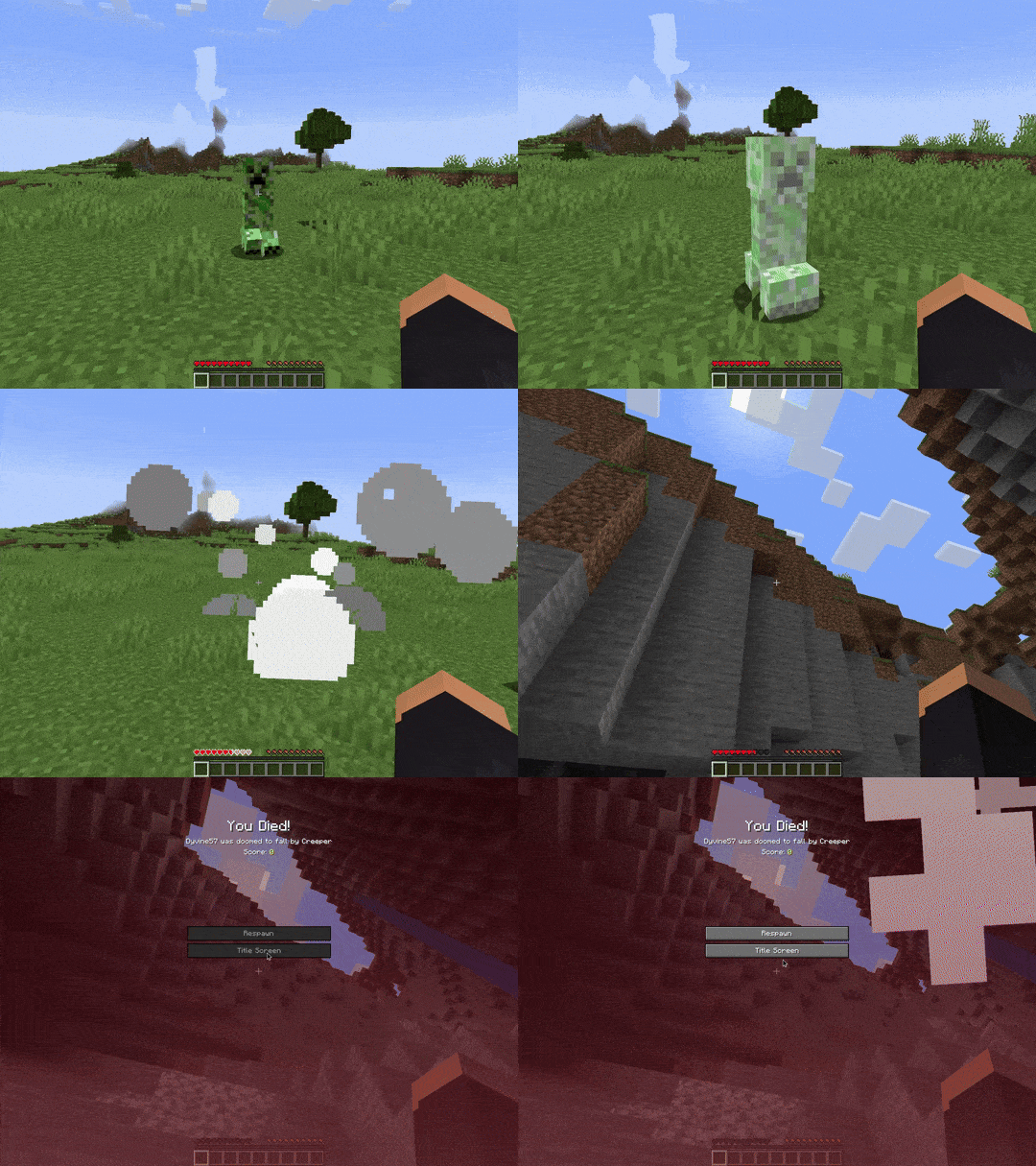
Simple server-side mod (works in singleplayer as well) that gives you configurable control over explosions by allowing you to toggle griefing, add extra knockback, and/or modify damage for each source.
Screenshots
About this Mod
Explosion Control & Rebalance
Simple server-side mod (works in singleplayer as well) that gives you configurable control over explosions by allowing you to toggle griefing, add extra knockback, and/or modify damage for each source.
Config
The mod is highly configurable allowing you to tweak aspects of the knockback and falloff as well as settings for each different type of explosion. You are also able to configure explosions from other mods using the Explosions.Custom.Exploders config option.
Click to see the default config file
# Controls aspects of the added knockback
[Knockback]
	# Strength of extra knockback caused by the explosion.
	# Default: 3.0
	KnockbackStrength = 3.0
	# Multiplier of extra knockback caused by the explosion to players.
	# Default: 0.9
	PlayerKnockbackMultiplier = 0.9
	# The amount of upward velocity added by the explosion as part of its knockback.
	# Default: 0.1
	UpwardsKnockback = 0.1

# Controls the falloff used for knockback and damage
[Falloff]
	# Exponent used for calculating the falloff.
	# Default: 2.0
	FalloffExponent = 2.0
	# Adds to the radius when calculating the falloff. Allows for entities near the edge of the explosion to still get some knockback
	# Default: 1.0
	FalloffExtension = 1.0

# Controls aspects of different types of explosions
[Explosions]

	[Explosions.Creeper]
		# Prevents creeper explosions from breaking blocks.
		# Default: true
		DisableCreeperGriefing = true
		# Enables extra knockback for creeper explosions.
		# Default: true
		EnableCreeperKnockback = true
		# Multiplier for extra knockback caused by creeper explosions.
		# Default: 1.0
		CreeperKnockbackMultiplier = 1.0
		# Multiplier for the total damage caused by creeper explosions.
		# Default: 1.0
		CreeperDamageMultiplier = 1.0

	[Explosions.EndCrystal]
		# Prevents end crystal explosions from breaking blocks and setting blocks on fire.
		# Default: false
		DisableEndCrystalGriefing = false
		# Enables extra knockback for end crystal explosions.
		# Default: true
		EnableEndCrystalKnockback = true
		# Multiplier for extra knockback caused by end crystal explosions.
		# Default: 0.75
		EndCrystalKnockbackMultiplier = 0.75
		# Multiplier for the total damage caused by end crystal explosions.
		# Default: 1.0
		EndCrystalDamageMultiplier = 1.0

	[Explosions.Fireball]
		# Prevents fireball explosions from breaking blocks and setting blocks on fire.
		# Default: false
		DisableFireballGriefing = false
		# Enables extra knockback for fireball explosions.
		# Default: true
		EnableFireballKnockback = true
		# Multiplier for extra knockback caused by fireball explosions.
		# Default: 0.75
		FireballKnockbackMultiplier = 0.75
		# Multiplier for the total damage caused by fireball explosions.
		# Default: 1.0
		FireballDamageMultiplier = 1.0

	[Explosions.TNT]
		# Prevents TNT explosions from breaking blocks.
		# Default: false
		DisableTNTGriefing = false
		# Enables extra knockback for TNT explosions.
		# Default: true
		EnableTNTKnockback = true
		# Multiplier for extra knockback caused by TNT explosions.
		# Default: 1.25
		TNTKnockbackMultiplier = 1.25
		# Multiplier for the total damage caused by TNT explosions.
		# Default: 1.0
		TNTDamageMultiplier = 1.0

	# Wither
	[Explosions.Wither]

		[Explosions.Wither.Spawn]
			# Prevents wither spawning explosions from breaking blocks.
			# Default: false
			DisableWitherGriefing = false
			# Enables extra knockback for wither spawning explosions.
			# Default: true
			EnableWitherKnockback = true
			# Multiplier for extra knockback caused by wither spawning explosions.
			# Default: 2.0
			WitherKnockbackMultiplier = 2.0
			# Multiplier for the total damage caused by wither spawning explosions.
			# Default: 1.0
			WitherDamageMultiplier = 1.0

		[Explosions.Wither.Skull]
			# Prevents wither skull explosions from breaking blocks.
			# Default: false
			DisableWitherSkullGriefing = false
			# Enables extra knockback for wither skull explosions.
			# Default: true
			EnableWitherSkullKnockback = true
			# Multiplier for extra knockback caused by wither skull explosions.
			# Default: 0.75
			WitherSkullKnockbackMultiplier = 0.75
			# Multiplier for the total damage caused by wither skull explosions.
			# Default: 1.0
			WitherSkullDamageMultiplier = 1.0

	[Explosions.Custom]
		# Allows for adding explosions from other mods.
		# Format: [EntityID, DisableGriefing, EnableKnockback, KnockbackMultiplier, DamageMultiplier]
		# Example: [["entity.minecraft.creeper", true, true, 1.0, 1.0], ["entity.minecraft.tnt", false, true, 1.25, 1.0]]
		Exploders = [[]]
Available Versions
How to Install Explosion Control & Rebalance on Your Server
Order Server
Order a Minecraft Java server with at least 3 GB RAM (4 GB recommended).
Set fabric Loader
In the panel under "Egg", select the fabric loader and matching Minecraft version (1.21.11).
Install Mod
Open the mod browser in the dashboard and search for "Explosion Control & Rebalance". Click "Install" – done! Alternatively, upload the .jar via SFTP to the /mods folder.
Compatibility
Mod Loaders
Minecraft Versions
1.21.11, 1.21.10, 1.21.9 (+6 more)
Server-side
✓ RequiredRecommended RAM
4 GB(min. 3 GB)Frequently Asked Questions
Explosion Control & Rebalance server crashes on startup – what to do?
Most common cause: wrong fabric version or insufficient RAM. Check the server log (latest.log) for "OutOfMemoryError" or "Mixin" errors. With Mado Hosting: ensure at least 3 GB RAM is allocated and the loader matches the mod version (1.21.11). You can switch loaders with one click in the panel.
Is Explosion Control & Rebalance compatible with fabric and neoforge?
Explosion Control & Rebalance officially supports fabric, neoforge for Minecraft 1.21.11, 1.21.10, 1.21.9. The Mado dashboard automatically detects incompatible loader combinations.
Server lagging with Explosion Control & Rebalance – how to optimize performance?
Recommended RAM: 4 GB (per 8 players). Use /spark profiler to check if Explosion Control & Rebalance consumes the most tick time. Common fixes: reduce server view-distance to 8-10, install "performant" or "starlight" as supplementary mods on Forge. With Mado Hosting, your server runs on NVMe SSDs with dedicated CPU cores for minimal latency.
Similar Mods




Rent Modded Server
Install Explosion Control & Rebalance with just one click on your server.