
Explosion Overhaul
A fully configurable mod increasing the impact and immersion of explosions from TNT plus other explosives with better physics and sound effects.
Screenshots
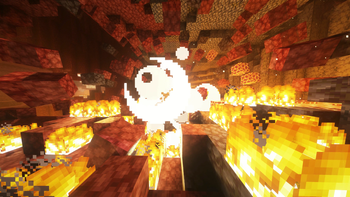

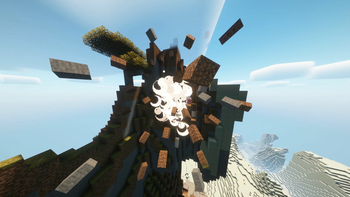
About this Mod

Cinematic, physics-enhanced explosions that feel powerful and dynamic.
Explosion Overhaul re-imagines Minecraft's vanilla explosion system with immersive visual and audio feedback — perfect for adventure, combat, realism-focused or even tech modpacks.
✨ Features
Works with every explosion: All vanilla and most modded explosives (such as creepers, TNT, crystals and fireballs) are all supported!
Physics Based Debris:
Explosions launch nearby blocks into the air as falling block entities with randomized speed, arc, and rotation. Enhances destructive capabilities of explosions.Screen Shake:
Players near an explosion experience configurable camera shake based on blast power and distance.Ear-Ringing Effect:
An ambient ringing sound plays when standing close to large explosions, enhancing the feeling of impact. Defaults to off, can cause discomfort especially at high volumes.Every Feature is Configurable:
Customize behavior viaconfig/explosion-overhaul.json, including:- Debris count, velocity ranges, and spawn chance
- Shake strength, radius, and duration
- Sound toggle
- Debug logging
🔧 Compatibility
- ✅ Minecraft 1.21.1
- ✅ Fabric & Neoforge (via Architectury)
- ✅ Works with most mods unless they fully override explosion logic
Recommended Mods
- Vectorientation Reforged: An in-house rewrite of Vectorientation to make launched rotate in the direction they are moving
- Vectorientation: Makes falling blocks rotate in the direction they are moving
- Supplementaries: Throwable bombs work well with the enhanced explosions
📜 Legal
License
Apache License 2.0 — open source and ready for use in any project.
View Source on GitHub
Credits
Iris, Rethinking Voxels and Vectorientation were used in the creation of some screenshots/promotional material.
Available Versions
How to Install Explosion Overhaul on Your Server
Order Server
Order a Minecraft Java server with at least 3 GB RAM (4 GB recommended).
Set fabric Loader
In the panel under "Egg", select the fabric loader and matching Minecraft version (1.21.1).
Install Mod
Open the mod browser in the dashboard and search for "Explosion Overhaul". Click "Install" – done! Alternatively, upload the .jar via SFTP to the /mods folder.
Compatibility
Mod Loaders
Minecraft Versions
1.21.1
Server-side
~ OptionalRecommended RAM
4 GB(min. 3 GB)Frequently Asked Questions
Explosion Overhaul server crashes on startup – what to do?
Most common cause: wrong fabric version or insufficient RAM. Check the server log (latest.log) for "OutOfMemoryError" or "Mixin" errors. With Mado Hosting: ensure at least 3 GB RAM is allocated and the loader matches the mod version (1.21.1). You can switch loaders with one click in the panel.
Is Explosion Overhaul compatible with fabric and neoforge and quilt?
Explosion Overhaul officially supports fabric, neoforge, quilt for Minecraft 1.21.1. The Mado dashboard automatically detects incompatible loader combinations.
Server lagging with Explosion Overhaul – how to optimize performance?
Recommended RAM: 4 GB (per 8 players). Use /spark profiler to check if Explosion Overhaul consumes the most tick time. Common fixes: reduce server view-distance to 8-10, install "performant" or "starlight" as supplementary mods on Forge. With Mado Hosting, your server runs on NVMe SSDs with dedicated CPU cores for minimal latency.
Similar Mods




Rent Modded Server
Install Explosion Overhaul with just one click on your server.