
Extended Worldgen
Formerly ContinuousBiomes
Screenshots
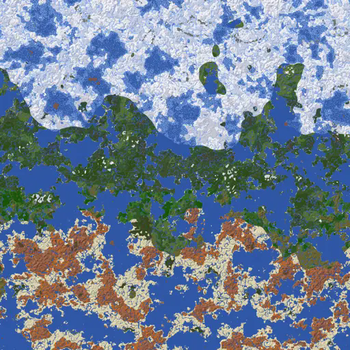
About this Mod
ATTENTION: This mod is still in an alpha stage of development. Breaking changes and instability should be expected.
Did deserts spawning right next to snowy mountains ever feel weird to you?
Or is it the fact that the climate in Minecraft is pseudo-random, so you can never know where you may find snow in the first place?
Behold, I might have something for you:
Extended Worldgen
This mod adds many new functions to Minecraft's Datapack system, which opens up new possibilities to developers and players alike. You can modify how the world behaves, solely based on the position of the block - to predefine a central continent no matter the seed, to have a temperature gradient in the world, and much, much more. This mod is but the framework to enable the most creative people out there to make their ideas a reality.
Roadmap
(in no particular order)
- add datapacks support (see Hijack Datapack System Instead (#2))
Newer versions require the use of datapacks to function properly. An example is available here.
Current Project State:
| MC Version | NeoForge | Forge | Fabric |
|---|---|---|---|
| 1.21.x | 1.0-rc3 | - | planned |
| 1.20.2-1.20.4 | 0.1 | - | - |
| 1.20.1 | - | 0.1 | - |
| 1.19.x | - | 0.1 | - |
Available Versions
How to Install Extended Worldgen on Your Server
Order Server
Order a Minecraft Java server with at least 4 GB RAM (6 GB recommended).
Set forge Loader
In the panel under "Egg", select the forge loader and matching Minecraft version (1.21.4).
Install Mod
Open the mod browser in the dashboard and search for "Extended Worldgen". Click "Install" – done! Alternatively, upload the .jar via SFTP to the /mods folder.
Compatibility
Mod Loaders
Minecraft Versions
1.21.4, 1.21.3, 1.21.2 (+8 more)
Server-side
✓ RequiredRecommended RAM
6 GB(min. 4 GB)Frequently Asked Questions
Extended Worldgen server crashes on startup – what to do?
Most common cause: wrong forge version or insufficient RAM. Check the server log (latest.log) for "OutOfMemoryError" or "Mixin" errors. With Mado Hosting: ensure at least 4 GB RAM is allocated and the loader matches the mod version (1.21.4). You can switch loaders with one click in the panel.
Is Extended Worldgen compatible with forge and neoforge?
Extended Worldgen officially supports forge, neoforge for Minecraft 1.21.4, 1.21.3, 1.21.2. The Mado dashboard automatically detects incompatible loader combinations.
Server lagging with Extended Worldgen – how to optimize performance?
Recommended RAM: 6 GB (per 5 players). Use /spark profiler to check if Extended Worldgen consumes the most tick time. Common fixes: reduce server view-distance to 8-10, install "performant" or "starlight" as supplementary mods on Forge. With Mado Hosting, your server runs on NVMe SSDs with dedicated CPU cores for minimal latency.
Similar Mods



Rent Modded Server
Install Extended Worldgen with just one click on your server.