
Extra Chests
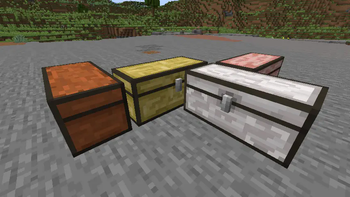
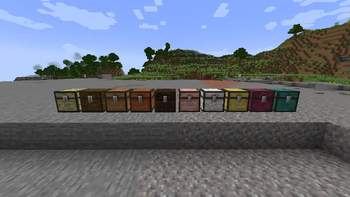
Adds a chest and a trapped chest for every vanilla wood, so your storage and journey matches your style.
Screenshots

About this Mod
Extra Chests
Overview
Adds a chest and a trapped chest for every vanilla wood type, so your storage matches your builds.
Works like the normal chest (double chests too). Trapped versions send redstone when opened.
Minecraft 1.21.5
Beta Release
My excuse to practice block entity creation and texturing.
Features
- All woods covered: Oak, Spruce, Birch, Jungle, Acacia, Dark Oak, Mangrove, Cherry, Pale Oak, Bamboo, Crimson, Warped.
- Double chests: Place two of the same type side-by-side to form a large chest.
- Trapped chests: Emit redstone power based on how many players are viewing the chest.
- Creative tabs:
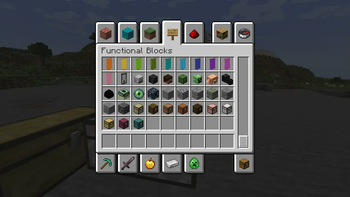
- Chests → Functional Blocks
- Trapped Chests → Redstone Blocks
Installation
- Download the mod file for your game version.
- Install a compatible loader (Fabric or NeoForge).
- Put the mod file in your
modsfolder. - Launch the game.
Dependencies
- Fabric: Fabric API
- NeoForge: NeoForge
- Architectury API (multi-loader helper)
(Check the “Dependencies” section on Modrinth for exact files.)
Usage
- Place any wood chest as you would a normal chest.
- Place two of the same chest next to each other to make a double chest.
- Use the trapped versions when you want a redstone signal on open.
- Find them in the Creative tabs listed above.
FAQ
Does this change loot tables or world gen?
No. These are buildable/placeable blocks for your worlds and builds.
Server or client?
Both. Add it on the server and clients.
Future Additions
- I forgot boat chests exist
- Same with minecarts
- Other mod compatability?? idk
Available Versions
How to Install Extra Chests on Your Server
Order Server
Order a Minecraft Java server with at least 3 GB RAM (4 GB recommended).
Set fabric Loader
In the panel under "Egg", select the fabric loader and matching Minecraft version (1.21.8).
Install Mod
Open the mod browser in the dashboard and search for "Extra Chests". Click "Install" – done! Alternatively, upload the .jar via SFTP to the /mods folder.
Compatibility
Mod Loaders
Minecraft Versions
1.21.8, 1.21.7, 1.21.6 (+6 more)
Server-side
✓ RequiredRecommended RAM
4 GB(min. 3 GB)Frequently Asked Questions
Extra Chests server crashes on startup – what to do?
Most common cause: wrong fabric version or insufficient RAM. Check the server log (latest.log) for "OutOfMemoryError" or "Mixin" errors. With Mado Hosting: ensure at least 3 GB RAM is allocated and the loader matches the mod version (1.21.8). You can switch loaders with one click in the panel.
Is Extra Chests compatible with fabric and neoforge?
Extra Chests officially supports fabric, neoforge for Minecraft 1.21.8, 1.21.7, 1.21.6. The Mado dashboard automatically detects incompatible loader combinations.
Server lagging with Extra Chests – how to optimize performance?
Recommended RAM: 4 GB (per 8 players). Use /spark profiler to check if Extra Chests consumes the most tick time. Common fixes: reduce server view-distance to 8-10, install "performant" or "starlight" as supplementary mods on Forge. With Mado Hosting, your server runs on NVMe SSDs with dedicated CPU cores for minimal latency.
Similar Mods

![[ETF] Entity Texture Features](https://cdn.modrinth.com/data/BVzZfTc1/af683d206d50b05258d865b0d6e4aa2f2cee12f2_96.webp)
![[EMF] Entity Model Features](https://cdn.modrinth.com/data/4I1XuqiY/6e5bbd0d06b1741bfdab6c0cfab6de8fdaf0064c_96.webp)



Rent Modded Server
Install Extra Chests with just one click on your server.