Extrude This!
A proof-of-concept mod for how new filler stones could be implemented without a need for worldgen.
Screenshots
About this Mod
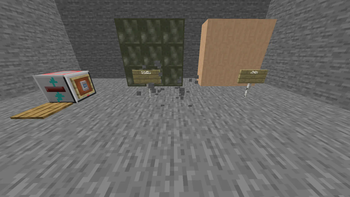
This mod, simply enough, seeks to prove how no worldgen changes are needed to new implement filler stones. JEI is recommended to more easily read these crafting recipes. Provided below are the MCreator recipe images.
Crafting recipe for a Vanity Slate:
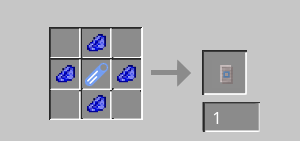
The tag icon in the center is any extruder-allowed block. The tag extrude_this:extruder_allowed has Andesite, Diorite, and Granite, Jiste, and Ijolite by default. Jiste and Ijolite are new special rocks crafted by stonecutting vanity slates. "Jiste" is a completely fictional rock whose name is pronounced "yist", and "Ijolite" is a real rock that has a Wikipedia page.
Crafting Recipe for an Extruder:
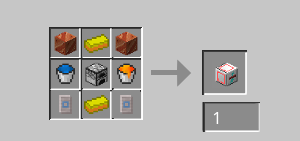
The center-top and center-bottom are gold ingots. The top left and top right are copper blocks, and the bottom left and bottom right are vanity slates. The center-left item is a water bucket, and the center-right item is a lava bucket. The very center item is a furnace.
By giving it redstone power, it can duplicate the block below it, if it is tagged extrude_this:extruder_allowed. The duplicate of the block (if successful) is sent to above the extruder block. Also, the block above the extruder has to be air for the duplication to work.
A note on Create, and any other mod that relies on non-cheap filler stones:
This mod is currently a proof-of-concept, and thus the extruder can duplicate andesite with no cost. Tread carefully. Once I figure out an energy cost, and once I figure out how to impliment config options to MCreator mods, I will make such a config option.
Available Versions
How to Install Extrude This! on Your Server
Order Server
Order a Minecraft Java server with at least 3 GB RAM (4 GB recommended).
Set forge Loader
In the panel under "Egg", select the forge loader and matching Minecraft version (1.20.1).
Install Mod
Open the mod browser in the dashboard and search for "Extrude This!". Click "Install" – done! Alternatively, upload the .jar via SFTP to the /mods folder.
Compatibility
Mod Loaders
Minecraft Versions
1.20.1
Server-side
✓ RequiredRecommended RAM
4 GB(min. 3 GB)Frequently Asked Questions
Extrude This! server crashes on startup – what to do?
Most common cause: wrong forge version or insufficient RAM. Check the server log (latest.log) for "OutOfMemoryError" or "Mixin" errors. With Mado Hosting: ensure at least 3 GB RAM is allocated and the loader matches the mod version (1.20.1). You can switch loaders with one click in the panel.
Is Extrude This! compatible with forge?
Extrude This! officially supports forge for Minecraft 1.20.1. The Mado dashboard automatically detects incompatible loader combinations.
Server lagging with Extrude This! – how to optimize performance?
Recommended RAM: 4 GB (per 8 players). Use /spark profiler to check if Extrude This! consumes the most tick time. Common fixes: reduce server view-distance to 8-10, install "performant" or "starlight" as supplementary mods on Forge. With Mado Hosting, your server runs on NVMe SSDs with dedicated CPU cores for minimal latency.
Similar Mods

![[ETF] Entity Texture Features](https://cdn.modrinth.com/data/BVzZfTc1/af683d206d50b05258d865b0d6e4aa2f2cee12f2_96.webp)
![[EMF] Entity Model Features](https://cdn.modrinth.com/data/4I1XuqiY/6e5bbd0d06b1741bfdab6c0cfab6de8fdaf0064c_96.webp)



Rent Modded Server
Install Extrude This! with just one click on your server.