
FabricExporter
Fabric mod that adds a Prometheus exporter with general metrics of your server
About this Mod
FabricExporter


Fabric mod that adds a Prometheus exporter with general metrics of your server.
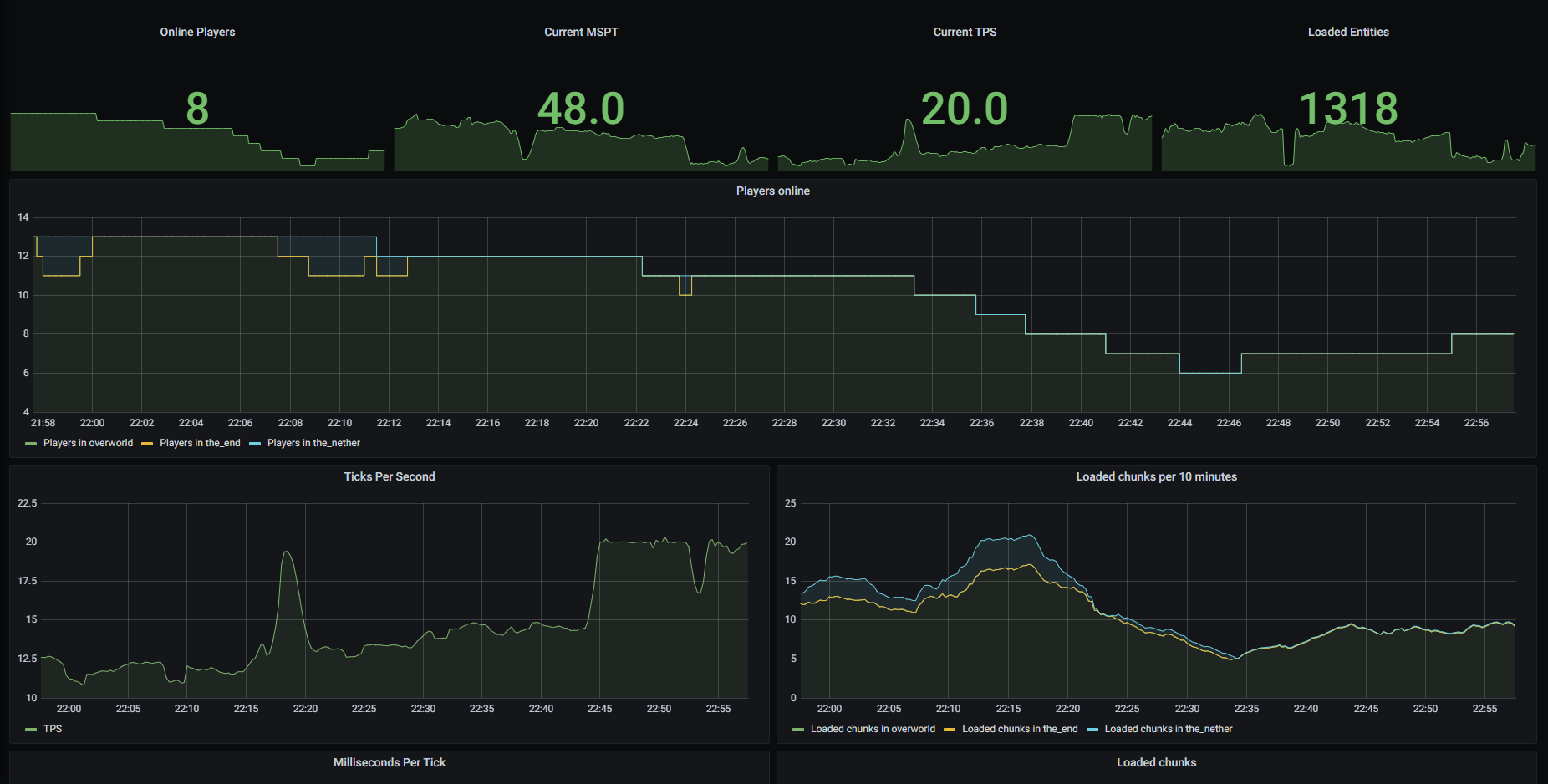
It's a server-side mod that exposes metrics of your Fabric server in Prometheus format.
So, it requires you to have at least Prometheus installed to collect provided metrics.
I recommend also using Grafana to visualize data.
If you want to get TPS and MSPT metrics, you should also install Spark as mod for your Fabric server.
Exposed metrics
Here is a list of metrics that are collected by FabricExporter.
- Metrics collected by Minecraft doesn't require anything, but may cause errors when running on old Minecraft versions
- Metrics collected by Spark require Spark to be installed
You can disable any of these metrics in config.
| Prometheus name | Description | Config property | Collected by |
|---|---|---|---|
minecraft_loaded_chunks |
Amount of currently loaded chunks on server | enable-loaded-chunks |
Minecraft |
minecraft_total_loaded_chunks |
Amount of total loaded chunks on server | enable-total-loaded-chunks |
Minecraft |
minecraft_mspt |
Count of milliseconds per tick (MSPT) | enable-mspt |
Spark |
minecraft_tps |
Count of ticks per second (TPS) | enable-tps |
Spark |
minecraft_players_online |
Amount of currently online players on your server | enable-players-online |
FabricExporter |
minecraft_entities |
Amount of currently loaded entities on your server | enable-entities |
FabricExporter |
minecraft_handshakes |
Count of handshake requests | enable-handshakes |
FabricExporter |
Getting started
To use this mod you should have at least Fabric server and Prometheus installed.
Installing mod
- Download the mod from Releases page.
- Drop downloaded mod jar to the
modsfolder. - Start your server to generate config file.
- Open
config/exporter.properties, ensure thatserver-portvalue is an open port that can be accessed by your Prometheus and change it if required. - Restart the server if you made changes in config.
Configuring Prometheus
- Open your Prometheus config file (it located at
/etc/prometheus/prometheus.ymlby default).
sudo nano /etc/prometheus/prometheus.yml
- Add FabricExporter endpoint to the
scrape_configssection.
Don't forget to replace127.0.0.1with address of your server and25585with port specified inserver-portproperty inexporter.propertiesfile.
- job_name: 'fabric'
  static_configs:
    - targets: ['127.0.0.1:25585']
- Restart Prometheus service.
sudo service prometheus restart
Importing Grafana dashboard
If you want to use Grafana, you can use my dashboard as template.
I assume that you have already created a Prometheus data source in Grafana.
So, let's import dashboard for FabricExporter.
- Log in to your Grafana and go to
Create -> Importtab. - Type
14492in "Import via grafana.com" field and click "Load". - On the next page change settings as you wish and click "Import".
Configuring
After your server starts, FabricExporter will create exporter.properties file in the config folder.
You should use this file to configure the mod.
In this file you can see some general settings and metrics settings.
General settings
| Property | Description | Default value |
|---|---|---|
server-port |
Port on what the web server will listen for requests | 25585 |
update-interval |
Interval between gauge metrics updates in milliseconds | 1000 |
use-spark |
If set to false, FabricExporter will be independent from Spark |
true |
Metrics settings
You can disable any metric that registered via MetricRegistry (all metrics by default) using exporter.properties file.
Names of properties consist of enable and metric name without prefix and _ replaced with -.
For example, if you want to disable minecraft_players_online, you should set enable-players-online to false.
You can also see list of available properties in "Exposed metrics" section.
If you can't find property for some metrics, you can manually add it.
All metrics are enabled by default.
License
MIT license. Read more in LICENSE
Available Versions
How to Install FabricExporter on Your Server
Order Server
Order a Minecraft Java server with at least 3 GB RAM (4 GB recommended).
Set fabric Loader
In the panel under "Egg", select the fabric loader and matching Minecraft version (26.1).
Install Mod
Open the mod browser in the dashboard and search for "FabricExporter". Click "Install" – done! Alternatively, upload the .jar via SFTP to the /mods folder.
Compatibility
Mod Loaders
Minecraft Versions
26.1, 1.21.11, 1.21.10 (+19 more)
Server-side
✓ RequiredRecommended RAM
4 GB(min. 3 GB)Frequently Asked Questions
FabricExporter server crashes on startup – what to do?
Most common cause: wrong fabric version or insufficient RAM. Check the server log (latest.log) for "OutOfMemoryError" or "Mixin" errors. With Mado Hosting: ensure at least 3 GB RAM is allocated and the loader matches the mod version (26.1). You can switch loaders with one click in the panel.
Is FabricExporter compatible with fabric?
FabricExporter officially supports fabric for Minecraft 26.1, 1.21.11, 1.21.10. The Mado dashboard automatically detects incompatible loader combinations.
Server lagging with FabricExporter – how to optimize performance?
Recommended RAM: 4 GB (per 8 players). Use /spark profiler to check if FabricExporter consumes the most tick time. Common fixes: reduce server view-distance to 8-10, install "performant" or "starlight" as supplementary mods on Forge. With Mado Hosting, your server runs on NVMe SSDs with dedicated CPU cores for minimal latency.
Similar Mods




![[ETF] Entity Texture Features](https://cdn.modrinth.com/data/BVzZfTc1/af683d206d50b05258d865b0d6e4aa2f2cee12f2_96.webp)
![[EMF] Entity Model Features](https://cdn.modrinth.com/data/4I1XuqiY/6e5bbd0d06b1741bfdab6c0cfab6de8fdaf0064c_96.webp)
Rent Modded Server
Install FabricExporter with just one click on your server.