
FabricPlots
Server-side, crossplay (Java + Bedrock) PlotSquared-style plot worlds for Fabric - claiming, merging, frame portals, plot-jailed build tools, floor & PvP customization, plot likes, crossplay menus, and optional economy.
Screenshots
About this Mod
FabricPlots
A server-side, PlotSquared-style plot world for Fabric / Minecraft 26.1.2 & 26.2, built for Java + Bedrock crossplay (Geyser/Floodgate). Nothing is required on the client — Bedrock players use every command and menu through Geyser. Drop the jar on the server and you have a full creative plot server.
Features
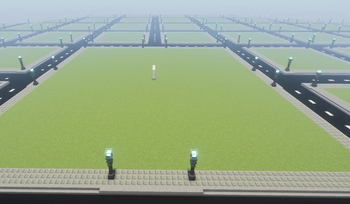
- Plot world — a bundled flat creative dimension with a gridded street network. Forces creative inside, survival outside.
- Claiming —
/plot claim,/plot auto,/plot home,/plot visit, per-player claim limits — or just tap Claim a Plot in the menu, no commands needed. - Grief protection — only the owner and trusted players build; roads and other plots are locked. Trust & deny lists (deny bounces a player off your plot).
- Make it yours — set your plot's floor from a paginated palette of every full-cube block (all the naturals, stones, woods, 16 concretes, ores — plus 26.2's sulfur & cinnabar), and toggle PvP per plot (safe by default).
- Likes & Top Plots — players
/plot likea plot, and a Top Plots gallery ranks every build by likes so people can browse and visit the best ones. - Plot merging, any shape — select plots with a wand and merge them into L / T / H / + or solid shapes; roads dissolve and the curb wraps the new outline.
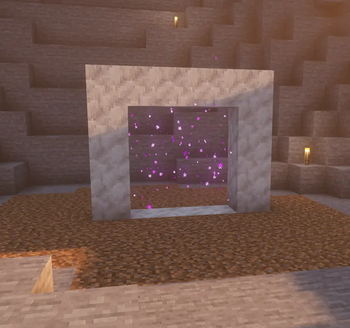
/plot uncombinesplits it back. - Frame portals — light a calcite frame at your base: flint & steel → spawn, or a Plot Portal Key → that exact plot. Exit portals auto-build by claimed plots. (Particle swirls, not the nether block — never sends anyone to the nether.)
- Build tools — a "WorldEdit-lite" jailed to your plot.
set,replace,walls,sphere,hsphere,cyl,copy,cut,paste,stack,move,undo,redo— every block written is ownership-checked, so it physically cannot edit a road or someone else's plot. - Clickable menus (crossplay) —
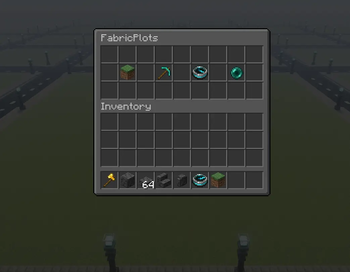
/plot menu(hub: Claim, My Plots, Build Editor, Portal Keys, Top Plots),/plot edit(build GUI; material = the block in your hand), and per-plot settings: rename, floor picker, PvP toggle, and trusted/denied management with player heads + name search. - Optional economy — off by default. Turn it on in the config to charge for claiming plots (with first-plot-free, admin exemption, and refunds on delete). Uses the Common Economy API, so it works with any compliant economy mod (e.g. Savs Common Economy) — and it's a soft dependency, so FabricPlots runs fine without one.
- Config & protection — live-reloadable config: time/weather toggles, explosion / fire / mob-griefing / projectile protection, inactivity expiry, spawn point, and more.
- Admin safety — ops are not auto-exempt; an op opts in to editing outside their own plots with
/plot admin.
Requirements
- Minecraft 26.1.2 or 26.2 (Fabric), Fabric API, JDK 25.
- sgui — the menu library, required. It isn't on Modrinth, so grab the build matching your Minecraft version:
- 26.1.2 → sgui-2.0.0+26.1.jar
- 26.2 → sgui-2.1.0+26.2.jar
- For Bedrock players: Geyser + Floodgate (Geyser connects directly to 26.1.x / 26.2 — no ViaProxy).
Put the FabricPlots jar + the matching sgui jar + Fabric API in mods/. Use a fresh world the first time (the plot dimension's geometry bakes in at world creation).
Optional: economy
To charge for plots, add a Common Economy API provider (e.g. Savs Common Economy, which supports 26.1.2 & 26.2) to mods/, set economy-enabled=true in config/fabricplots.properties, and run /plot reload. Without a provider present, claiming stays free even if enabled.
Keeping plot items separate (recommended)
FabricPlots does not isolate inventories on its own — items carry between the plot world and your other worlds. To keep the plot world's creative items from leaking into your main world, pair it with Dimensional Inventories and put the plot dimension in its own pool:
/diminv pool plots create
/diminv pool plots dimension fabricplots:plots assign
/diminv pool plots gamemode creative
Links
Source & issues: github.com/beachfury/fabricplots
Type /plot help in-game for the full command list.
License
MIT.
Available Versions
How to Install FabricPlots on Your Server
Order Server
Order a Minecraft Java server with at least 3 GB RAM (4 GB recommended).
Set fabric Loader
In the panel under "Egg", select the fabric loader and matching Minecraft version (26.2).
Install Mod
Open the mod browser in the dashboard and search for "FabricPlots". Click "Install" – done! Alternatively, upload the .jar via SFTP to the /mods folder.
Compatibility
Mod Loaders
Minecraft Versions
26.2, 26.1.2
Server-side
✓ RequiredRecommended RAM
4 GB(min. 3 GB)Frequently Asked Questions
FabricPlots server crashes on startup – what to do?
Most common cause: wrong fabric version or insufficient RAM. Check the server log (latest.log) for "OutOfMemoryError" or "Mixin" errors. With Mado Hosting: ensure at least 3 GB RAM is allocated and the loader matches the mod version (26.2). You can switch loaders with one click in the panel.
Is FabricPlots compatible with fabric?
FabricPlots officially supports fabric for Minecraft 26.2, 26.1.2. The Mado dashboard automatically detects incompatible loader combinations.
Server lagging with FabricPlots – how to optimize performance?
Recommended RAM: 4 GB (per 8 players). Use /spark profiler to check if FabricPlots consumes the most tick time. Common fixes: reduce server view-distance to 8-10, install "performant" or "starlight" as supplementary mods on Forge. With Mado Hosting, your server runs on NVMe SSDs with dedicated CPU cores for minimal latency.
Similar Mods






Rent Modded Server
Install FabricPlots with just one click on your server.