
FallPredict
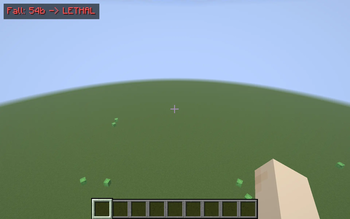
A tiny HUD that predicts the fall damage of the drop directly below your feet, before you step off.
Screenshots
About this Mod
FallPredict answers one question every time you're standing on a ledge: "Would I die if I jumped from here?" — without making you count blocks or do mental math.
What it does
- Every client tick it casts a ray straight down from your feet to the first solid block or fluid surface below.
- It converts that drop height into the exact vanilla fall damage you'd take and shows it in the top-left of your HUD: e.g. "Fall: 12b -> 4.5 hrt".
- The readout is color-coded: yellow = survivable, orange = half your health or more, red "LETHAL" = the fall would kill you at your current health.
- Over a bottomless drop it reads "Fall: void -> LETHAL".
- The badge only appears when there's an actual drop below you (more than the vanilla 3-block safe height), so it stays out of your way on flat ground.
Controls
- J — toggle the readout on/off. An action-bar message confirms the state.
How it's built
- Uses a downward
RaycastContext(collider + fluid surface) from the player's feet — landing in water reads as a safe, low number. - Damage uses the real vanilla formula
ceil(fallDistance - 3)in health points, so the prediction matches what the game would actually deal. - Lethality compares predicted damage against your live health, not max health.
Notes
- Pure client-side — install on your client only. Works on any Fabric server, fully vanilla compatible.
- Shows the base vanilla fall damage; it does not subtract Feather Falling, so treat it as a worst-case estimate for enchanted boots.
- The badge respects F1 (hide HUD) and hides while a menu is open.
- No config files, no dependencies beyond Fabric API.
Compatibility
Minecraft 1.21.8, 1.21.9, 1.21.10, 1.21.11 — Fabric Loader 0.16+. One JAR covers all four. Drop into your mods/ folder alongside Fabric API.
Available Versions
How to Install FallPredict on Your Server
Order Server
Order a Minecraft Java server with at least 3 GB RAM (4 GB recommended).
Set fabric Loader
In the panel under "Egg", select the fabric loader and matching Minecraft version (1.21.11).
Install Mod
Open the mod browser in the dashboard and search for "FallPredict". Click "Install" – done! Alternatively, upload the .jar via SFTP to the /mods folder.
Compatibility
Mod Loaders
Minecraft Versions
1.21.11, 1.21.10, 1.21.9 (+1 more)
Server-side
✗ UnsupportedRecommended RAM
4 GB(min. 3 GB)Frequently Asked Questions
FallPredict server crashes on startup – what to do?
Most common cause: wrong fabric version or insufficient RAM. Check the server log (latest.log) for "OutOfMemoryError" or "Mixin" errors. With Mado Hosting: ensure at least 3 GB RAM is allocated and the loader matches the mod version (1.21.11). You can switch loaders with one click in the panel.
Is FallPredict compatible with fabric?
FallPredict officially supports fabric for Minecraft 1.21.11, 1.21.10, 1.21.9. The Mado dashboard automatically detects incompatible loader combinations.
Server lagging with FallPredict – how to optimize performance?
Recommended RAM: 4 GB (per 8 players). Use /spark profiler to check if FallPredict consumes the most tick time. Common fixes: reduce server view-distance to 8-10, install "performant" or "starlight" as supplementary mods on Forge. With Mado Hosting, your server runs on NVMe SSDs with dedicated CPU cores for minimal latency.
Similar Mods




![[ETF] Entity Texture Features](https://cdn.modrinth.com/data/BVzZfTc1/af683d206d50b05258d865b0d6e4aa2f2cee12f2_96.webp)
![[EMF] Entity Model Features](https://cdn.modrinth.com/data/4I1XuqiY/6e5bbd0d06b1741bfdab6c0cfab6de8fdaf0064c_96.webp)
Rent Modded Server
Install FallPredict with just one click on your server.