Fancy some client tweaks?
Adds Cosmetics, new death particles and some pvp utils
Screenshots

About this Mod
This mod adds a lot of stuff that is compleatly client side; it is usable from every vanilla server to even the heavilly modded ones! You can find older versions and all the source code on my github repository.
NOTE: Because this mod is 100% client-side, other players wont see your cosmetics, etc.
Blood:
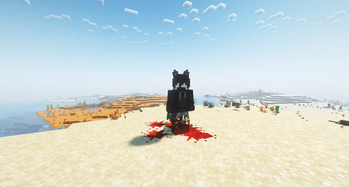
This is the change that you will find without any configuring. It replaces the normal death particles for players with blood particles (they align pixel perfect!). Standing in them will make any player's feet covered in blood. Because it replaces the normal death particles, it wont show when instant respawn is on.
Armor Hud:
This simple change displays your armor in the upper right corner of your screen. It also displays count, cooldown and most importantly: durability. The armor hud can be customized and enabled using
/client-tweaks armor_hud
Arguments are:
show_armor [true|false] (default: false) ->
enables rendering of the armor on the hud
show_arrows [true|false] (default: false) ->
enables rendering of arrow count based on potion types
pos [TOP_RIGHT|TOP_LEFT|BOTTOM_RIGHT|BOTTOM_LEFT|HOTBAR] (default: TOP_RIGHT) ->
changes position of the armor hud
Example:
enable everything and change its position to the hotbar
/client-tweaks armor_hud show_armor true
/client-tweaks armor_hud show_arrow true
/client-tweaks armor_hud pos HOTBAR
Cosmetics and Configuring:
There are three default cosmetics available: "ears", "particles" and "tail". Both "particles" and "ears" can be configured. You can find images of those in the gallery section.
Configuring is easy once you understood it. This can be done by using "/client-tweaks cosmetic".
/client-tweaks cosmetic add <cosmetic> <target>
applies the specified cosmetic to the specified player
/client-tweaks remove <category> <target>
cosmetic gets removed from the player
/client-tweaks list <target>
lists all cosmetics of a certain player and the config if present
/client-tweaks list json
spits out the raw json file
/client-tweaks options <category> <target> <key> <value>
sets a certain key inside of a the targets config to the specified value. e.g. /client-tweaks options SPORES SomeGuy10 "particle" "minecraft:flame" changes the spores from SomeGuy10 to the flame particles. Currently only the TAILED and SPORES Cosmetics can be customized. More info in the Cosmetics section)
Available options:
"tail": texture of the tail (texture)
Defaults:
"texture": "client-tweaks:textures/entity/tail_feature.png"
"tail": x, y and z offset (x, y, z), x, y and z velocity (vx, vy, vz), min and max amount of particles that get spawned randomly(minParticle, maxParticle), min and max delay between spawning randomly (minCooldown, maxCooldown), the actual particle (particle)
Defaults:
  "x": 0d,
  "y": 1d,
  "z": 0d,
  "vx": 0d,
  "vy": 0d,
  "vz": 0d,
  "particle": "minecraft:crimson_spore",
  "minParticle": 2,
  "maxParticle": 4,
  "minCooldown": 30,
  "maxCooldown": 60
The d in x, y, z, vx, vy and vz means double. For anyone not familliar with java code, that is a number with decimal places. The other numbers without the d are integers, they dont have decimal places. "minCooldown" and "maxCooldown" are in ticks.
Custom Cosmetics:
You start by defining a cosmetic inside the .minecraft/config/client-tweaks/cosmetics directory by creating a .json file. In this example we will call it "planks.json".
Inside the file, we need to specify an item we want to display as a cosmetic.
{
  "item": "minecraft:oak_planks"
}
You can enable the cosmetic using /client-tweaks cosmetic add planks Player123
As you can see, we used the file name as the cosmetic's id.
When trying this yourself, you will see that nothing happened. That is, because the planks are INSIDE you. You can modify offset, scale and rotation like you would modify some matricies. For instance:
{
  "item": "minecraft:oak_planks",
  "matrix_operations": [
    {
      "type": "scale",
      "x": 5.0,
      "y": 5.0,
      "z": 5.0
    }
  ]
}
this scales up the planks by a factor of 5. You can view the example in the gallery.
all matrix operations are:
- "translate", modifies the offset, parameters:
- x
- y
- z
- "scale", scales the cosmetic, parameters:
- x
- y
- z
- "rotate", rotates the cosmetic around the axis defined by x, y & z, parameters:
- x
- y
- z
- degrees (in radians)
If you find any issues in general with my mod, go on the github repository and create a new issue in the issues tab. Because github is the platform that I use most, you can create a new issue with the question label when there are any uncertainties and I will try to answer your questions. If you have any suggestions (e.g. new cosmetics) also create a new issue with the enhancement label.
Box Outlines:
You can mark areas in your world with box outlines and categorize them with colors.
/client-tweaks box_outlines add red ~-1 ~-1 ~-1 ~1 ~2 ~1
for instance creates a box around the player.
Adding is straightforward, but removing is a little more complex.
You can remove all:
/client-tweaks box_outlines remove all
You can remove by box:
/client-tweaks box_outlines remove box ~-1 ~-1 ~-1 ~1 ~2 ~1
You can remove by color:
/client-tweaks box_outlines remove color red
/client-tweaks box_outlines remove color value FF0000
You can remove all in a radius:
/client-tweaks box_outlines remove radius 5
Install this mod, if you find any of the above features intriguing.
If you dont know how to install mods / the fabric loader / anithing else fabric modding related visit this amazing page from the official fabric wiki.
Available Versions
How to Install Fancy some client tweaks? on Your Server
Order Server
Order a Minecraft Java server with at least 3 GB RAM (4 GB recommended).
Set fabric Loader
In the panel under "Egg", select the fabric loader and matching Minecraft version (1.21.11).
Install Mod
Open the mod browser in the dashboard and search for "Fancy some client tweaks?". Click "Install" – done! Alternatively, upload the .jar via SFTP to the /mods folder.
Compatibility
Mod Loaders
Minecraft Versions
1.21.11, 1.21.10, 1.21.8 (+2 more)
Server-side
✗ UnsupportedRecommended RAM
4 GB(min. 3 GB)Frequently Asked Questions
Fancy some client tweaks? server crashes on startup – what to do?
Most common cause: wrong fabric version or insufficient RAM. Check the server log (latest.log) for "OutOfMemoryError" or "Mixin" errors. With Mado Hosting: ensure at least 3 GB RAM is allocated and the loader matches the mod version (1.21.11). You can switch loaders with one click in the panel.
Is Fancy some client tweaks? compatible with fabric?
Fancy some client tweaks? officially supports fabric for Minecraft 1.21.11, 1.21.10, 1.21.8. The Mado dashboard automatically detects incompatible loader combinations.
Server lagging with Fancy some client tweaks? – how to optimize performance?
Recommended RAM: 4 GB (per 8 players). Use /spark profiler to check if Fancy some client tweaks? consumes the most tick time. Common fixes: reduce server view-distance to 8-10, install "performant" or "starlight" as supplementary mods on Forge. With Mado Hosting, your server runs on NVMe SSDs with dedicated CPU cores for minimal latency.
Similar Mods

![[ETF] Entity Texture Features](https://cdn.modrinth.com/data/BVzZfTc1/af683d206d50b05258d865b0d6e4aa2f2cee12f2_96.webp)
![[EMF] Entity Model Features](https://cdn.modrinth.com/data/4I1XuqiY/6e5bbd0d06b1741bfdab6c0cfab6de8fdaf0064c_96.webp)



Rent Modded Server
Install Fancy some client tweaks? with just one click on your server.