
Farlands Restored Remastered
Brings the farlands (the old world generation bug) into the future to 1.7.10!
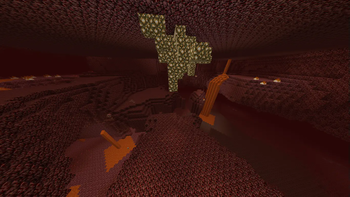
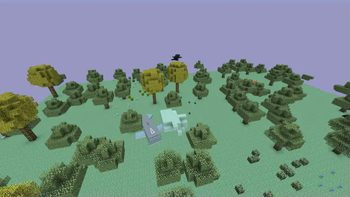
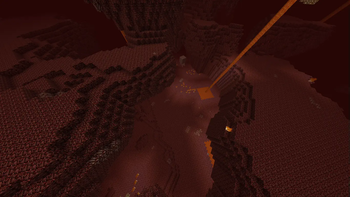
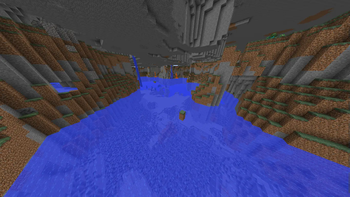
Screenshots

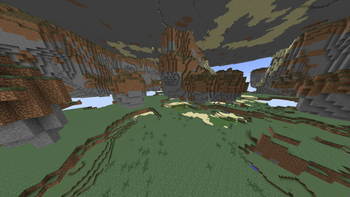
About this Mod
My fork of "FarLandsRestored" originally by Valiec2019. Check out their original version here: https://www.curseforge.com/minecraft/mc-mods/farlandsrestored
My changes:
- Remove the "farlands" world type. You can now experience farlands, not only in normal worlds with the default generator, it also works for many others!!
- Add ability to specify in what directions the farlands generate (for example, you can configure them to only spawn east).
- Add option to change when the farlands start in the nether/end differently from the overworld.
- Remove version checker code.
Tested working generators: (everything vanilla has farlands, some things added by mods/bukkit-plugins will have them)
- Default,
- Amplified (incredibly cool btw try it),
- Large Biomes,
- Biomes O Plenty,
- Twilight Forest,
- Aether I, Aether II, and Aether Departure
Tested not working generators and other incompatibilities
- Superflat (the terraingen is too simple to be affected noticeably),
- RTG,
- coretweak's
fix_heightmap_rangesetting (which sucks, as it fixes the weird 256 height lighting dark spots), - neodymium also forwardports the graphical issues with being this far from 0,0, for better or worse :P
Description:
Restores the farlands by removing the exact lines of code mojang added to stop them spawning, that were added all the way back after minecraft's beta 1.7.3 release. This means these farlands are identical to the original, with all of their quirks and intricacies. This uses mixins, so it should work regardless of what other mods play with worldgen, unless they provide their own terrain noise generator.
They will spawn past 12,550,820 by default. They can be configured to 'spawn' earlier, by overflowing the noise octaves sooner, but this will only spawn the terrain gen sooner, not some of the other 'effects' caused by the farlands. You still need to go out to 12,550,820 for those.
Check out the images section to see the mod for yourself.
Dependencies:
The only dependency of the mod is a mixins provider. The one you should probably use is unimixins. https://modrinth.com/mod/unimixins
Config file: (farlands.cfg)
general {
    # Approximate Far Lands start distance. Might not change the start distance for some generators added by mods. (set to -1 for default distance) [range: -1 ~ 12550820, default: -1]
    I:FarLandsStart=-1

    # Approximate Far Lands start distance in the end. (set to -1 for default distance) [range: -1 ~ 12550820, default: -1]
    I:FarLandsStartEnd=-1

    # Approximate Far Lands start distance in the nether. If you want the farlands in the nether to line up with farlands in the overworld, set this to an eighth of the value. (set to -1 for default distance) [range: -1 ~ 12550820, default: -1]
    I:FarLandsStartNether=-1

    # Directions that farlands will generate. Examples: "NEWS" for all directions. "NW" to spawn them north and to the west. "E" to spawn them to the east. [default: NEWS]
    S:generateInDirection=NEWS
}
Modpacks:
Yes, this code is MIT licensed, you don't need my permission.
Will you port to x.y?
Maybe if I'm nagged enough. It should be trivial enough to tweak the code a bit to work on any version, it's mostly just finding working forgegradles/mixins for all the versions.
Thanks:
- Thanks to Valiec for making the original mod!
- Thanks to everyone the legacy modding discord room for helping me!
Available Versions
How to Install Farlands Restored Remastered on Your Server
Order Server
Order a Minecraft Java server with at least 4 GB RAM (6 GB recommended).
Set forge Loader
In the panel under "Egg", select the forge loader and matching Minecraft version (1.7.10).
Install Mod
Open the mod browser in the dashboard and search for "Farlands Restored Remastered". Click "Install" – done! Alternatively, upload the .jar via SFTP to the /mods folder.
Compatibility
Mod Loaders
Minecraft Versions
1.7.10
Server-side
✓ RequiredRecommended RAM
6 GB(min. 4 GB)Frequently Asked Questions
Farlands Restored Remastered server crashes on startup – what to do?
Most common cause: wrong forge version or insufficient RAM. Check the server log (latest.log) for "OutOfMemoryError" or "Mixin" errors. With Mado Hosting: ensure at least 4 GB RAM is allocated and the loader matches the mod version (1.7.10). You can switch loaders with one click in the panel.
Is Farlands Restored Remastered compatible with forge?
Farlands Restored Remastered officially supports forge for Minecraft 1.7.10. The Mado dashboard automatically detects incompatible loader combinations.
Server lagging with Farlands Restored Remastered – how to optimize performance?
Recommended RAM: 6 GB (per 5 players). Use /spark profiler to check if Farlands Restored Remastered consumes the most tick time. Common fixes: reduce server view-distance to 8-10, install "performant" or "starlight" as supplementary mods on Forge. With Mado Hosting, your server runs on NVMe SSDs with dedicated CPU cores for minimal latency.
Similar Mods



Rent Modded Server
Install Farlands Restored Remastered with just one click on your server.