
FCompat_VanillaPlus
A mod to balance and connect other mods in my Vanilla+ modpack.
Screenshots
About this Mod
WELCOME!
This is a compatibility/balance mod created to connect various mods in my Vanilla+ modpack, which can be found here. It can be used without the pack, but its intended purpose is to add compatibility between a variety of mods specific to that pack.
Current Features: (Check changelogs for a more detailed breakdown)
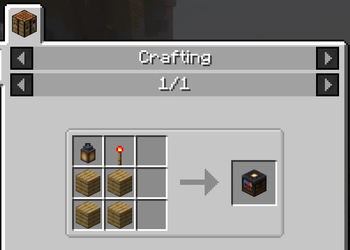
- Exposure Lightroom block is now craftable with Hardcore Torches Lit Lantern
- Better Fletching Tables (BFT) now works with VariantVanillaBlocks fletching tables of different woods
- Farmer's Delight now compatible with Fish of Thieves
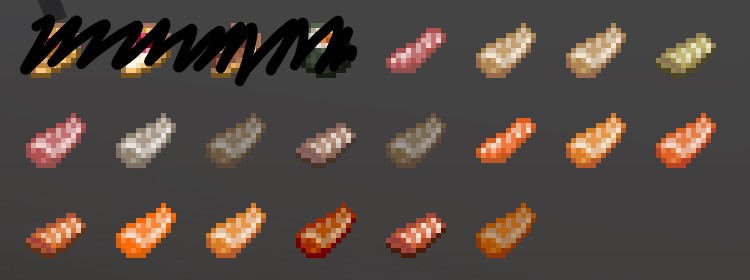
- Fish can be cut into their respective slices (slices added as new items)
- Fish and Slices can be used where raw_fish are used
- Fish Slices can be cooked (furnace, smoker, campfire) and both cooked and raw variants can be eaten
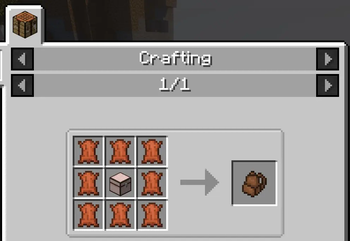
- INMIS backpacks can be crafted using any chest from VariantVanillaBlocks
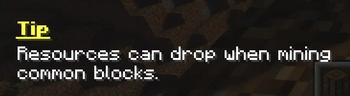
- Using the Tips mod, various Tips have been added as a way to explain less intuitive new features
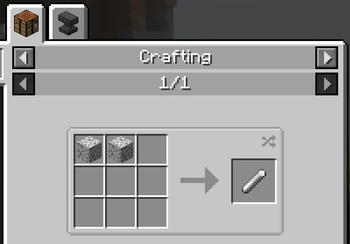
- Chalk can now additionally be crafted using diorite.
TODO
- Fix some mods not showing up in JEI
- Fix lectern variants not working with all atlases
- Fix Smithing Table variants not working with Purpur upgrades
- Tips. So many more tips to make.
NOTE
- You have my permission to use this mod in your modpacks, as long as you acknowledge that I have not tested this for compatability outside of my own pack.
- If you have any feedback please send to [email protected]
Available Versions
How to Install FCompat_VanillaPlus on Your Server
Order Server
Order a Minecraft Java server with at least 3 GB RAM (4 GB recommended).
Set fabric Loader
In the panel under "Egg", select the fabric loader and matching Minecraft version (1.20.4).
Install Mod
Open the mod browser in the dashboard and search for "FCompat_VanillaPlus". Click "Install" – done! Alternatively, upload the .jar via SFTP to the /mods folder.
Compatibility
Mod Loaders
Minecraft Versions
1.20.4, 1.20.3, 1.20.2 (+1 more)
Server-side
✓ RequiredRecommended RAM
4 GB(min. 3 GB)Frequently Asked Questions
FCompat_VanillaPlus server crashes on startup – what to do?
Most common cause: wrong fabric version or insufficient RAM. Check the server log (latest.log) for "OutOfMemoryError" or "Mixin" errors. With Mado Hosting: ensure at least 3 GB RAM is allocated and the loader matches the mod version (1.20.4). You can switch loaders with one click in the panel.
Is FCompat_VanillaPlus compatible with fabric?
FCompat_VanillaPlus officially supports fabric for Minecraft 1.20.4, 1.20.3, 1.20.2. The Mado dashboard automatically detects incompatible loader combinations.
Server lagging with FCompat_VanillaPlus – how to optimize performance?
Recommended RAM: 4 GB (per 8 players). Use /spark profiler to check if FCompat_VanillaPlus consumes the most tick time. Common fixes: reduce server view-distance to 8-10, install "performant" or "starlight" as supplementary mods on Forge. With Mado Hosting, your server runs on NVMe SSDs with dedicated CPU cores for minimal latency.
Similar Mods




![[ETF] Entity Texture Features](https://cdn.modrinth.com/data/BVzZfTc1/af683d206d50b05258d865b0d6e4aa2f2cee12f2_96.webp)
![[EMF] Entity Model Features](https://cdn.modrinth.com/data/4I1XuqiY/6e5bbd0d06b1741bfdab6c0cfab6de8fdaf0064c_96.webp)
Rent Modded Server
Install FCompat_VanillaPlus with just one click on your server.