
Fillbiome Command Backport
Backports "/fillbiome" command from 1.19.3 to previous 1.19.2 version
Screenshots
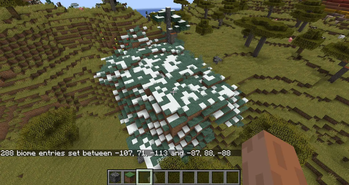
About this Mod
Fillbiome Command Backport
About
/fillbiome is a command for pointwise changing biome types in a specific area, which was introduced in game since 1.19.3. It's a perfect tool for map creators, however minecraft version 1.19.2 lacks of it. This mod just backports this command from 1.19.3 to previous 1.19.2 version.
Usage
The command syntax is /fillbiome <from> <to> <biome>. Just replace <from> and <to> with a x/y/z coordinates of the area and provide a valid biome type in <biome>. You can also use an optional alternate syntax when using the replace option : /fillbiome <from> <to> <biome> replace <filter>
Examples :
/fillbiome -87 88 -113 -107 71 -88 minecraft:plains (will replace selected area with plains biome type)
/fillbiome -87 88 -113 -107 71 -88 minecraft:plains replace minecraft:badlands (will replace all badlands biome types in selected area with plains biome type. Biomes other than badlands will remain unchanged)
Notes
- Sends full chunk data packets to players with loaded affected chunks, so biome changes appear immediately for them like in 1.19.3. There might be some rare issues when part of affected chunks's apperance is not immediately refreshed for player. In that case they can re-log to world or just travel / teleport somewhere else and than go back.
The command only changes the biome type, but not the blocks in it. It will affect such things as grass / water color, specific entity spawn, weather effects e.t.c - Biome boundaries are slightly different from selected area as game stores them in cells of 4×4×4 blocks, this command is applied on each selected biome cell, not each block, which will result in changes are not applied at the exact coordinates specified.
- 1.19.3 version of this command had a maximum limit of selected area volume, which was hardcoded as 32768 blocks. This was deprecated later in 1.19.4 as
commandModificationBlockLimitgamerule was added. As there is no such rule for 1.19.2, you can change this limit via config file in mod directory.
Requirments
Installation: Drop .jar file into mods folder.
Credits and License
You can freely use this mod in modpacks and do whatever you want with it, a small credit is appreciated.
Available Versions
How to Install Fillbiome Command Backport on Your Server
Order Server
Order a Minecraft Java server with at least 3 GB RAM (4 GB recommended).
Set fabric Loader
In the panel under "Egg", select the fabric loader and matching Minecraft version (1.19.2).
Install Mod
Open the mod browser in the dashboard and search for "Fillbiome Command Backport". Click "Install" – done! Alternatively, upload the .jar via SFTP to the /mods folder.
Compatibility
Mod Loaders
Minecraft Versions
1.19.2
Server-side
✓ RequiredRecommended RAM
4 GB(min. 3 GB)Frequently Asked Questions
Fillbiome Command Backport server crashes on startup – what to do?
Most common cause: wrong fabric version or insufficient RAM. Check the server log (latest.log) for "OutOfMemoryError" or "Mixin" errors. With Mado Hosting: ensure at least 3 GB RAM is allocated and the loader matches the mod version (1.19.2). You can switch loaders with one click in the panel.
Is Fillbiome Command Backport compatible with fabric?
Fillbiome Command Backport officially supports fabric for Minecraft 1.19.2. The Mado dashboard automatically detects incompatible loader combinations.
Server lagging with Fillbiome Command Backport – how to optimize performance?
Recommended RAM: 4 GB (per 8 players). Use /spark profiler to check if Fillbiome Command Backport consumes the most tick time. Common fixes: reduce server view-distance to 8-10, install "performant" or "starlight" as supplementary mods on Forge. With Mado Hosting, your server runs on NVMe SSDs with dedicated CPU cores for minimal latency.
Similar Mods




![[ETF] Entity Texture Features](https://cdn.modrinth.com/data/BVzZfTc1/af683d206d50b05258d865b0d6e4aa2f2cee12f2_96.webp)
![[EMF] Entity Model Features](https://cdn.modrinth.com/data/4I1XuqiY/6e5bbd0d06b1741bfdab6c0cfab6de8fdaf0064c_96.webp)
Rent Modded Server
Install Fillbiome Command Backport with just one click on your server.