Filled Map Coordinates
A small mod that records where an empty map is filled and uses that to show coordinates of the area a filled map is covering.
Screenshots
About this Mod
Filled Map Coordinates
A small mod that records where an empty map is filled and uses that to show coordinates of the area a filled map is covering.
Screenshots
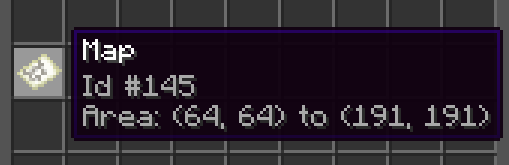
With advanced tooltips disabled:
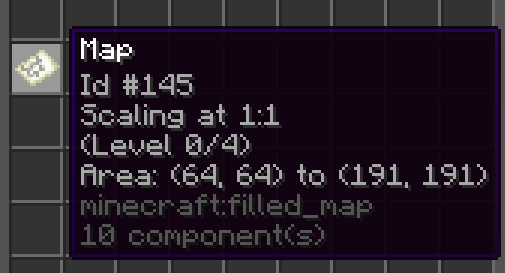
With advanced tooltips enabled:
Configuration
There's just a single config value, and… you could just not install the mod if you're inclined to change it:
# If enabled, the mod stores coordinate data on the map item when creating a new filled map
enabled: true
You can manage config in-game with the command /mapcoordinates <config-value> true/false.
Alternatively, you can edit it manually in config/FilledMapCoordinates/config.yml.
Usage
When enabled, simply use maps like you always would.
Whenever you create a new filled map, Minecraft will now store the exact coordinates where
you did so in custom component data on the map item itself. The mod then uses that data to
calculate the coordinates of the top-left and bottom-right corners of the area that this map
covers.
It will also record the scaling level of a map, and update it if you zoom the map out
on a cartography table. You can read up on the Wiki
zoom level / scale works with regard to the coordinates a map covers.
The mod needs to be present both on the server (for storing the data) and the client
(for showing the data). Note that already existing maps will not show the new tooltip
information as they do not have the required coordinates metadata present on the item.
If uninstalling the mod later, the metadata stored by the mod should not have any impact.
I was only able to get this mod done by building on somyk's mod Map Art Copyright. Thank you!
Available Versions
How to Install Filled Map Coordinates on Your Server
Order Server
Order a Minecraft Java server with at least 3 GB RAM (4 GB recommended).
Set fabric Loader
In the panel under "Egg", select the fabric loader and matching Minecraft version (1.21.4).
Install Mod
Open the mod browser in the dashboard and search for "Filled Map Coordinates". Click "Install" – done! Alternatively, upload the .jar via SFTP to the /mods folder.
Compatibility
Mod Loaders
Minecraft Versions
1.21.4, 1.21.3, 1.21.2 (+2 more)
Server-side
✓ RequiredRecommended RAM
4 GB(min. 3 GB)Frequently Asked Questions
Filled Map Coordinates server crashes on startup – what to do?
Most common cause: wrong fabric version or insufficient RAM. Check the server log (latest.log) for "OutOfMemoryError" or "Mixin" errors. With Mado Hosting: ensure at least 3 GB RAM is allocated and the loader matches the mod version (1.21.4). You can switch loaders with one click in the panel.
Is Filled Map Coordinates compatible with fabric and quilt?
Filled Map Coordinates officially supports fabric, quilt for Minecraft 1.21.4, 1.21.3, 1.21.2. The Mado dashboard automatically detects incompatible loader combinations.
Server lagging with Filled Map Coordinates – how to optimize performance?
Recommended RAM: 4 GB (per 8 players). Use /spark profiler to check if Filled Map Coordinates consumes the most tick time. Common fixes: reduce server view-distance to 8-10, install "performant" or "starlight" as supplementary mods on Forge. With Mado Hosting, your server runs on NVMe SSDs with dedicated CPU cores for minimal latency.
Similar Mods




![[ETF] Entity Texture Features](https://cdn.modrinth.com/data/BVzZfTc1/af683d206d50b05258d865b0d6e4aa2f2cee12f2_96.webp)
![[EMF] Entity Model Features](https://cdn.modrinth.com/data/4I1XuqiY/6e5bbd0d06b1741bfdab6c0cfab6de8fdaf0064c_96.webp)
Rent Modded Server
Install Filled Map Coordinates with just one click on your server.
Details
- License
- Creative Commons Attribution Non Commercial Share Alike 4.0 International
- Server-side
- Required