
FishBot
Automatic fishing mod with realistic behavior and in-game configuration.
Screenshots
About this Mod
🎣 FishBot – Automatic Fishing Mod (Client-Side, Fabric)
FishBot is an advanced client-side mod for Minecraft Java (Fabric), designed to fully automate fishing while maintaining realistic behavior and minimizing...
⚙️ Features
Full Automation
- Automatically casts and reels the fishing rod at the perfect moment.
- Simulates human behavior using configurable random delays.
- Realistic Camera Movement: Subtle idle movement and natural recoil when catching fish.
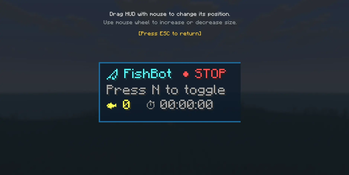
- Dynamic HUD (MiniHud).
🖥️ Displays:
- session time
- fish count
- bot status
Additional Features:
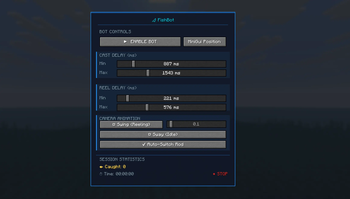
- In-Game Configuration (GUI): Fully customizable settings through a clean interface.
- AutoSwitch (Auto Rod Selection): Automatically selects the fishing rod when enabled.
- Multilingual Support: Automatically matches the game language (PL / EN).
▶️ How to Use
1. Set Keybinds
- Options → Controls → AutoFishing
- Toggle Bot (default: F)
- Open Menu (default: R)
2. Adjust HUD
- Open menu (R)
- Click “MiniGui Position”
- Drag it anywhere
- Scroll to resize
3. Start Fishing
- Have a fishing rod
- Stand near water
- Press F
The bot will start automatically. You can leave your PC and relax ☕
🔧 Advanced Settings
Cast Delay
- Delay before recasting
- recommended: 800 – 2200 ms
Reel Delay
- Reaction time after a bite
- recommended: 100 – 350 ms
- ~200 ms = human-like reaction
🎥 Camera Animation
- 1.0 → natural
- lower → smoother
- higher → stronger movement
⚠️ Please note: This mod is intended for singleplayer or servers that allow automation mods. Usage on public servers may violate their rules!
Available Versions
How to Install FishBot on Your Server
Order Server
Order a Minecraft Java server with at least 3 GB RAM (4 GB recommended).
Set fabric Loader
In the panel under "Egg", select the fabric loader and matching Minecraft version (1.21.11).
Install Mod
Open the mod browser in the dashboard and search for "FishBot". Click "Install" – done! Alternatively, upload the .jar via SFTP to the /mods folder.
Compatibility
Mod Loaders
Minecraft Versions
1.21.11
Server-side
✗ UnsupportedRecommended RAM
4 GB(min. 3 GB)Frequently Asked Questions
FishBot server crashes on startup – what to do?
Most common cause: wrong fabric version or insufficient RAM. Check the server log (latest.log) for "OutOfMemoryError" or "Mixin" errors. With Mado Hosting: ensure at least 3 GB RAM is allocated and the loader matches the mod version (1.21.11). You can switch loaders with one click in the panel.
Is FishBot compatible with fabric?
FishBot officially supports fabric for Minecraft 1.21.11. The Mado dashboard automatically detects incompatible loader combinations.
Server lagging with FishBot – how to optimize performance?
Recommended RAM: 4 GB (per 8 players). Use /spark profiler to check if FishBot consumes the most tick time. Common fixes: reduce server view-distance to 8-10, install "performant" or "starlight" as supplementary mods on Forge. With Mado Hosting, your server runs on NVMe SSDs with dedicated CPU cores for minimal latency.
Similar Mods




Rent Modded Server
Install FishBot with just one click on your server.