
Fixed Levels
Adds configuration options for experience levels. Set a flat amount of EXP required to reach each level or customize an EXP curve.
About this Mod
Fixed Levels
A fork of Linear Levels
Are you annoyed at how much EXP it costs to enchant gear at an anvil? To enchant something that costs 1 level, at level 1, you'll spend a lot less EXP than if you were at level 30. That's because it costs a certain number of levels to enchant, instead of EXP. So, to combat this, I prefer to make all levels require the same EXP, that way, I don't feel robbed when spending levels naming a Netherite Sword at level 100.
With curve mode off, you can set a specific amount of EXP required for every level. Or, with curve mode on, you can customize a curve that suits your preference if you want.
You can also set a max limit on how much exp is required for the next level when using vanilla or custom curve mode. By default, this is turned off, but is set for 107 exp, which is how much it takes to go from level 29 to level 30. You can adjust this however you want. When enabled, and using vanilla or custom curve, exp required will not exceed the max.
Go ahead, name that sword when you're level 100 and not feel cheated out of hard-earned EXP.
How to configure
Fixed Levels is required on the server. However, it can also be installed on the client, in which case mods like EXP Counter will show the correct amount of EXP per level.
By default the base experience to reach each new level takes 30 EXP. But you can set it to whatever you want.
New! With version 1.1, you can now use commands to query and set config options. Perfect for server OPs!
Get the current config options (no permissions required)
/fixedlevels query [curveMode|baseXPForOneLevel|curveModeMultiplier]
Set config options. Requires permission level 4
/fixedlevels set [curveMode|baseXPForOneLevel|curveModeMultiplier] value
If installed on the client, you can use Mod Menu to configure the settings in single player. On your dedicated server, modify the fixed-levels.json5 file or level 4 OPs can use the above commands.
Curve mode uses a configurable calculation to apply a curve to level up instead of just a flat EXP per level.
{
	// Enables custom exp levels. Disable to use vanilla calculations.
	"useCustomExpLevels": true,
	// Curve mode calculation is XPToNextLevel = (baseXPForOneLevel + (experienceLevel * curveModeMultiplier)).
	"curveMode": false,
	// The amount of exp to go from level 0 to level 1. If curve mode is off, this amount is for every level.
	"baseXPForOneLevel": 30,
	// The multiplier used in the curve mode calculation.
	"curveModeMultiplier": 2,
	// When enabled, limits the amount of exp needed for the next level for vanilla and custom curve mode.
	"useExpCap": false,
	// This sets the max amount of exp needed for the next level if using vanilla or custom curve mode.
	"maxExpForNextLevel": 107
}
If Mod Menu and Cloth Config API is installed and Fixed Levels is installed on your client, you can modify the settings in the GUI.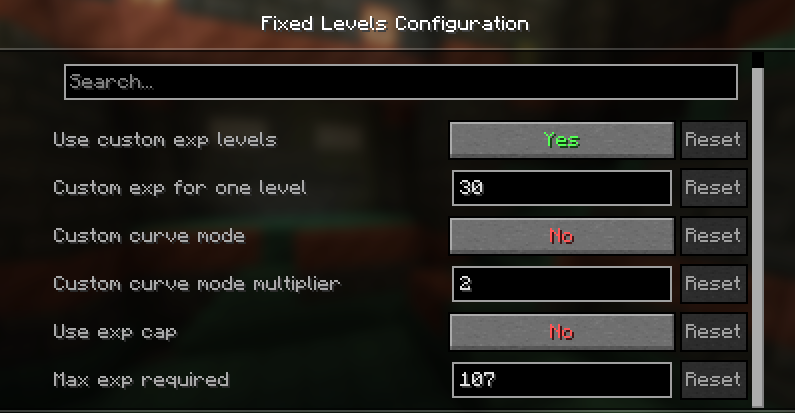
Available Versions
How to Install Fixed Levels on Your Server
Order Server
Order a Minecraft Java server with at least 3 GB RAM (4 GB recommended).
Set fabric Loader
In the panel under "Egg", select the fabric loader and matching Minecraft version (26.1.2).
Install Mod
Open the mod browser in the dashboard and search for "Fixed Levels". Click "Install" – done! Alternatively, upload the .jar via SFTP to the /mods folder.
Compatibility
Mod Loaders
Minecraft Versions
26.1.2, 26.1.1, 26.1 (+12 more)
Server-side
~ OptionalRecommended RAM
4 GB(min. 3 GB)Frequently Asked Questions
Fixed Levels server crashes on startup – what to do?
Most common cause: wrong fabric version or insufficient RAM. Check the server log (latest.log) for "OutOfMemoryError" or "Mixin" errors. With Mado Hosting: ensure at least 3 GB RAM is allocated and the loader matches the mod version (26.1.2). You can switch loaders with one click in the panel.
Is Fixed Levels compatible with fabric?
Fixed Levels officially supports fabric for Minecraft 26.1.2, 26.1.1, 26.1. The Mado dashboard automatically detects incompatible loader combinations.
Server lagging with Fixed Levels – how to optimize performance?
Recommended RAM: 4 GB (per 8 players). Use /spark profiler to check if Fixed Levels consumes the most tick time. Common fixes: reduce server view-distance to 8-10, install "performant" or "starlight" as supplementary mods on Forge. With Mado Hosting, your server runs on NVMe SSDs with dedicated CPU cores for minimal latency.
Similar Mods




Rent Modded Server
Install Fixed Levels with just one click on your server.