
Flan-Rental
Adding a rental property system to the mod flan
Screenshots
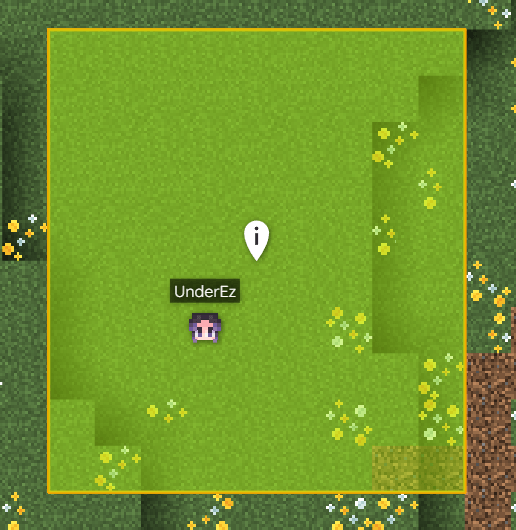
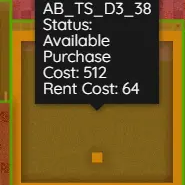
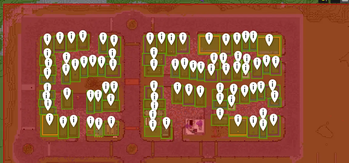
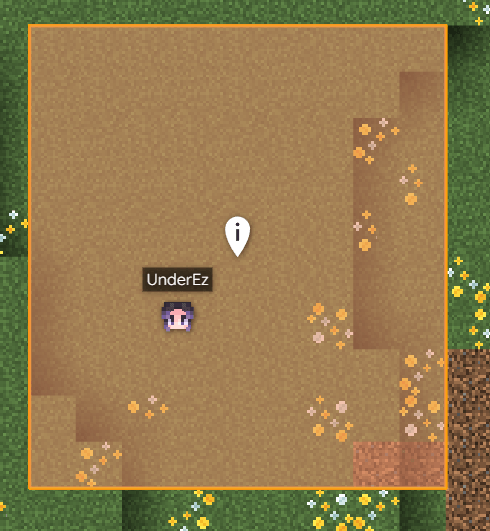
About this Mod
Flan Rent
Automated Shop Rentals for Flan Claims
Supports NeoForge & Fabric (Minecraft 1.21.1)
Flan Rent is a server-side rental system that turns Flan claims into rentable shop plots.
Instead of permanent ownership, players can rent shops using automated purchase and daily rent payments. The mod handles payments, evictions, claim syncing, and transaction tracking automatically.
When a player rents a plot, they are automatically added as a Flan co-owner so protections stay fully synchronized.
Features
Fully automated rental system
Daily recurring rent collection
Automatic Flan co-owner syncing
Missed payment tracking and eviction system
Transaction history logging
Admin-owned plots and money sink support
Automatic cleanup when Flan claims are deleted
Optional BlueMap integration
Server-side only
Currency Support
NeoForge
Lightman’s Currency
Create: Numismatics
Impactor
Fabric
CobbleDollars
Impactor
Currency systems are automatically detected and can be switched through admin commands.
How It Works
A player creates a rental plot inside their Flan claim
Another player rents the plot by paying the purchase price
Rent is charged automatically every day
The renter becomes a Flan co-owner automatically
If rent cannot be paid:
missed payments are tracked
back-rent is recovered when possible
renters are eventually evicted
Player Commands
Create a Rental Plot
/flanrent create
Creates a rental plot inside your Flan claim.
purchasePrice = upfront rental cost
rentCost = daily recurring rent
Notes:
Only one rental plot per main claim
Subclaims may also be rented
Renting both a main claim and subclaim simultaneously is not supported
Plot Information
/flanrent info
Shows:
owner
renter
rent cost
purchase price
plot status
location
Claim a Plot
/flanrent claim
Pays the purchase price
Sets you as the renter
Adds you as a Flan co-owner automatically
End a Rental
/flanrent unclaim
Removes the renter and revokes Flan co-owner permissions.
View Your Rentals
/flanrent myplots
Shows all plots you are currently renting.
/flanrent myrentals
Shows all plots you own.
Transaction History
/flanrent history
Displays purchases and rent payments.
Delete a Rental Plot
/flanrent delete
Deletes the rental plot you are standing in.
Requirements:
no active renter
must be the plot owner
Bank Commands
/flanrent setbank
Sets where rent income is deposited.
/flanrent setdefaultbank
Sets the default bank used for future plots.
Admin Commands
Requires OP Level 2
Create or Remove Plots
/flanrentadmin create
Creates an admin-owned rental plot.
/flanrentadmin remove
Deletes a rental plot and clears renter data.
Plot Information
/flanrentadmin info [name]
Shows plot details.
/flanrentadmin list
Lists all rental plots on the server.
Modify Plot Settings
/flanrentadmin set price
Updates pricing.
/flanrentadmin set bank
Configures payment targets.
/flanrentadmin set renter
Assigns a renter manually.
Admin-Owned Money Sink
/flanrentadmin claimasadmin
Marks a plot as admin-owned.
Rent is collected and deleted instead of paid to a player.
Useful for:
server economies
inflation control
public market systems
Debug & Currency Commands
/flanrentadmin checkpayments
Shows missed or pending rent.
/flanrentadmin debug bank
Displays bank balance information.
/flanrentadmin debug charge
Forces an immediate rent charge attempt.
/flanrentadmin currency
Shows the active currency system.
/flanrentadmin currency set
Changes the active currency system.
/flanrentadmin currency reload
Reloads currency configuration.
BlueMap Integration
Optional BlueMap support can display rental plots as map markers.
Commands:
/flanrentadmin bluemap toggle
Enable or disable markers.
/flanrentadmin bluemap reload
Rebuild all plot markers.
/flanrentadmin bluemap check
Shows integration status and marker counts.
Notes
Server-side only
No client installation required
Designed for survival servers, towns, shopping districts, and player economies
Keeps Flan permissions synchronized automatically
Available Versions
How to Install Flan-Rental on Your Server
Order Server
Order a Minecraft Java server with at least 3 GB RAM (4 GB recommended).
Set fabric Loader
In the panel under "Egg", select the fabric loader and matching Minecraft version (1.21.1).
Install Mod
Open the mod browser in the dashboard and search for "Flan-Rental". Click "Install" – done! Alternatively, upload the .jar via SFTP to the /mods folder.
Compatibility
Mod Loaders
Minecraft Versions
1.21.1
Server-side
✓ RequiredRecommended RAM
4 GB(min. 3 GB)Frequently Asked Questions
Flan-Rental server crashes on startup – what to do?
Most common cause: wrong fabric version or insufficient RAM. Check the server log (latest.log) for "OutOfMemoryError" or "Mixin" errors. With Mado Hosting: ensure at least 3 GB RAM is allocated and the loader matches the mod version (1.21.1). You can switch loaders with one click in the panel.
Is Flan-Rental compatible with fabric and neoforge?
Flan-Rental officially supports fabric, neoforge for Minecraft 1.21.1. The Mado dashboard automatically detects incompatible loader combinations.
Server lagging with Flan-Rental – how to optimize performance?
Recommended RAM: 4 GB (per 8 players). Use /spark profiler to check if Flan-Rental consumes the most tick time. Common fixes: reduce server view-distance to 8-10, install "performant" or "starlight" as supplementary mods on Forge. With Mado Hosting, your server runs on NVMe SSDs with dedicated CPU cores for minimal latency.
Similar Mods




Rent Modded Server
Install Flan-Rental with just one click on your server.