
Flashbackinstantrecord
This mod adds 3 different keybinds letting you click them to Start and stop flashback in a single click. It also adds 30+ Different triggers to start / stop flashback automatically without you touching anything.
Screenshots
About this Mod
Flashback Instant Record
Flashback Instant Record is an extension for the Flashback replay mod. It gives you better control over when your game is being recorded. Instead of leaving Flashback running all the time (which takes up a lot of storage space) or navigating menus while you are getting attacked, this mod allows you to instantly start recording with a single key press or automate your recordings completely based on gameplay events.
Why this is useful for SMPs and casual players
If you play on a multiplayer server, you know that the best moments usually happen when you least expect them, like getting ambushed by another player or hitting a clutch move.
- Save Storage: You do not need to record hours of strip mining just to capture a short PvP fight.
- Never Miss a Moment: With features like automatic recording when a player is spotted or when you take damage, your game will start recording the exact moment danger approaches.
- Spam Prevention: The mod is smart enough to know if it is already recording. If you get hit by a sword multiple times, it will not create multiple overlapping recordings. It locks the recording on the first hit and waits until the event is over.
Core Features
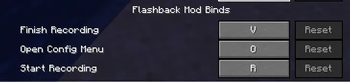
- Quick Access Keys: Dedicated keys to instantly Start (R) and Stop (V) recording without opening a single menu. (Can be configured)
- The Mega Config: A built in YACL interface (Press O or go into the modmenu list and open the configuration menu there) to tweak exactly how the mod behaves.
- Actionbar and Audio Feedback: Optionally replace the default toasts with clean Actionbar text and notification sounds so you know exactly when you are recording.
The Triggers
We built over 30 triggers so you can customize exactly what causes a recording to start or stop. Here is a breakdown of what every trigger does:
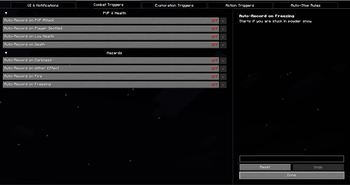
Combat and Hazards
- PVP Attack: Starts recording the exact moment another player hits you.
- Player Spotted: Starts recording the moment another player enters your render distance. It ignores spectators. Perfect for catching stalkers.
- Low Health: Starts recording if you drop below 3 hearts.
- Death: Starts recording the moment you die. Great for capturing the aftermath or your coordinates.
- Darkness: Starts recording when you get hit by the Warden Darkness effect.
- Wither Effect: Starts recording if you are inflicted with Wither.
- Poison: Starts recording when poisoned.
- Levitation: Starts recording when hit by a Shulker.
- Fire: Starts recording the moment you catch on fire.
- Freezing: Starts recording if you are trapped in Powder Snow.
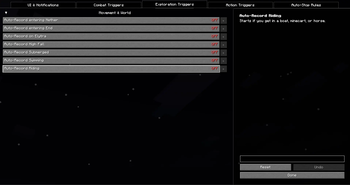
Exploration and Movement
- Enter Nether: Starts recording when you travel through a Nether Portal.
- Enter End: Starts recording when you enter the End dimension.
- Elytra Flight: Starts recording the moment you launch with an Elytra.
- High Fall: Starts recording if you fall more than 10 blocks. Perfect for water bucket clutches.
- Submerged: Starts recording if your head goes completely underwater.
- Swimming: Starts recording when the swimming animation plays.
- Riding: Starts recording when you hop into a boat, minecart, horse, or pig.
- Y Below 0: Starts recording when diving deep underground below Y level 0.
- In Rain: Starts recording when it begins to rain.
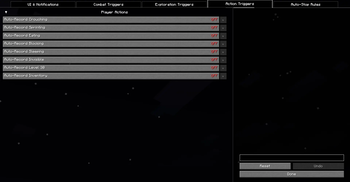
Player Actions
- Sprinting: Starts recording whenever you sprint.
- Crouching: Starts recording when you sneak.
- Eating: Starts recording when you consume food or drink a potion.
- Blocking: Starts recording when you raise a shield.
- Sleeping: Starts recording when you get into a bed.
- Invisible: Starts recording the moment you drink an Invisibility potion.
- Level 30: Starts recording the moment you hit 30 XP. Perfect for capturing enchantments.
- Open Inventory: Starts recording whenever you open a chest, barrel, or your own inventory.
- Trading: Starts recording when opening a villager trading screen.
- Typing: Starts recording when opening chat.
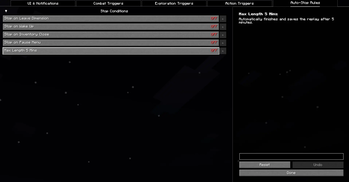
Automatic Stop Rules
- Stop on Death: Automatically saves and finishes your recording the moment you die.
- Stop on Leave Dimension: Automatically saves your recording when you leave the End or the Nether.
- Stop on Wake Up: Automatically saves your recording when you leave a bed.
- Stop on Inventory Close: Automatically saves your recording when you close a GUI menu.
- Stop on Pause: Automatically saves your recording if you hit ESC.
- Stop if AFK: Automatically saves your recording if you stand still and do not look around for 30 seconds.
- Max Length: A safety feature that automatically stops and saves the recording after a custom duration. Supports seconds (e.g. 30s), minutes (e.g. 5m), or hours (e.g. 2h).
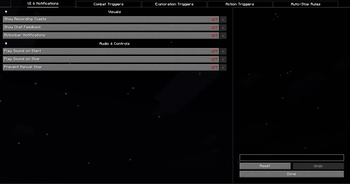
UI and Notifications
- Show Recording Toasts: Toggle the default Flashback corner toasts on or off.
- Show Chat Feedback: Toggle the default Flashback chat messages on or off.
- Actionbar Notifications: Replaces chat spam with clean text above your hotbar.
- Play Sound on Start or Stop: Plays a subtle ding sound effect so you know the recording state without looking.
- Prevent Manual Stop: Disables the manual Stop key press so you do not accidentally cancel a recording in the middle of a fight.
Dependencies
This is an extension and strictly requires the base mods to function. All credits go to the original developers. Please make sure you have the following installed:
Available Versions
How to Install Flashbackinstantrecord on Your Server
Order Server
Order a Minecraft Java server with at least 3 GB RAM (4 GB recommended).
Set fabric Loader
In the panel under "Egg", select the fabric loader and matching Minecraft version (26.1.2).
Install Mod
Open the mod browser in the dashboard and search for "Flashbackinstantrecord". Click "Install" – done! Alternatively, upload the .jar via SFTP to the /mods folder.
Compatibility
Mod Loaders
Minecraft Versions
26.1.2, 26.1.1, 26.1 (+1 more)
Server-side
✗ UnsupportedRecommended RAM
4 GB(min. 3 GB)Frequently Asked Questions
Flashbackinstantrecord server crashes on startup – what to do?
Most common cause: wrong fabric version or insufficient RAM. Check the server log (latest.log) for "OutOfMemoryError" or "Mixin" errors. With Mado Hosting: ensure at least 3 GB RAM is allocated and the loader matches the mod version (26.1.2). You can switch loaders with one click in the panel.
Is Flashbackinstantrecord compatible with fabric?
Flashbackinstantrecord officially supports fabric for Minecraft 26.1.2, 26.1.1, 26.1. The Mado dashboard automatically detects incompatible loader combinations.
Server lagging with Flashbackinstantrecord – how to optimize performance?
Recommended RAM: 4 GB (per 8 players). Use /spark profiler to check if Flashbackinstantrecord consumes the most tick time. Common fixes: reduce server view-distance to 8-10, install "performant" or "starlight" as supplementary mods on Forge. With Mado Hosting, your server runs on NVMe SSDs with dedicated CPU cores for minimal latency.
Similar Mods




![[ETF] Entity Texture Features](https://cdn.modrinth.com/data/BVzZfTc1/af683d206d50b05258d865b0d6e4aa2f2cee12f2_96.webp)
![[EMF] Entity Model Features](https://cdn.modrinth.com/data/4I1XuqiY/6e5bbd0d06b1741bfdab6c0cfab6de8fdaf0064c_96.webp)
Rent Modded Server
Install Flashbackinstantrecord with just one click on your server.