
About this Mod
Flashcards
Basically flashcards but inside Minecraft so you can study while playing.
Configuration

Pressing the H key will open the config menu above. Here you can set the number of minutes between each question and toggle it on/off. When toggled off, you can press the G key (for 1.21.6+ this keybind may conflict with vanilla) to prompt a question on-demand. Pressing the "Edit Questions" button will open the screen below.
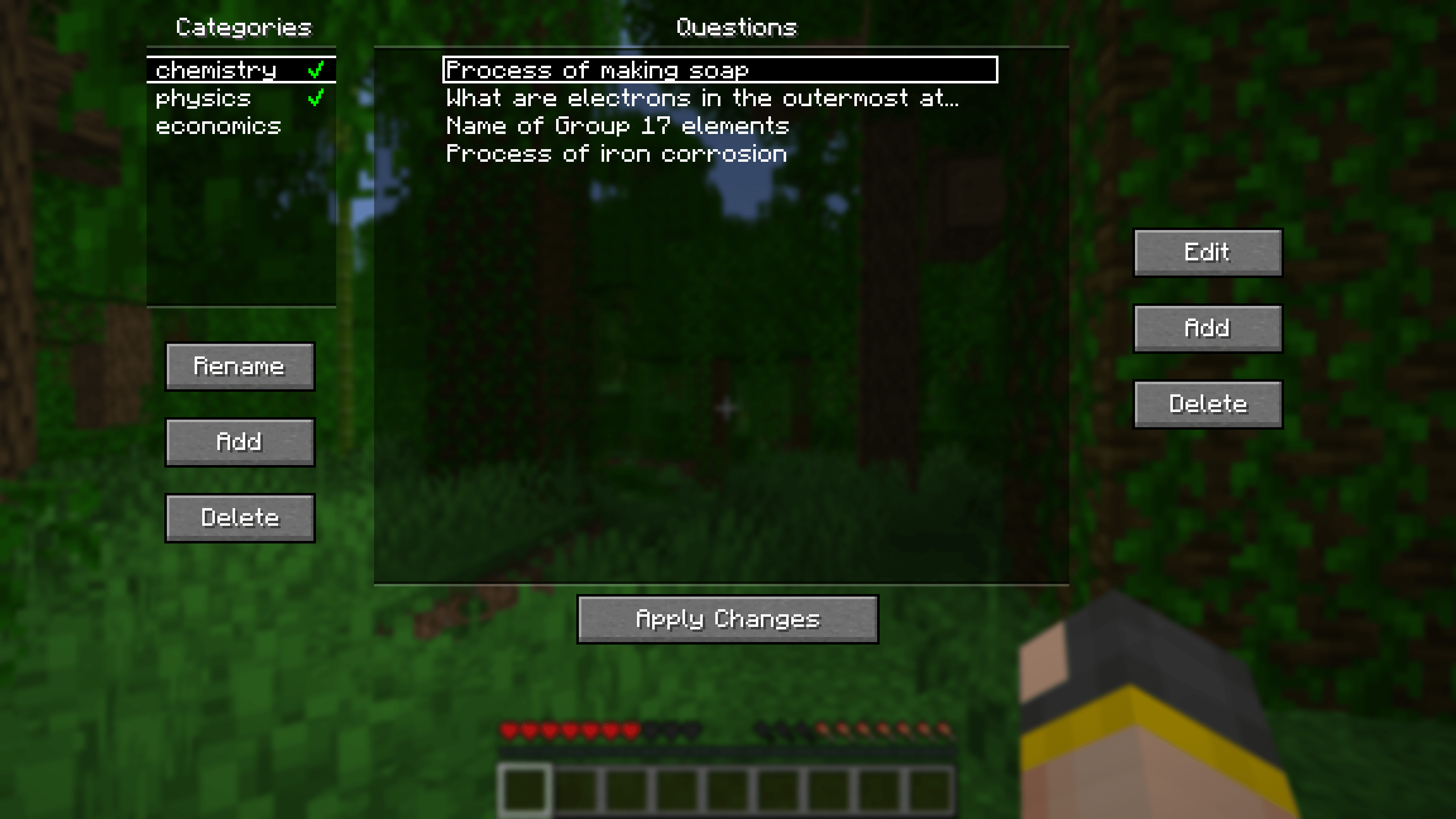
Here you can add, edit and delete questions. Questions can be seperated into different categories for organisational purposes. Clicking the green tick next to a category's name will enable/disable the questions in that category.
Other stuff
Additional Config

Pressing the "Additional Config..." button on the main config screen will open the menu above. Here you can set rewards/punishments for getting a question correct/wrong via commands. By default, there are no rewards/punishments set. You can do something simple like the image above or you can do something fancier. For example, you can create a loot table in a datapack and use the loot command to give you randomised loot each time you get a question correct.
For convenience, a default datapack with some presets is provided at .minecraft/config/flashcards/flashcards-dp.zip. To use it, copy the ZIP file into the datapacks folder of your world. The presets include:
- function flashcards:presets/random-bad-effect
- function flashcards:presets/random-good-effect
- function flashcards:presets/random-bad-mob
- loot give @s loot flashcards:presets/random-bad-item
- loot give @s loot flashcards:presets/random-good-item
Importing from Anki
Export your flashcards from Anki as a plain TXT file without HTML and media references. Rename the exported file to "anki.txt" and put it into the.minecraft/config/flashcards/questions/ folder. On startup, the mod will automatically convert that TXT file into the mod's own JSON files. You can import multiple different Anki decks at once as long as the word "anki" is in the name of each TXT file.
If you want to include images in your export, ensure "HTML and media references" is checked. Then, copy the image files from Anki's media folder into
.minecraft/config/flashcards/media/.
Importing from CSV/TSV
Place your CSV/TSV files into the.minecraft/config/flashcards/questions/ folder. On startup, the mod will automatically convert these files into the mod's own JSON files. The format is as follows:QUESTION_TEXT
QUESTION_IMAGE_FILENAME is optional. Copy the corresponding images into .minecraft/config/flashcards/media/.
Credit to this Reddit post for the original idea of this mod.
Available Versions
How to Install Flashcards on Your Server
Order Server
Order a Minecraft Java server with at least 3 GB RAM (4 GB recommended).
Set fabric Loader
In the panel under "Egg", select the fabric loader and matching Minecraft version (26.1.2).
Install Mod
Open the mod browser in the dashboard and search for "Flashcards". Click "Install" – done! Alternatively, upload the .jar via SFTP to the /mods folder.
Compatibility
Mod Loaders
Minecraft Versions
26.1.2, 26.1.1, 26.1 (+12 more)
Server-side
✗ UnsupportedRecommended RAM
4 GB(min. 3 GB)Frequently Asked Questions
Flashcards server crashes on startup – what to do?
Most common cause: wrong fabric version or insufficient RAM. Check the server log (latest.log) for "OutOfMemoryError" or "Mixin" errors. With Mado Hosting: ensure at least 3 GB RAM is allocated and the loader matches the mod version (26.1.2). You can switch loaders with one click in the panel.
Is Flashcards compatible with fabric?
Flashcards officially supports fabric for Minecraft 26.1.2, 26.1.1, 26.1. The Mado dashboard automatically detects incompatible loader combinations.
Server lagging with Flashcards – how to optimize performance?
Recommended RAM: 4 GB (per 8 players). Use /spark profiler to check if Flashcards consumes the most tick time. Common fixes: reduce server view-distance to 8-10, install "performant" or "starlight" as supplementary mods on Forge. With Mado Hosting, your server runs on NVMe SSDs with dedicated CPU cores for minimal latency.
Similar Mods




![[ETF] Entity Texture Features](https://cdn.modrinth.com/data/BVzZfTc1/af683d206d50b05258d865b0d6e4aa2f2cee12f2_96.webp)
![[EMF] Entity Model Features](https://cdn.modrinth.com/data/4I1XuqiY/6e5bbd0d06b1741bfdab6c0cfab6de8fdaf0064c_96.webp)
Rent Modded Server
Install Flashcards with just one click on your server.