
Flight Conduit
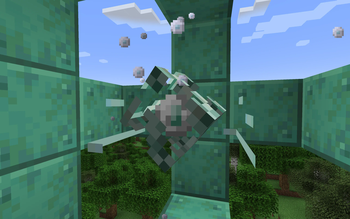
A new and balanced way to implement creative flight to a player's experience. Needing to craft a new conduit and extending the range by adding more rings around it.
Screenshots
About this Mod
Flight Conduit mod
by jojosolos, with the help of Noppes.

What is this
This mod adds a new type of conduit that grants new (and probably better) benefits, for those who like to build outside of water.
The craft for the conduit requires a player to explore the caves, new dimensions, and have to go through the painful experience of waiting for Copper blocks to Oxidize.
How does it work
Similar to a regular Minecraft conduit, you will need to place it, with a requirement of Weathered or fully Oxidized Copper blocks surrounding it (1 block of space in between). Water is not necessary for this Flight Conduit to function.
The more rings you add around it (up to 3 rings), the more distance and more benefits you get.
This doesn't replace a beacon. If you want speed, haste, etc, you will still need a beacon.
Benefits
Base benefits (regardless of ring amount)
- Creative Flight (range depends on the amount of rings)
- Slow Falling effect if you exit the range of Flight Conduit for a short period of time
Level 3 benefits (all 3 rings) - Kills phantoms if they enter a range of 20 blocks from the conduit
If anyone cares enough...
I can continue working on this mod and having more configurations for it so you can customize it to your needs, but as of now, I am keeping it as it is for my needs :)
Available Versions
How to Install Flight Conduit on Your Server
Order Server
Order a Minecraft Java server with at least 3 GB RAM (4 GB recommended).
Set forge Loader
In the panel under "Egg", select the forge loader and matching Minecraft version (1.20.1).
Install Mod
Open the mod browser in the dashboard and search for "Flight Conduit". Click "Install" – done! Alternatively, upload the .jar via SFTP to the /mods folder.
Compatibility
Mod Loaders
Minecraft Versions
1.20.1, 1.19.2
Server-side
✓ RequiredRecommended RAM
4 GB(min. 3 GB)Frequently Asked Questions
Flight Conduit server crashes on startup – what to do?
Most common cause: wrong forge version or insufficient RAM. Check the server log (latest.log) for "OutOfMemoryError" or "Mixin" errors. With Mado Hosting: ensure at least 3 GB RAM is allocated and the loader matches the mod version (1.20.1). You can switch loaders with one click in the panel.
Is Flight Conduit compatible with forge?
Flight Conduit officially supports forge for Minecraft 1.20.1, 1.19.2. The Mado dashboard automatically detects incompatible loader combinations.
Server lagging with Flight Conduit – how to optimize performance?
Recommended RAM: 4 GB (per 8 players). Use /spark profiler to check if Flight Conduit consumes the most tick time. Common fixes: reduce server view-distance to 8-10, install "performant" or "starlight" as supplementary mods on Forge. With Mado Hosting, your server runs on NVMe SSDs with dedicated CPU cores for minimal latency.
Similar Mods




Rent Modded Server
Install Flight Conduit with just one click on your server.