
Flingo Tier Tagger
Client-side Fabric mod that fetches and displays Flingo Tiers rankings next to player names in nametags and the tab list.
Screenshots

About this Mod
Flingo Tagger
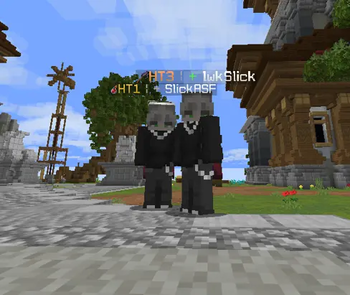
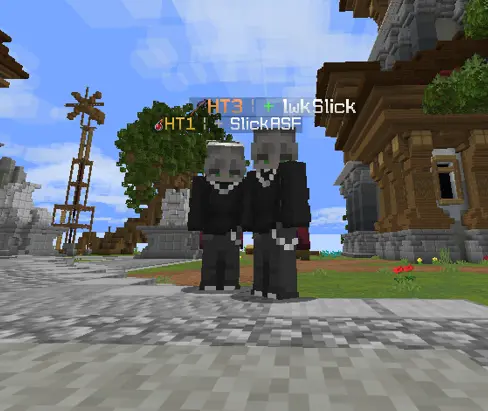
Flingo Tagger is a client-side Fabric mod that pulls player tier rankings from the Flingo Tiers ranking system and displays them directly in Minecraft — next to nametags, in the tab list, and on armor stands/text displays.
Based on TierTagger by uku3lig and netiyiy (MPL-2.0). Credit to them for the original architecture.
Features
- 🏷️ Nametag tags — tier shown above player heads in the world
- 📋 Tab list tags — tier shown next to names in the player list
- 🎮 9 gamemode icons — Axe, Mace, NetHop, Pot, SMP, Spear, Sword, UHC, Vanilla (custom bitmap font icons)
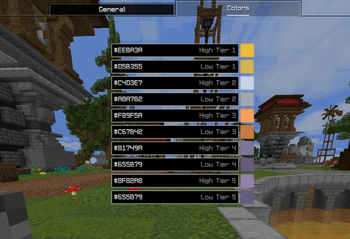
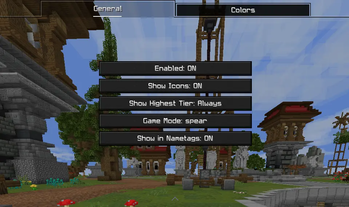
- ⚙️ Config screen — configure via Mod Menu (show icons, tier colors, gamemode preference, highest-tier display mode)
- 🔍
/flingo-tagger <player>— look up any player's full rankings in chat - 🔁 Auto-caching — rankings are fetched once and cached per session
- 🔔 Auto update checker — notified in chat when a new version is available on Modrinth
How Tiers Work
Flingo Tiers is a Minecraft PvP ranking system covering multiple gamemodes. Rankings use a High Tier / Low Tier system (HT1, LT1, HT2, etc.) with peak tracking. The mod fetches rankings live from the Flingo Tiers backend (Firebase Firestore, public read).
Supported gamemodes: Axe · Mace · NetHop · Pot · SMP · Spear · Sword · UHC · Vanilla
You can view the full leaderboard at Flingo Tiers.
Configuration
Open via Mod Menu → Flingo Tagger or press Escape → Mods.
Options include:
- Toggle tier tags and icons on/off
- Set your preferred gamemode display
- Choose between showing your selected gamemode tier, highest tier, or always highest
- Customize tier colors
Commands
/flingo-tagger <username>— prints that player's full rankings in chat
Client-side only — works on any server.
Available Versions
How to Install Flingo Tier Tagger on Your Server
Order Server
Order a Minecraft Java server with at least 3 GB RAM (4 GB recommended).
Set fabric Loader
In the panel under "Egg", select the fabric loader and matching Minecraft version (1.21.11).
Install Mod
Open the mod browser in the dashboard and search for "Flingo Tier Tagger". Click "Install" – done! Alternatively, upload the .jar via SFTP to the /mods folder.
Compatibility
Mod Loaders
Minecraft Versions
1.21.11
Server-side
✗ UnsupportedRecommended RAM
4 GB(min. 3 GB)Frequently Asked Questions
Flingo Tier Tagger server crashes on startup – what to do?
Most common cause: wrong fabric version or insufficient RAM. Check the server log (latest.log) for "OutOfMemoryError" or "Mixin" errors. With Mado Hosting: ensure at least 3 GB RAM is allocated and the loader matches the mod version (1.21.11). You can switch loaders with one click in the panel.
Is Flingo Tier Tagger compatible with fabric?
Flingo Tier Tagger officially supports fabric for Minecraft 1.21.11. The Mado dashboard automatically detects incompatible loader combinations.
Server lagging with Flingo Tier Tagger – how to optimize performance?
Recommended RAM: 4 GB (per 8 players). Use /spark profiler to check if Flingo Tier Tagger consumes the most tick time. Common fixes: reduce server view-distance to 8-10, install "performant" or "starlight" as supplementary mods on Forge. With Mado Hosting, your server runs on NVMe SSDs with dedicated CPU cores for minimal latency.
Similar Mods

![[ETF] Entity Texture Features](https://cdn.modrinth.com/data/BVzZfTc1/af683d206d50b05258d865b0d6e4aa2f2cee12f2_96.webp)
![[EMF] Entity Model Features](https://cdn.modrinth.com/data/4I1XuqiY/6e5bbd0d06b1741bfdab6c0cfab6de8fdaf0064c_96.webp)



Rent Modded Server
Install Flingo Tier Tagger with just one click on your server.