
Floppy HUD
A DOOM-like HUD clientside mod!
Screenshots
About this Mod
Fabric version coming soon, follow the project to get notified when a new update drops!
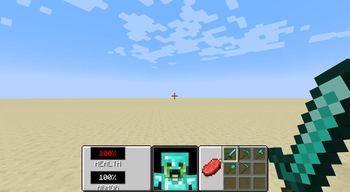
Floppy HUD is a total client-side HUD conversion mod for Minecraft NeoForge 1.21.1. It completely replaces the vanilla Minecraft interface with a nostalgic, fully functional retro UI inspired by the legendary 1993 Doom shareware release.
This mod is a port of the HUD from the official April Fools 2019 Minecraft version '3D Shareware v1.34' with new features.
Features
- The Classic Panel: A custom, fully transparent 256x64 retro hotbar panel that anchors beautifully to the bottom of the screen.
- Live 3D Player Face: A fully animated, 3D rendering of the player's face right in the center of the HUD. The model features custom rotation math to simulate "looking around" while perfectly freezing the actual entity's hitboxes in the game world.
- Dynamic Pixel-Perfect Status Bars:
- Hunger: A classic meat shank icon that gradually slices itself away pixel-by-pixel as you starve, using exact bounding-box UV math.
- Oxygen: A custom bubble icon that seamlessly appears and shrinks when diving underwater.
- Clean Text & Translations: Features native Minecraft localization support (fully translatable
HEALTHandARMORtext) and dynamic percentage tracking. - Seamless Vanilla Integration: Automatically shifts vanilla overlays (like XP levels and item names) to fit the new layout, while safely assassinating conflicting vanilla HUD elements (Armor, Food, Health) using custom Mixins and the NeoForge Event Bus.
Installation
Since this is a client-side only mod, it does not need to be installed on servers.
- Ensure you have NeoForge 1.21.1 installed.
- Download the latest
.jarfile from the Releases tab. - Drop the mod into your
.minecraft/modsfolder. - Boot up the game and enjoy the Doom-like HUD!
Under the Hood (For Developers)
This mod was built with a heavy focus on clean, modern rendering practices and optimized code structure:
- GuiGraphics & Z-Layers: Utilizes modern
GuiGraphics.blitand matrix stack translations (pose().translate) for flawless Z-layer sorting and Alpha Blending. - Smart UI Math: Drops the buggy vanilla 1.14 integer-division traps in favor of pure float percentage calculations for UI shrinking effects.
- Safe Overrides: Uses a combination of
@Mixin(Gui.class)to outright kill unnecessary vanilla rendering calls before they happen, andRenderGuiLayerEvent.Preto safely shift necessary vanilla text elements without breaking other mods.
Localization
The mod natively supports Minecraft's .json language system. It currently has support for en_us; en_gb; pt_pt and pt_br. To add a translation for your language, simply create a new language file (e.g., es_es.json) in the mod's asset folder with the following keys:
{
  "gui.floppyhud.health": "HEALTH",
  "gui.floppyhud.armor": "ARMOR"
}
Available Versions
How to Install Floppy HUD on Your Server
Order Server
Order a Minecraft Java server with at least 3 GB RAM (4 GB recommended).
Set neoforge Loader
In the panel under "Egg", select the neoforge loader and matching Minecraft version (1.21.1).
Install Mod
Open the mod browser in the dashboard and search for "Floppy HUD". Click "Install" – done! Alternatively, upload the .jar via SFTP to the /mods folder.
Compatibility
Mod Loaders
Minecraft Versions
1.21.1
Server-side
✗ UnsupportedRecommended RAM
4 GB(min. 3 GB)Frequently Asked Questions
Floppy HUD server crashes on startup – what to do?
Most common cause: wrong neoforge version or insufficient RAM. Check the server log (latest.log) for "OutOfMemoryError" or "Mixin" errors. With Mado Hosting: ensure at least 3 GB RAM is allocated and the loader matches the mod version (1.21.1). You can switch loaders with one click in the panel.
Is Floppy HUD compatible with neoforge?
Floppy HUD officially supports neoforge for Minecraft 1.21.1. The Mado dashboard automatically detects incompatible loader combinations.
Server lagging with Floppy HUD – how to optimize performance?
Recommended RAM: 4 GB (per 8 players). Use /spark profiler to check if Floppy HUD consumes the most tick time. Common fixes: reduce server view-distance to 8-10, install "performant" or "starlight" as supplementary mods on Forge. With Mado Hosting, your server runs on NVMe SSDs with dedicated CPU cores for minimal latency.
Similar Mods




Rent Modded Server
Install Floppy HUD with just one click on your server.