
Floral Aditions
Hello! This is my first Minecraft mod, Enjoy! :D
Screenshots
About this Mod
Floral Town Decorations mod 1.0.0
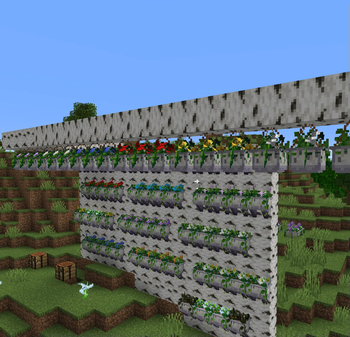
This mod seeks to add new decoration blocks to place all throughout your Minecraft worlds! Currently it has been made available only for Minecraft java 1.20 to 1.20.1 for Fabric, but in the future, I may make it also for: forge and Minecraft Bedrock.
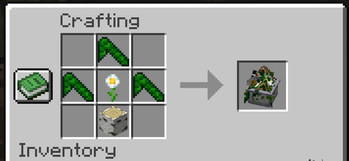
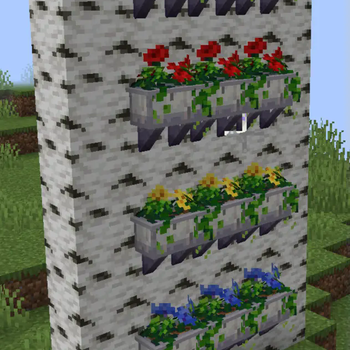
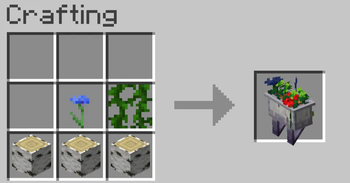
Currently the only new blocks you can craft are Planters! These can make your Minecraft builds have more personality and beauty! They can be made with all small flowers, for the exception of torch flowers, this is because the software I used to make the mod, MCreator, doesn't offer the torch flower as an option when putting items in your recipes. Another thing to note: the planter also requires a 3 item-base in the crafting grid of birch logs, put the flower of choice in the center, and then a singular vine on the left or right of that and presto! You have made your very own planter! (If you craft this item with a wither rose the leaves will match the color of the wither rose stem.)
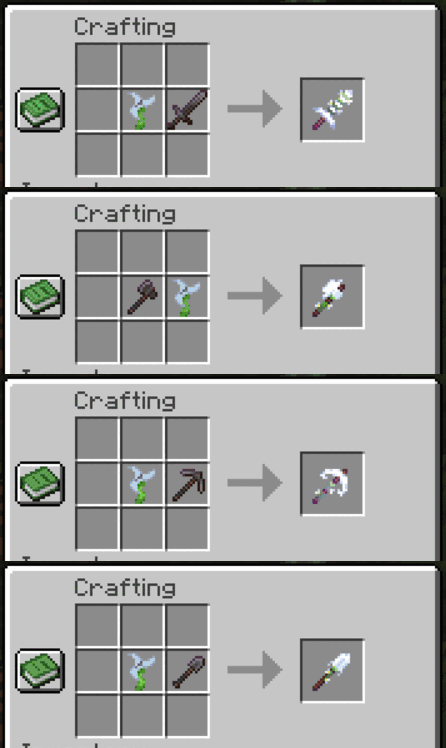
Note: I forgot to make the Starbound Hoe craftable, this will be fixed in the future.
Enjoy the mod! And please remember to drink water :D
Available Versions
How to Install Floral Aditions on Your Server
Order Server
Order a Minecraft Java server with at least 3 GB RAM (4 GB recommended).
Set fabric Loader
In the panel under "Egg", select the fabric loader and matching Minecraft version (1.20.1).
Install Mod
Open the mod browser in the dashboard and search for "Floral Aditions". Click "Install" – done! Alternatively, upload the .jar via SFTP to the /mods folder.
Compatibility
Mod Loaders
Minecraft Versions
1.20.1, 1.20
Server-side
✓ RequiredRecommended RAM
4 GB(min. 3 GB)Frequently Asked Questions
Floral Aditions server crashes on startup – what to do?
Most common cause: wrong fabric version or insufficient RAM. Check the server log (latest.log) for "OutOfMemoryError" or "Mixin" errors. With Mado Hosting: ensure at least 3 GB RAM is allocated and the loader matches the mod version (1.20.1). You can switch loaders with one click in the panel.
Is Floral Aditions compatible with fabric?
Floral Aditions officially supports fabric for Minecraft 1.20.1, 1.20. The Mado dashboard automatically detects incompatible loader combinations.
Server lagging with Floral Aditions – how to optimize performance?
Recommended RAM: 4 GB (per 8 players). Use /spark profiler to check if Floral Aditions consumes the most tick time. Common fixes: reduce server view-distance to 8-10, install "performant" or "starlight" as supplementary mods on Forge. With Mado Hosting, your server runs on NVMe SSDs with dedicated CPU cores for minimal latency.
Similar Mods

![[ETF] Entity Texture Features](https://cdn.modrinth.com/data/BVzZfTc1/af683d206d50b05258d865b0d6e4aa2f2cee12f2_96.webp)
![[EMF] Entity Model Features](https://cdn.modrinth.com/data/4I1XuqiY/6e5bbd0d06b1741bfdab6c0cfab6de8fdaf0064c_96.webp)



Rent Modded Server
Install Floral Aditions with just one click on your server.