
(Discontinued) FNaF's: Build & Decor (Java Edition)
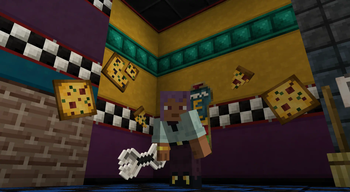
An addon with which you can recreate the restaurant from the famous FNAF game but now in Minecraft Java edition!
Screenshots
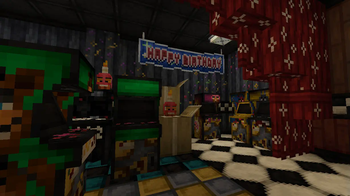
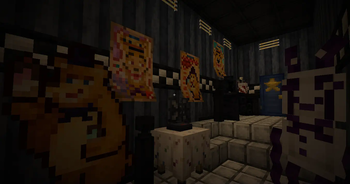
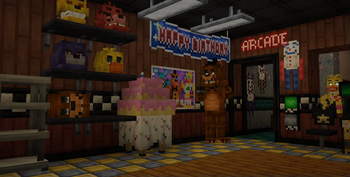
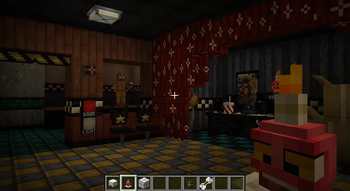
About this Mod
FNaF's Decorations for Java Edition (Port)
An addon with which you can recreate the restaurant from the famous FNAF game but now in Minecraft Bedrock! This addon is currently still under development, so there are missing blocks such as those of FNAF 2,3,4, etc...


- You can create a pizzeria using a wide variety of blocks that will expand every wednesday
- The blocks have a function to change the variants of the blocks using the mc vanilla axes
- Decorative blocks really well designed and added to avoid any bugs
- Good textures and designs
- and more!


Ever wanted to recreate the restaurant from FNAF 1/2 in Minecraft? Well, now you can do it with FNAF's Decorations, this addon adds a wide variety of blocks to decorate, obviously inspired by the FNAF 1/2 restaurant, also in the future, blocks based on other FNAF 2,3 restaurants or even the house on 4 will be added!
Also, this addon you can use it in your maps based on FNAF 1/2/3, but you have to leave respective credits of Modrinth link of this mod
Note:
Please note that this mod still has some missing content so it will be added in future versions to finally look like the bedrock edition which you can find here FD Bedrock Edition


Here I will show you which versions are currently compatible with the mod and which other possible versions will be available in the future
NeoForge (GeckoLib Requiered) (Download)
- 1.20.4 ✅Forge (GeckoLib Requiered) (Download)
- 1.20.1 ✅
- 1.19.4 (❌ Delayed)
- 1.19.2 ✅
- 1.18.2 (❌ Delayed)Fabric (Fabric Api Requiered) (Download)
- 1.20.1 ✅
If you see some versions with this emoji (❌) it means that they are not available yet


Join to FB&D Community Server!


Available Versions
How to Install (Discontinued) FNaF's: Build & Decor (Java Edition) on Your Server
Order Server
Order a Minecraft Java server with at least 3 GB RAM (4 GB recommended).
Set fabric Loader
In the panel under "Egg", select the fabric loader and matching Minecraft version (1.21.1).
Install Mod
Open the mod browser in the dashboard and search for "(Discontinued) FNaF's: Build & Decor (Java Edition)". Click "Install" – done! Alternatively, upload the .jar via SFTP to the /mods folder.
Compatibility
Mod Loaders
Minecraft Versions
1.21.1, 1.20.4, 1.20.1 (+3 more)
Server-side
~ OptionalRecommended RAM
4 GB(min. 3 GB)Frequently Asked Questions
(Discontinued) FNaF's: Build & Decor (Java Edition) server crashes on startup – what to do?
Most common cause: wrong fabric version or insufficient RAM. Check the server log (latest.log) for "OutOfMemoryError" or "Mixin" errors. With Mado Hosting: ensure at least 3 GB RAM is allocated and the loader matches the mod version (1.21.1). You can switch loaders with one click in the panel.
Is (Discontinued) FNaF's: Build & Decor (Java Edition) compatible with fabric and forge and neoforge?
(Discontinued) FNaF's: Build & Decor (Java Edition) officially supports fabric, forge, neoforge for Minecraft 1.21.1, 1.20.4, 1.20.1. Note: Forge and Fabric mods are NOT cross-compatible – pick one loader and stick with it. The Mado dashboard automatically detects incompatible loader combinations.
Server lagging with (Discontinued) FNaF's: Build & Decor (Java Edition) – how to optimize performance?
Recommended RAM: 4 GB (per 8 players). Use /spark profiler to check if (Discontinued) FNaF's: Build & Decor (Java Edition) consumes the most tick time. Common fixes: reduce server view-distance to 8-10, install "performant" or "starlight" as supplementary mods on Forge. With Mado Hosting, your server runs on NVMe SSDs with dedicated CPU cores for minimal latency.
Similar Mods

![[ETF] Entity Texture Features](https://cdn.modrinth.com/data/BVzZfTc1/af683d206d50b05258d865b0d6e4aa2f2cee12f2_96.webp)
![[EMF] Entity Model Features](https://cdn.modrinth.com/data/4I1XuqiY/6e5bbd0d06b1741bfdab6c0cfab6de8fdaf0064c_96.webp)



Rent Modded Server
Install (Discontinued) FNaF's: Build & Decor (Java Edition) with just one click on your server.