
FontSwap
Import any font. Restyle all of Minecraft. Instantly.
Screenshots




About this Mod
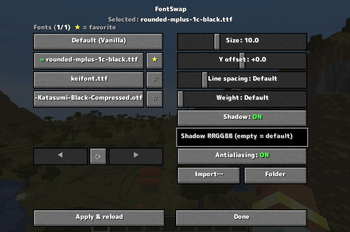
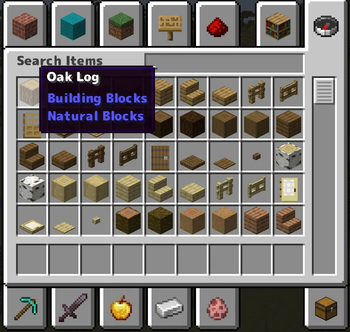
FontSwap lets you drop in any .ttf / .otf font and applies it to the entire game — chat, menus, books, signs, tooltips, everything — live, without restarting. Everything is controlled from a clean in-game menu (default key: K).
✨ Features
- 🔤 Whole-game font swap — import any font file and the whole UI switches to it instantly
- ⭐ Favorites — pin the fonts you use most to the top of the list
- 🔧 Fine control — adjust size, vertical offset, line spacing (works in books & signs too) and weight (faux-bold)
- 🌑 Custom text shadow — turn the drop shadow on/off or recolor it with a hex code
- 🟦 Antialiasing toggle — switch to a crunchy pixel-art look for crisp, retro text
- 🌍 10 languages — EN · 日本語 · 简体中文 · 繁體中文 · 한국어 · DE · FR · ES · RU · PT-BR
- ⚡ Client-side only — works on any server, nothing to install server-side
🎮 How to use
- Press K in game to open the FontSwap menu (rebindable in Controls)
- Click Import… and pick a
.ttf/.otffile — or drop fonts intoconfig/fontswap/fonts/ - Select a font, tweak the sliders, and hit Apply & reload
📦 Supported versions
- Forge: 1.20.1 / 1.20.2 / 1.20.4 / 1.20.6
- NeoForge: 1.21.1 / 1.21.3 / 1.21.4 / 1.21.5 / 1.21.8 / 1.21.10 / 1.21.11 / 26.1
ℹ️ Download the file matching both your MC version and loader. On 26.1 / 26.1.1, NeoForge is still in beta — a beta loader is required there.
ℹ️ Notes
- You supply your own font files — please respect the license of any commercial fonts.
- "Weight" thickens the font (normal → bold); it can't make a font thinner than its design. For a light look, import a Light/Thin variant.
💛 Support
If FontSwap is useful to you, you can support development on Ko-fi. Thank you!
Available Versions
How to Install FontSwap on Your Server
Order Server
Order a Minecraft Java server with at least 3 GB RAM (4 GB recommended).
Set forge Loader
In the panel under "Egg", select the forge loader and matching Minecraft version (26.1.2).
Install Mod
Open the mod browser in the dashboard and search for "FontSwap". Click "Install" – done! Alternatively, upload the .jar via SFTP to the /mods folder.
Compatibility
Mod Loaders
Minecraft Versions
26.1.2, 26.1.1, 26.1 (+11 more)
Server-side
✗ UnsupportedRecommended RAM
4 GB(min. 3 GB)Frequently Asked Questions
FontSwap server crashes on startup – what to do?
Most common cause: wrong forge version or insufficient RAM. Check the server log (latest.log) for "OutOfMemoryError" or "Mixin" errors. With Mado Hosting: ensure at least 3 GB RAM is allocated and the loader matches the mod version (26.1.2). You can switch loaders with one click in the panel.
Is FontSwap compatible with forge and neoforge?
FontSwap officially supports forge, neoforge for Minecraft 26.1.2, 26.1.1, 26.1. The Mado dashboard automatically detects incompatible loader combinations.
Server lagging with FontSwap – how to optimize performance?
Recommended RAM: 4 GB (per 8 players). Use /spark profiler to check if FontSwap consumes the most tick time. Common fixes: reduce server view-distance to 8-10, install "performant" or "starlight" as supplementary mods on Forge. With Mado Hosting, your server runs on NVMe SSDs with dedicated CPU cores for minimal latency.
Similar Mods

![[ETF] Entity Texture Features](https://cdn.modrinth.com/data/BVzZfTc1/af683d206d50b05258d865b0d6e4aa2f2cee12f2_96.webp)
![[EMF] Entity Model Features](https://cdn.modrinth.com/data/4I1XuqiY/6e5bbd0d06b1741bfdab6c0cfab6de8fdaf0064c_96.webp)



Rent Modded Server
Install FontSwap with just one click on your server.