Fox Nap
A survival-, multiplayer- and copyright-friendly mod for adding custom music discs to your world
Screenshots


About this Mod


What is This?
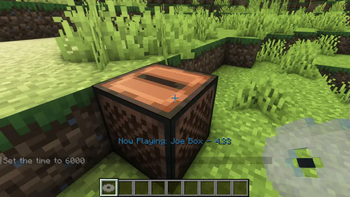
FoxNap is a simple "Vanilla Plus" mod for adding custom music discs to Minecraft.
- Unlike what you can achieve with
resource packs alone
music discs added via FoxNap do not overwrite the vanilla music discs. - Unlike similar mods, FoxNap allows you to:
- add as many or as few music discs as you want
- add whatever music you want
- use different music than other players on the same server
- obtain all music discs in survival, via a
new villager profession
(utilities for modifying creeper / treasure chest loot tables are planned)
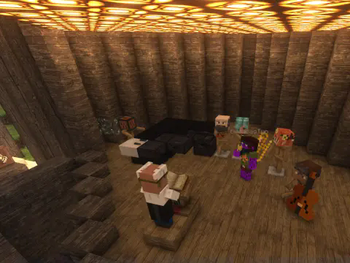
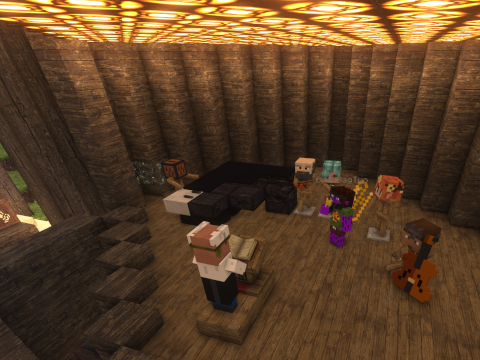
FoxNap also adds custom musical instruments that you can play like goat horns,
giving you the creative freedom to stage
"live music" performances.
Setup and Customization
This mod comes pre-bundled with seven new music discs:
Four tracks performed by PM Music
from Lud and Schlatts Musical Emporium
all of which are permissively licensed under the terms specified
here
(I am redistributing them via this repo and mod under the compatible
Creative Commons Attribution-ShareAlike 4.0 License).
If this built-in playlist sounds like your jam, and you have no desire to add anything else, then
congrats! This is easy! This is a Fabric mod with builds for 1.19+ and depends only on
the Fabric API, so just download
the appropriate build to your instance's mods folder, start the game, and
go find a village.
But if you're interested in some customization, read on:
Resource Pack Generator
If manually converting mp3s and hand-editing JSON isn't your idea of a fun time, this project
provides an alternative in the form of a stand-alone and portable resource pack generator.
Installation
- Download the executable from the release page
that matches your operating system and your version of the mod. - Depending on your operating system and security settings, you may need
to explicitly make the resource pack generator executable (on *nix systems,
you can do this from a terminal by runningchmod u+x /path/to/FoxNapRPGor by
going into Properties in most file managers).
Generating Resource and Data Packs
Place the generator executable in an empty folder, then move any music you
want to turn into records into that folder. There is no limit to the
number of tracks you can include, and they do not need to be pre-converted
to Ogg. The only requirement is that
the files have to be
decodable by ffmpeg.
Pro Tip: if your music files include metadata, the title
and artist
name will get automatically extracted, and any album art will be used to help generate the music
disc texture.
When you're ready, simply double-click the FoxNapRPG executable. A terminal window may pop
up showing progress of the resource pack creation, and before you know it you should have some
new files in your current directory:
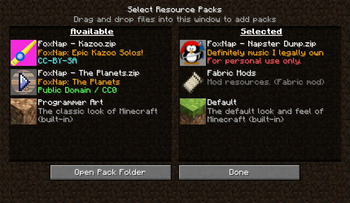
FoxNapRP.zipis the resource pack containing all your converted songs and music disc textures,
and you can throw that into your MinecraftresourcepacksfolderFoxNapDP.zipis the datapack that defines all the properties of the tracks themselves. You'll
need to put this pack into thedatapacksfolder of any world where you want to use your music
(see note below about multiplayer).foxnap.yamlneeds to go into your Minecraftconfigfolder. This tells the game how many
music discs to enable for you.
Advanced Options: Command-Line Options
You can also run the generator from the command-line, which will give you access to a bunch of
additional customization options, such as setting the directories to search for music or the
locations the generated resource pack and mod config should be saved.
For further details, run:
$ ./FoxNapRPG --help
from the folder where you saved the generator executable.
What About Multiplayer?
When playing on a server, it's the server's datapacks and config file that will dictate:
- how long each song will play
- the redstone signal strength coming out of jukeboxes playing each disc
- the number of tracks available from the Maestro
but it's each player's resource pack and config file that will control:
- the songs that each disc will play
- the appearance (and description) of each disc
- which discs show up as "placeholder" records
Explicitly:
- if the server has a greater number of discs specified than both what you've specified in your
config, some discs will show up for you with placeholder
textures and sound files - if you have more discs in your resource pack than are set on the server, then not all tracks will
be available in your shared game - some music discs may continue silently after a song ends, and some might cut off
Beyond the number of discs, though, there's no reason why every player can't come online with
a completely custom playlist of songs with similar lengths!
Obtaining Records and More!
So now that you've registered these custom records to the game, how do you actually get them?
Outside of commands (e.g. /give @s foxnap:track_1) and Creative Mode, the sole way to obtain
FoxNap records is by trading with The Maestro, a new villager who has a Jukebox as a job site
(note
that The Maestro does not currently spawn naturally, but this feature is planned).

The Maestro will pay top dollar for tonewood--stripped
blocks of rare wood types--goat horns and non-FoxNap records and sells, alongside your custom
music discs, a wide variety of playable musical instruments (with textures adopted from the classic
mxTune mod).
Disabling The Maestro
If you'd prefer not to add The Maestro to your game (and would like to obtain your music discs
in some other way, such as a datapack), you can disable this part of the mod by editing yourfoxnap.yaml config file and adding the following line:
enable_maestro: false
Fox Nap Vanilla
With the release of Minecraft 1.21, music discs are now entirely data-driven! As such, the
resource and datapacks generated by the Fox Nap Resource Pack Generator are entirely compatible
with the vanilla game. Details can be found on
the wiki.
Contributing
Find a bug? Have a suggestion or a question? Want to contribute a new feature or enhancement?
Open an issue!
License and Acknowledgements
All code in this repository is licensed under
GPLv3.
Builds of the FoxNap Resource Pack Generator (FoxNapRPG) include binaries of
ffmpeg which is licensed under
the GNU Lesser General Public License (LGPL) version 2.1
or later and incorporates components licensed under
the GNU General Public License (GPL) version 2
or later.
All assets in this repository are distributed under the
Creative Commons Attribution-ShareAlike 4.0 License
unless
otherwise stated.
Instrument icons are taken from the mod mxTune
by @AeronicaMC.
Instrument sounds are courtesy of Philharmonia's
sound sample library.
Many thanks to @FoundationGames for making the code of
his awesome Sandwichable mod so easy to
understand and learn from, and similarly to
Modding by Kaupenjoe for his awesome and detailed
tutorials on Minecraft modding, in this case
his tutorial for adding a custom villager profession.
Also shouting out @Siphalor and Reddit's
jSdCool for
this conversation on adding
non-mod external libraries to a Fabric mod. It should not have been this hard to add the SnakeYAML
library to a mod.







Available Versions
How to Install Fox Nap on Your Server
Order Server
Order a Minecraft Java server with at least 3 GB RAM (4 GB recommended).
Set fabric Loader
In the panel under "Egg", select the fabric loader and matching Minecraft version (26.1.2).
Install Mod
Open the mod browser in the dashboard and search for "Fox Nap". Click "Install" – done! Alternatively, upload the .jar via SFTP to the /mods folder.
Compatibility
Mod Loaders
Minecraft Versions
26.1.2, 26.1.1, 26.1 (+26 more)
Server-side
✓ RequiredRecommended RAM
4 GB(min. 3 GB)Frequently Asked Questions
Fox Nap server crashes on startup – what to do?
Most common cause: wrong fabric version or insufficient RAM. Check the server log (latest.log) for "OutOfMemoryError" or "Mixin" errors. With Mado Hosting: ensure at least 3 GB RAM is allocated and the loader matches the mod version (26.1.2). You can switch loaders with one click in the panel.
Is Fox Nap compatible with fabric and quilt?
Fox Nap officially supports fabric, quilt for Minecraft 26.1.2, 26.1.1, 26.1. The Mado dashboard automatically detects incompatible loader combinations.
Server lagging with Fox Nap – how to optimize performance?
Recommended RAM: 4 GB (per 8 players). Use /spark profiler to check if Fox Nap consumes the most tick time. Common fixes: reduce server view-distance to 8-10, install "performant" or "starlight" as supplementary mods on Forge. With Mado Hosting, your server runs on NVMe SSDs with dedicated CPU cores for minimal latency.
Similar Mods

![[ETF] Entity Texture Features](https://cdn.modrinth.com/data/BVzZfTc1/af683d206d50b05258d865b0d6e4aa2f2cee12f2_96.webp)
![[EMF] Entity Model Features](https://cdn.modrinth.com/data/4I1XuqiY/6e5bbd0d06b1741bfdab6c0cfab6de8fdaf0064c_96.webp)



Rent Modded Server
Install Fox Nap with just one click on your server.