
FPS Benchmark
Cinematic auto-benchmark for Minecraft. One-click Base run is built for everyone - 3 minutes, then a clean FPS results table (Markdown + JSON). 40 deeper stress tests cover particles, entities, redstone, lighting, chunks, memory.
Screenshots
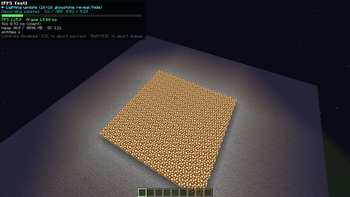
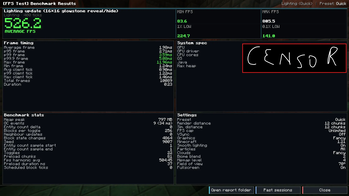
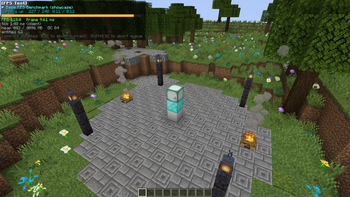
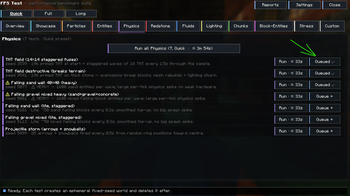
About this Mod
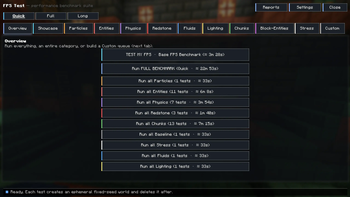
FPS Benchmark is a one-click cinematic FPS benchmarking suite for Minecraft. Press Run Base Benchmark and the mod creates a temporary world, drives the camera through a scripted 3-minute stress sequence, and writes you a clean results table — no setup, no flying around with F3 open.
Fabric NeoForge(Soon)
For tinkerers, 40 deeper stress tests are available too: particles, entities, redstone, lighting, chunk loading and memory each get a dedicated run.
One-click Base Benchmark
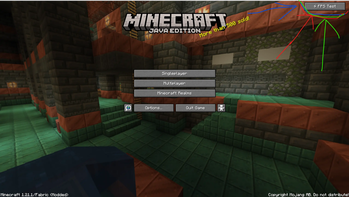
Open the in-game menu, press Run Base Benchmark, walk away.
- The mod creates an isolated temporary world with a deterministic seed (your saves are not touched).
- Drives the camera along a scripted cinematic path for ~3 minutes through 8 different stress scenes.
- Collects FPS, frame-time, tick-time, heap and GC metrics.
- Writes a tidy results table (Markdown + JSON) the moment it's done.
- Shows you a 3DMark-style summary screen right away.
This run is designed for regular players — no setup, no math, just a clear number you can compare against friends or your own previous run.
A clean results table, not a wall of numbers
Every run produces a folder in fpstest-reports/<sessionId>/:
| File | Format | What's inside |
|---|---|---|
report.md |
Markdown | Human-readable table, ASCII FPS graphs, frame-time histograms |
report.json |
JSON | Machine-readable: every test, every metric, every per-frame sample |
fps.csv / session.csv |
CSV | Drop straight into Excel or Pandas |
system.json |
JSON | MC version, OS, CPU, Java, GPU vendor / renderer |
The Markdown report is the headline output: a table listing every test with avg FPS, 1% low, 0.1% low, p99 frame time, tick time, heap and GC time. Paste it straight into Discord or a mod review.
Compare two saved sessions with one click — the mod writes compare-A-vs-B.md showing per-test deltas.
Beyond Base — 41 tests across 12 categories
| Category | Tests |
|---|---|
| Showcase | 3-min cinematic flyby across 8 biomes |
| Baseline | empty flat world (clean render measurement) |
| Particles | 7 particle types + ALL_TOGETHER + particle quarry |
| Entities | cows, sheep, AI zombies, pigs, villagers, chickens, items, XP orbs (200–500 each), zombie maze, items merge storm |
| Physics | TNT field × 2, falling sand × 4, projectile storm |
| Redstone | 6×6 observer clocks, dust grid, piston-slime array |
| Fluids | fluid spread |
| Lighting | lighting update churn |
| Block-Entities | hopper grid, comparator storage |
| Entity AI | 80-villager village with brain on |
| Static Render | dense forest |
| Chunk flyby | 12 different biomes |
Three duration presets per test: Quick (~36 s), Full (~80 s), Long (~225 s).
What gets measured
- FPS — average, harmonic mean, 1% low, 0.1% low, p99 frame time
- Client tick time — avg / max
- Memory — heap, peak heap, GC events, GC time
- Server-side counters (mixin-instrumented) — scheduled block ticks, scheduled fluid ticks, block-state changes, neighbour updates, section rebuilds, explosions, falling-block landings
Live HUD overlay
A configurable overlay during runs — FPS / frame ms / tick ms / heap / entities. 4 anchor positions, compact mode, customisable visibility.
Controls
- ESC — abort the current test
- Shift + ESC — abort the entire queue
Languages
8 locales out of the box: English, Русский, Українська, Español, Français, Deutsch, 中文, 日本語.
Requirements
- Minecraft 1.21 other versions in plans
- Fabric Loader ≥ 0.16.0
- Fabric API
- Java 21
Client-side mod. No server install needed.
License
MIT License — fork, modify, redistribute, just keep the attribution.
Re-uploads of the compiled .jar to other hosting sites without permission are not allowed under Modrinth's content rules. Please link to this page instead.
Available Versions
How to Install FPS Benchmark on Your Server
Order Server
Order a Minecraft Java server with at least 3 GB RAM (4 GB recommended).
Set fabric Loader
In the panel under "Egg", select the fabric loader and matching Minecraft version (1.21.1).
Install Mod
Open the mod browser in the dashboard and search for "FPS Benchmark". Click "Install" – done! Alternatively, upload the .jar via SFTP to the /mods folder.
Compatibility
Mod Loaders
Minecraft Versions
1.21.1, 1.21
Server-side
✗ UnsupportedRecommended RAM
4 GB(min. 3 GB)Frequently Asked Questions
FPS Benchmark server crashes on startup – what to do?
Most common cause: wrong fabric version or insufficient RAM. Check the server log (latest.log) for "OutOfMemoryError" or "Mixin" errors. With Mado Hosting: ensure at least 3 GB RAM is allocated and the loader matches the mod version (1.21.1). You can switch loaders with one click in the panel.
Is FPS Benchmark compatible with fabric?
FPS Benchmark officially supports fabric for Minecraft 1.21.1, 1.21. The Mado dashboard automatically detects incompatible loader combinations.
Server lagging with FPS Benchmark – how to optimize performance?
Recommended RAM: 4 GB (per 8 players). Use /spark profiler to check if FPS Benchmark consumes the most tick time. Common fixes: reduce server view-distance to 8-10, install "performant" or "starlight" as supplementary mods on Forge. With Mado Hosting, your server runs on NVMe SSDs with dedicated CPU cores for minimal latency.
Similar Mods




![[ETF] Entity Texture Features](https://cdn.modrinth.com/data/BVzZfTc1/af683d206d50b05258d865b0d6e4aa2f2cee12f2_96.webp)

Rent Modded Server
Install FPS Benchmark with just one click on your server.