
FPS hud
High precision FPS displaying mod with a customizable HUD
About this Mod
FPShud,
a mod that displays FPS with high precision on a customizable HUD
Mod features:
Main FPSis the main FPS value, regulated by theMain Update IntervalAvererage FPSis the average FPS value from all the values took inAverage Update IntervalMax FPSis the maximum FPS value from all the values took inMin Update IntervalMin FPSis the minimum FPS value from all the values took inMax Update Interval
FPShud with default settings

HUD Features:
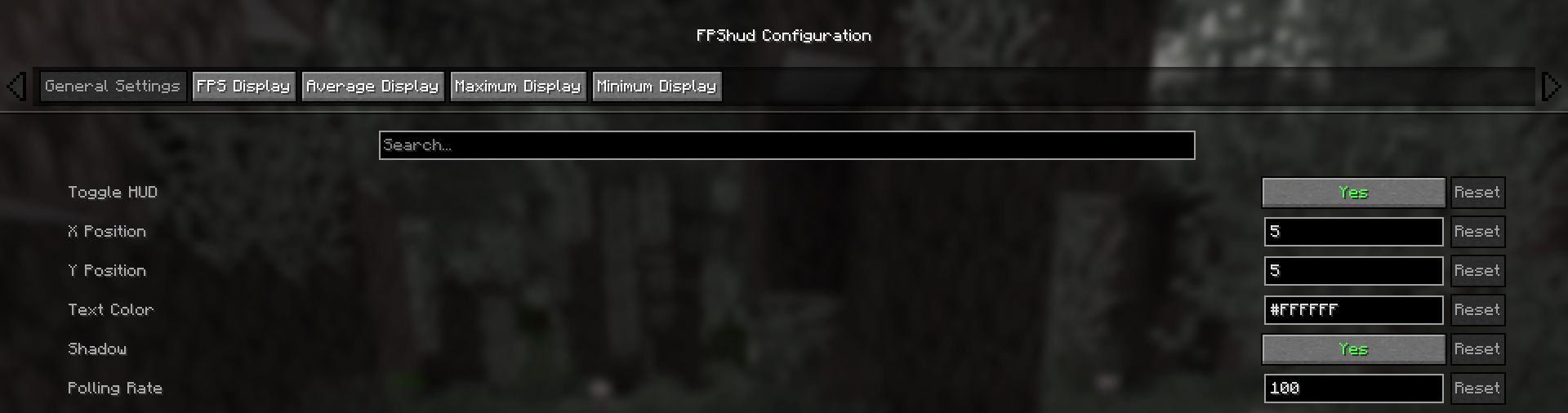
- General Settings:
Toggle HUDtoggles the entire HUDX Positionchanges the X position of the HUD on the screenY Positionchanges the Y position of the HUD on the screenText Colorchanges the color of the entire HUDShadowenables or disables the text shadow on the HUDPolling Rateindicates how frequently the mod should poll FPS
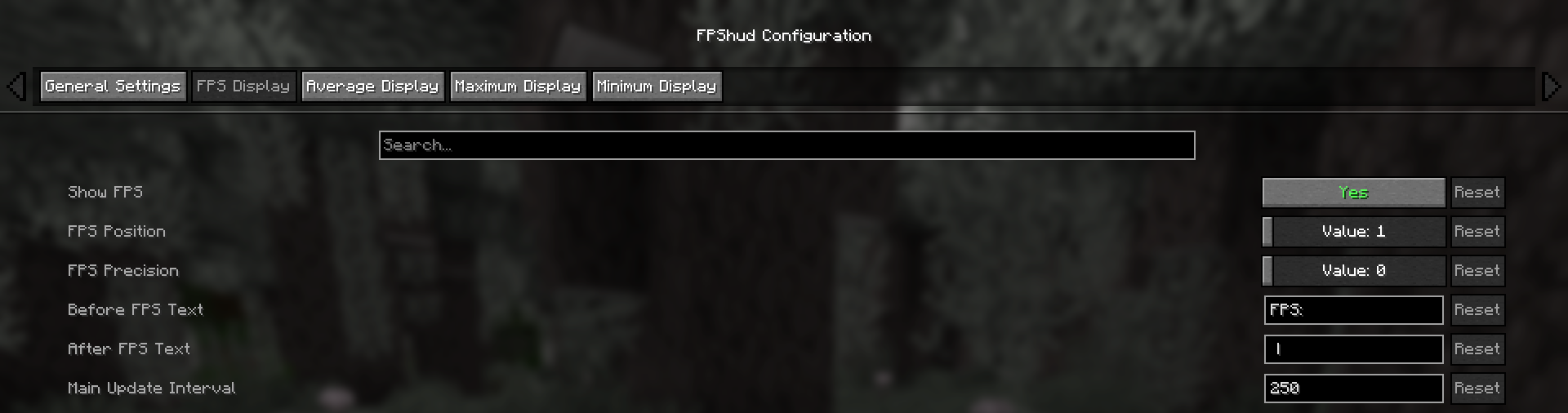
- FPS Display, Average Display, Maximum Display, Minimum display
Those settings can be changed for every one of the 4 fields:
Show FPStoggles the FPS fieldFPS Positionindicates the position of the field (first, second, third, fourth)FPS Precisionindicates how many points of precision the field haveBefore FPS Textchanges the text displayed before the specific field FPS valueAfter FPS Textchanges the text displayed after the specific field FPS value
ModMenu config:
- GUI config is accessible from the ModMenu mods list
The config screen is divided into 5 categories:
- General Settings:
- FPS Display, Average Display, Maximum Display, Minimum display:
Why FPShud?
Highly precise:
FPShud uses time elapsed from frame to frame for the FPS value calculation;
This method of sampling elevates precision and customization, permitting millisecond precise calculations and FPS displayingFPShud works with a
Polling Ratealgorithm; samples are taken every frame, then smoothen every poll-time and finally processed to make them match the requiredMain Update Interval,Average Update Interval,Maximum Update IntervalandMinimum Update IntervalrequirementsFor those reasons, it is not recommended to set
Polling RateandUpdate Intervalto low values because results may appear very fluctuating
Highly customizable:
You can customize the HUD to match every style:
only showing Avr and Max, modified 'Before Text', changed 'Text Color', removed 'Shadow', changed 'Precision' and modified 'Update Intervals'

Other:
If you are using ModMenu install ClothConfigAPI to access the config screen
Don't want ModMenu? The config file is accessible and editable in your config directory, changes apply after a game restart
Settings will be saved in your config folder and updated at runtime
The mod is client side (works on multiplayer)
Links:
Available Versions
How to Install FPS hud on Your Server
Order Server
Order a Minecraft Java server with at least 3 GB RAM (4 GB recommended).
Set fabric Loader
In the panel under "Egg", select the fabric loader and matching Minecraft version (1.21.11).
Install Mod
Open the mod browser in the dashboard and search for "FPS hud". Click "Install" – done! Alternatively, upload the .jar via SFTP to the /mods folder.
Compatibility
Mod Loaders
Minecraft Versions
1.21.11, 1.21.10, 1.21.9 (+9 more)
Server-side
✗ UnsupportedRecommended RAM
4 GB(min. 3 GB)Frequently Asked Questions
FPS hud server crashes on startup – what to do?
Most common cause: wrong fabric version or insufficient RAM. Check the server log (latest.log) for "OutOfMemoryError" or "Mixin" errors. With Mado Hosting: ensure at least 3 GB RAM is allocated and the loader matches the mod version (1.21.11). You can switch loaders with one click in the panel.
Is FPS hud compatible with fabric and quilt?
FPS hud officially supports fabric, quilt for Minecraft 1.21.11, 1.21.10, 1.21.9. The Mado dashboard automatically detects incompatible loader combinations.
Server lagging with FPS hud – how to optimize performance?
Recommended RAM: 4 GB (per 8 players). Use /spark profiler to check if FPS hud consumes the most tick time. Common fixes: reduce server view-distance to 8-10, install "performant" or "starlight" as supplementary mods on Forge. With Mado Hosting, your server runs on NVMe SSDs with dedicated CPU cores for minimal latency.
Similar Mods




Rent Modded Server
Install FPS hud with just one click on your server.