
FpsPing
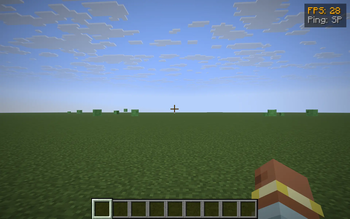
Tiny top-right HUD with your FPS and server ping — color-coded thresholds, toggle with G.
Screenshots
About this Mod
FpsPing drops a tiny two-line panel in the top-right corner of the screen with the only two performance numbers most players actually want to glance at:
- FPS — your current frames-per-second, exactly the number F3 shows in its "fps" line.
- Ping — your round-trip latency to the server in milliseconds, taken from the same player list the Tab menu uses. In singleplayer it just reads SP instead of a meaningless
0 ms.
Color-coded thresholds
Numbers change color so you don't have to read them — you glance:
- Green — FPS ≥ 60 / ping ≤ 60 ms (silky)
- Yellow — FPS ≥ 30 / ping ≤ 150 ms (fine)
- Orange — FPS ≥ 15 / ping ≤ 300 ms (struggling)
- Red — anything worse (something is wrong)
Features
- One key to toggle the HUD (default G, raw GLFW polling so it works on every supported MC version — no rebind UI needed).
- Hides automatically when you press F1 to hide the rest of the HUD.
- Pure client-side — install on the client only, works on any server, no game-state changes.
- Tiny render cost — two lines of text and a translucent backdrop, no per-frame allocations.
Compatibility
Works on Minecraft 1.21.8, 1.21.9, 1.21.10, and 1.21.11 (Fabric Loader 0.16+). One JAR for all four — install via Fabric, drop into your mods/ folder.
Why another FPS/ping HUD?
Because most "performance HUD" mods are part of huge utility packs that draw 12 other widgets you didn't ask for. FpsPing does only this one job, in <100 lines of code, with no config files and no dependencies beyond Fabric API. If you just want a glanceable pulse on how the client and the connection are doing, this is the smallest possible answer.
Available Versions
How to Install FpsPing on Your Server
Order Server
Order a Minecraft Java server with at least 3 GB RAM (4 GB recommended).
Set fabric Loader
In the panel under "Egg", select the fabric loader and matching Minecraft version (1.21.11).
Install Mod
Open the mod browser in the dashboard and search for "FpsPing". Click "Install" – done! Alternatively, upload the .jar via SFTP to the /mods folder.
Compatibility
Mod Loaders
Minecraft Versions
1.21.11, 1.21.10, 1.21.9 (+1 more)
Server-side
✗ UnsupportedRecommended RAM
4 GB(min. 3 GB)Frequently Asked Questions
FpsPing server crashes on startup – what to do?
Most common cause: wrong fabric version or insufficient RAM. Check the server log (latest.log) for "OutOfMemoryError" or "Mixin" errors. With Mado Hosting: ensure at least 3 GB RAM is allocated and the loader matches the mod version (1.21.11). You can switch loaders with one click in the panel.
Is FpsPing compatible with fabric?
FpsPing officially supports fabric for Minecraft 1.21.11, 1.21.10, 1.21.9. The Mado dashboard automatically detects incompatible loader combinations.
Server lagging with FpsPing – how to optimize performance?
Recommended RAM: 4 GB (per 8 players). Use /spark profiler to check if FpsPing consumes the most tick time. Common fixes: reduce server view-distance to 8-10, install "performant" or "starlight" as supplementary mods on Forge. With Mado Hosting, your server runs on NVMe SSDs with dedicated CPU cores for minimal latency.
Similar Mods




![[ETF] Entity Texture Features](https://cdn.modrinth.com/data/BVzZfTc1/af683d206d50b05258d865b0d6e4aa2f2cee12f2_96.webp)
![[EMF] Entity Model Features](https://cdn.modrinth.com/data/4I1XuqiY/6e5bbd0d06b1741bfdab6c0cfab6de8fdaf0064c_96.webp)
Rent Modded Server
Install FpsPing with just one click on your server.