
Free Camera
Free camera rotation and adjustable zoom in third-person mode.
Screenshots
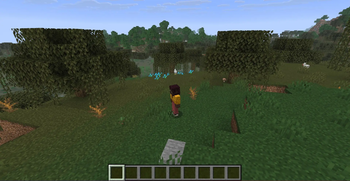
About this Mod
Take full command of your camera with freecam, orbit, tripod, cinematic modes, roll, zoom, and more — all in one lightweight Fabric mod.
Features
Freecam
Detach the camera from your character and fly freely through the world. Move with WASD, look with the mouse, and scroll to adjust speed. Press Space to go up, Shift to go down.
Orbit
Press F6 while in third-person (F5) to orbit around your character. Drag the mouse to orbit 360°, scroll to adjust distance (1.5–20 blocks), and zoom in with V.
Tripod Lock (F7)
Freeze the camera in place and take back control of your character. Move around freely while the camera stays locked on the scene. Press F7 again to release. Works in both freecam and orbit.
Cinematic Mode (F8)
Smooth, natural camera transitions. Adjust the smoothing strength in settings.
Roll (Z / C)
Tilt the camera around its viewing axis. The roll increment is configurable from 0.5° to 45°. Mouse movement stays screen-aligned regardless of tilt.
Zoom (V)
Hold V to zoom in. Adjust the zoom factor in settings.
Reset (R)
Freecam: return the camera to its starting position. Orbit: snap back behind the player.
Controls
| Key | Action |
|---|---|
| F6 | Toggle freecam / orbit |
| F7 | Toggle tripod lock |
| F8 | Toggle cinematic mode |
| F9 | Open settings |
| R | Reset camera position |
| WASD | Freecam movement |
| Space / Shift | Freecam up / down |
| Mouse | Look around / orbit |
| Scroll | Adjust speed / orbit distance |
| V (hold) | Zoom |
| Z / C | Roll left / right |
Settings (F9)
| Category | Setting | Range | Description |
|---|---|---|---|
| Flight | Flight Speed | 0.1x – 10x | Freecam movement speed |
| Scroll Speed | 1.05x – 3x | How fast speed changes per scroll tick | |
| Show Speed | ON / OFF | Show speed in the action bar on scroll | |
| Camera Control | Mouse Sensitivity | 0.1x – 5x | General camera look sensitivity |
| Orbit Sensitivity | 0.05x – 5x | Orbit mode look sensitivity | |
| Invert Orbit Y | ON / OFF | Invert vertical orbit axis | |
| Roll Increment | 0.5° – 45° | Degrees of roll per key press | |
| Camera | Smoothing Factor | 0.01 – 0.50 | Cinematic transition smoothness |
| Zoom Factor | 0.05x – 1x | Zoom magnification level |
Additional Details
- F5 safety: Switching camera perspective auto-deactivates the mod
- Fullbright: Automatic night vision while active
- NoClip: The player entity ignores physics in freecam mode
- HUD hiding: Hotbar, boss bar, scoreboard, and overlays are hidden
- ModMenu: Settings are accessible through ModMenu
Developer: Cukkoo
Version: 2.1.0
License: MIT
Available Versions
How to Install Free Camera on Your Server
Order Server
Order a Minecraft Java server with at least 3 GB RAM (4 GB recommended).
Set fabric Loader
In the panel under "Egg", select the fabric loader and matching Minecraft version (26.1.2).
Install Mod
Open the mod browser in the dashboard and search for "Free Camera". Click "Install" – done! Alternatively, upload the .jar via SFTP to the /mods folder.
Compatibility
Mod Loaders
Minecraft Versions
26.1.2, 26.1.1, 26.1 (+3 more)
Server-side
✗ UnsupportedRecommended RAM
4 GB(min. 3 GB)Frequently Asked Questions
Free Camera server crashes on startup – what to do?
Most common cause: wrong fabric version or insufficient RAM. Check the server log (latest.log) for "OutOfMemoryError" or "Mixin" errors. With Mado Hosting: ensure at least 3 GB RAM is allocated and the loader matches the mod version (26.1.2). You can switch loaders with one click in the panel.
Is Free Camera compatible with fabric and forge and neoforge?
Free Camera officially supports fabric, forge, neoforge for Minecraft 26.1.2, 26.1.1, 26.1. Note: Forge and Fabric mods are NOT cross-compatible – pick one loader and stick with it. The Mado dashboard automatically detects incompatible loader combinations.
Server lagging with Free Camera – how to optimize performance?
Recommended RAM: 4 GB (per 8 players). Use /spark profiler to check if Free Camera consumes the most tick time. Common fixes: reduce server view-distance to 8-10, install "performant" or "starlight" as supplementary mods on Forge. With Mado Hosting, your server runs on NVMe SSDs with dedicated CPU cores for minimal latency.
Similar Mods




Rent Modded Server
Install Free Camera with just one click on your server.