
Freelook++
Enhanced freelook mod with improved camera controls and features for better gameplay experience.
Screenshots
About this Mod
Freelook++ - Enhanced Camera Controls
Enhanced freelook mod with improved camera controls and features for better gameplay experience.
Features
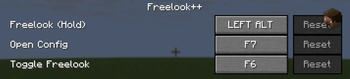
- Hold to Freelook: Hold Left Alt to temporarily enable freelook mode
- Toggle Freelook: Press F6 to toggle freelook mode on/off
- Perspective Toggle Control: Configure what happens when you try to change perspective (F5) while freelook is toggled
- Configurable Controls: Customize key bindings in Options > Controls > Freelook++ category
- Smooth Camera Movement: Enhanced camera controls with configurable sensitivity
- Client-Side Only: No server-side dependencies required - works on any server!
- Lightweight: Minimal performance impact on your game
Controls
| Key | Action |
|---|---|
| Left Alt (Hold) | Temporary freelook mode |
| F6 | Toggle freelook mode |
| F7 | Open configuration screen |
Keys can be customized in the Controls menu!
Configuration Options
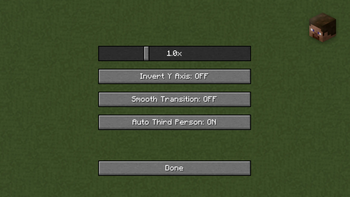
- Mouse Sensitivity: Adjust mouse sensitivity for freelook (0.1x to 3.0x)
- Invert Y Axis: Invert vertical mouse movement
- Smooth Transition: Enable smooth camera transitions
- Auto Third Person: Automatically switch to third person when freelook is enabled
- Perspective Toggle Behavior: Choose what happens when you press F5 while freelook is toggled:
- Do Nothing: Ignore perspective toggle (default)
- Deactivate Freelook: Turn off freelook when perspective is toggled
Access the configuration screen by pressing F7 or through the Controls menu!
Note: Perspective toggle behavior only affects toggled freelook (F6), not held freelook (Left Alt).
Perfect for:
- Building: Look around while placing blocks
- Exploring: Check your surroundings safely
- PvP: Maintain awareness while moving
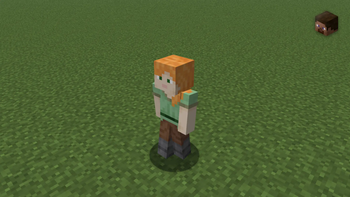
- Screenshots: Get the perfect angle
Installation
- Install Fabric Loader
- Download Fabric API
- Download Freelook++ from this page
- Place both mod files in your
.minecraft/modsfolder - Launch Minecraft with the Fabric profile
Requirements
- Minecraft: Latest supported versions (updated regularly)
- Fabric Loader: Latest compatible version
- Fabric API: Required
- Java: 21+
- Environment: Client-side only
- Server Compatibility: Works on all servers
Support
- Bug Reports: GitHub Issues
- Source Code: GitHub Repository
License
Open source under MIT License.
Enjoy enhanced camera controls with Freelook++!
Available Versions
How to Install Freelook++ on Your Server
Order Server
Order a Minecraft Java server with at least 3 GB RAM (4 GB recommended).
Set fabric Loader
In the panel under "Egg", select the fabric loader and matching Minecraft version (1.21.10).
Install Mod
Open the mod browser in the dashboard and search for "Freelook++". Click "Install" – done! Alternatively, upload the .jar via SFTP to the /mods folder.
Compatibility
Mod Loaders
Minecraft Versions
1.21.10, 1.21.10-rc1, 1.21.9 (+2 more)
Server-side
✗ UnsupportedRecommended RAM
4 GB(min. 3 GB)Frequently Asked Questions
Freelook++ server crashes on startup – what to do?
Most common cause: wrong fabric version or insufficient RAM. Check the server log (latest.log) for "OutOfMemoryError" or "Mixin" errors. With Mado Hosting: ensure at least 3 GB RAM is allocated and the loader matches the mod version (1.21.10). You can switch loaders with one click in the panel.
Is Freelook++ compatible with fabric?
Freelook++ officially supports fabric for Minecraft 1.21.10, 1.21.10-rc1, 1.21.9. The Mado dashboard automatically detects incompatible loader combinations.
Server lagging with Freelook++ – how to optimize performance?
Recommended RAM: 4 GB (per 8 players). Use /spark profiler to check if Freelook++ consumes the most tick time. Common fixes: reduce server view-distance to 8-10, install "performant" or "starlight" as supplementary mods on Forge. With Mado Hosting, your server runs on NVMe SSDs with dedicated CPU cores for minimal latency.
Similar Mods




Rent Modded Server
Install Freelook++ with just one click on your server.