
FriendHighlight
Lightweight Fabric client-side mod to highlight friends in Chat, TAB, and Nametags with custom HEX colors and symbols.
Screenshots

About this Mod
FriendHighlight 🌟
Tired of losing your friends in a crowded chat or a massive server?
FriendHighlight is a lightweight, client-side Fabric mod designed to make your social experience in Minecraft much better. It allows you to mark your friends with custom colors and symbols, making them stand out in the crowd.
✨ Features:
- Custom Nickname Highlighting: Only the friend's nickname is colored in chat, keeping the message readable.
- HEX Color Support: Use any color like
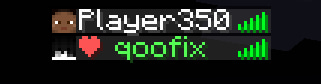
#FF5555or#00AAAAfor perfect customization. - TAB List Integration: Add custom symbols (like ❤ or [F]) and colors to your friends in the player list.
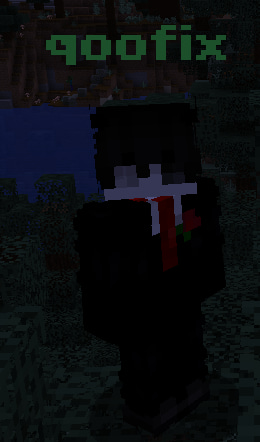
- Nametag Styling: Make friends' names bold and colorful above their heads.
- Smart Commands: Tab-completion for players online and built-in protection (you can't add yourself!).
- Easy Config: Fully customizable via ModMenu and Cloth Config.
🛠 Commands:
/friend add <nickname>— Add a player to your friend list./friend remove <nickname>— Remove a player from your list.
📦 Requirements:
- Fabric API
- Cloth Config API
- ModMenu (Optional, for settings menu)
Надоело терять друзей в бесконечном чате или в толпе на сервере?
FriendHighlight — это легкий клиентский мод для Fabric, который сделает твою игру с друзьями гораздо удобнее. Он позволяет выделять друзей кастомными цветами и символами, чтобы они всегда были на виду.
✨ Особенности:
- Умная подсветка чата: Окрашивается только никнейм друга, сохраняя оригинальный текст сообщения.
- Поддержка HEX-цветов: Используй любые оттенки (например,
#55FF55), чтобы настроить стиль под себя. - Интеграция в ТАБ: Добавляй кастомные символы (например, ❤ или [F]) и цвета в списке игроков.
- Ники над головой: Сделай имена друзей жирными и цветными.
- Удобные команды: Автозаполнение ников в чате и защита от ошибок (нельзя добавить самого себя).
- Настройки: Удобное меню через ModMenu и Cloth Config.
🛠 Команды:
/friend add <ник>— Добавить игрока в список друзей./friend remove <ник>— Удалить игрока из списка.
📦 Требования:
- Fabric API
- Cloth Config API
- ModMenu (Опционально, для доступа к настройкам)
Available Versions
How to Install FriendHighlight on Your Server
Order Server
Order a Minecraft Java server with at least 3 GB RAM (4 GB recommended).
Set fabric Loader
In the panel under "Egg", select the fabric loader and matching Minecraft version (1.21.11).
Install Mod
Open the mod browser in the dashboard and search for "FriendHighlight". Click "Install" – done! Alternatively, upload the .jar via SFTP to the /mods folder.
Compatibility
Mod Loaders
Minecraft Versions
1.21.11, 1.21.10, 1.21.9 (+9 more)
Server-side
✗ UnsupportedRecommended RAM
4 GB(min. 3 GB)Frequently Asked Questions
FriendHighlight server crashes on startup – what to do?
Most common cause: wrong fabric version or insufficient RAM. Check the server log (latest.log) for "OutOfMemoryError" or "Mixin" errors. With Mado Hosting: ensure at least 3 GB RAM is allocated and the loader matches the mod version (1.21.11). You can switch loaders with one click in the panel.
Is FriendHighlight compatible with fabric?
FriendHighlight officially supports fabric for Minecraft 1.21.11, 1.21.10, 1.21.9. The Mado dashboard automatically detects incompatible loader combinations.
Server lagging with FriendHighlight – how to optimize performance?
Recommended RAM: 4 GB (per 8 players). Use /spark profiler to check if FriendHighlight consumes the most tick time. Common fixes: reduce server view-distance to 8-10, install "performant" or "starlight" as supplementary mods on Forge. With Mado Hosting, your server runs on NVMe SSDs with dedicated CPU cores for minimal latency.
Similar Mods

![[ETF] Entity Texture Features](https://cdn.modrinth.com/data/BVzZfTc1/af683d206d50b05258d865b0d6e4aa2f2cee12f2_96.webp)
![[EMF] Entity Model Features](https://cdn.modrinth.com/data/4I1XuqiY/6e5bbd0d06b1741bfdab6c0cfab6de8fdaf0064c_96.webp)



Rent Modded Server
Install FriendHighlight with just one click on your server.