Frostbyte's Item Model Modifier
Adds the /model command, allowing any item to be given any model
Screenshots

About this Mod



Overview:
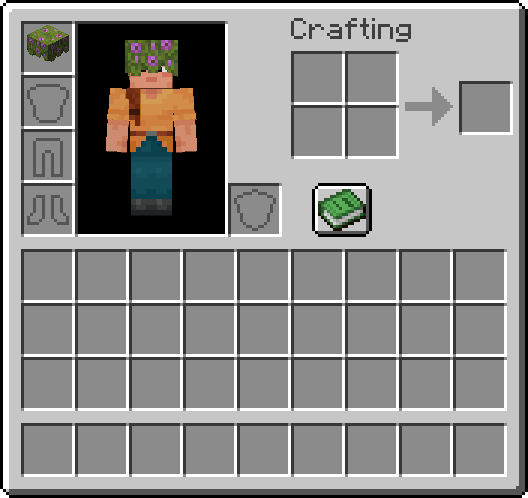
This mod adds a /model command, allowing any item to be given any model. /model can be called with one of four arguments, as long as the player's main hand is not empty:
/model get: Returns the identifier of the model that is currently applied to the item/model set <identifier>: Sets the item's model to the model defined by<identifier>/model reset: Resets the item to its vanilla model/model gui: Opens a GUI which can be used to visually browse through every currently loaded item model
Items modified via the /model command remain 100% vanilla, so the custom model will render even for players who don't have Frostbyte's Item Model Modifier installed (as long as the model is vanilla or part of a texture pack that is shared by all players involved). Additionally, if the item being modified is a helmet, the new model will be rendered instead of the helmet texture.
Using the GUI:
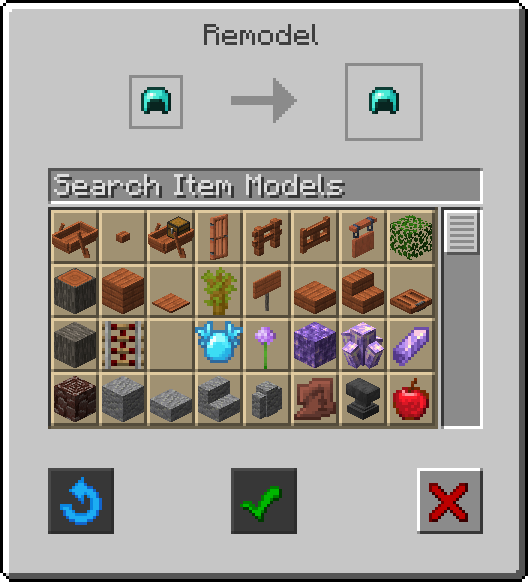
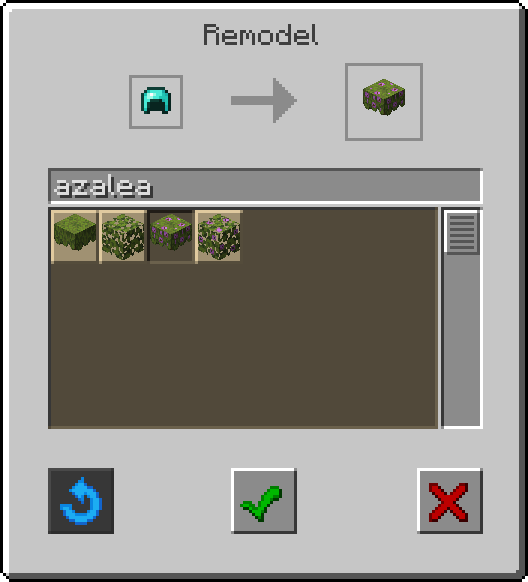
When running the /model gui command while holding any item in the player's mainhand, a new Remodel screen will be opened. The two item slots at the top of the screen will display the current held item (left) and a preview of that item with the currently slected model applied (right).
Below these item slots are a search bar and a stonecutter-style scrollable list of every currently loaded item model, listed in alphabetical order by identifier.
The GUI also contains three buttons:
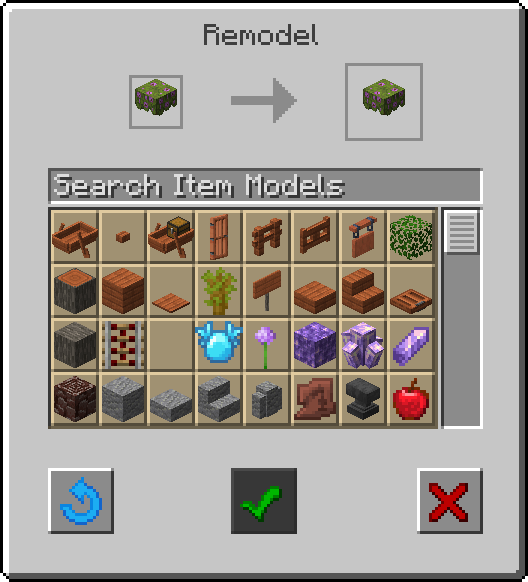
- A blue circular arrow (left): resets the held item to its vanilla model
- A green check mark (center): applies the currently selected model
- A red X (right): exits the GUI
If any of the models in the list are clicked, the preview item slot (right) will update to reflect the current selection. The button with the green check mark (center) will then become active, signifying that it can be clicked to apply the current selection and exit the GUI.
If /model gui is run with an already modified item in the player's mainhand, the button with the blue circular arrow (left) will be active, signifying that it can be clicked to reset the current item to its vanilla model and exit the GUI.
Once an item has been remodeled:
- No mod-dependent data will have been applied, meaning custom model will remain even if Frostbyte's Item Model Modifier is uninstalled
- If the item is stackable, it will now only stack with other items with the same NBT data
- If the item can be equipped to the head slot, its new model will be rendered instead of the armor texture
FAQs:
- Will this be updated to 1.x.x? - Yes! I plan on updating this mod for as long as I can. Expect to wait a few weeks after major Minecraft updates for an updated version of this mod. There may be longer pauses between minor versions depending on how busy I am.
- Will you make a Forge version? - No. I don't make Forge mods, but feel free to make your own (unofficial) port as long as you credit me for any code borrowed from this mod.
- Can I use this in my mod pack? - Yes! I made this mod for people to use!
Download:
Modrinth - https://modrinth.com/mod/frostbytes-item-model-modifier
Curseforge - https://www.curseforge.com/minecraft/mc-mods/frostbytes-item-model-modifier
Available Versions
How to Install Frostbyte's Item Model Modifier on Your Server
Order Server
Order a Minecraft Java server with at least 3 GB RAM (4 GB recommended).
Set fabric Loader
In the panel under "Egg", select the fabric loader and matching Minecraft version (1.21.11).
Install Mod
Open the mod browser in the dashboard and search for "Frostbyte's Item Model Modifier". Click "Install" – done! Alternatively, upload the .jar via SFTP to the /mods folder.
Compatibility
Mod Loaders
Minecraft Versions
1.21.11, 1.21.10, 1.21.8 (+1 more)
Server-side
✓ RequiredRecommended RAM
4 GB(min. 3 GB)Frequently Asked Questions
Frostbyte's Item Model Modifier server crashes on startup – what to do?
Most common cause: wrong fabric version or insufficient RAM. Check the server log (latest.log) for "OutOfMemoryError" or "Mixin" errors. With Mado Hosting: ensure at least 3 GB RAM is allocated and the loader matches the mod version (1.21.11). You can switch loaders with one click in the panel.
Is Frostbyte's Item Model Modifier compatible with fabric?
Frostbyte's Item Model Modifier officially supports fabric for Minecraft 1.21.11, 1.21.10, 1.21.8. The Mado dashboard automatically detects incompatible loader combinations.
Server lagging with Frostbyte's Item Model Modifier – how to optimize performance?
Recommended RAM: 4 GB (per 8 players). Use /spark profiler to check if Frostbyte's Item Model Modifier consumes the most tick time. Common fixes: reduce server view-distance to 8-10, install "performant" or "starlight" as supplementary mods on Forge. With Mado Hosting, your server runs on NVMe SSDs with dedicated CPU cores for minimal latency.
Similar Mods

![[ETF] Entity Texture Features](https://cdn.modrinth.com/data/BVzZfTc1/af683d206d50b05258d865b0d6e4aa2f2cee12f2_96.webp)
![[EMF] Entity Model Features](https://cdn.modrinth.com/data/4I1XuqiY/6e5bbd0d06b1741bfdab6c0cfab6de8fdaf0064c_96.webp)



Rent Modded Server
Install Frostbyte's Item Model Modifier with just one click on your server.
Details
- License
- Creative Commons Attribution Non Commercial 4.0 International
- Server-side
- Required