
LocalChat
A lightweight, immersive chat mod that limits chat visibility based on distance.
Screenshots
About this Mod
🔊 Local Chat (NeoForge)
"Communication with a sense of distance."
「距離を感じる、リアルなコミュニケーションを。」
🇺🇸 English
Local Chat is a lightweight and immersive chat modification. It limits chat visibility based on distance, making communication more realistic and engaging.
✨ Key Features
- 📏 Distance-based Chat: Messages only reach players within a specific range.
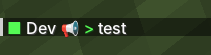
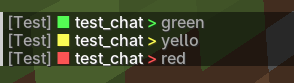
- 🎨 Proximity Indicators: Chat icons change color based on distance:
- 🟢 Green: Very close (Within 20%)
- 🟡 Yellow: Within earshot (Within 60%)
- 🔴 Red: Far away (Up to 100%)
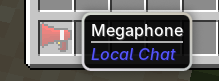
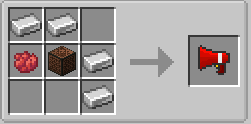
- 📢 Megaphone (Amplification):
- Doubles your chat range when active.
- Displays a 📢 icon next to your name and above your head.
- Features custom sound effects and a visual enchantment glint.
- 📍 Precision Tooltips: Hover over icons to see the exact distance (e.g.,
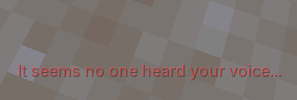
Distance: 12.4m). - 🗣 Feedback: Notification when no one is around to hear you.
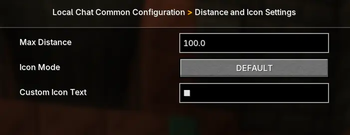
- ⚙️ Configurable: Easily change max distance and icons via the in-game config menu.
🇯🇵 日本語
Local Chat は、チャットに「距離」の概念を追加する没入型Modです。
メッセージが届く範囲を制限することで、マルチプレイでのロールプレイやサバイバルの臨場感を高めます。
✨ 主な機能
- 📏 距離制限チャット: 設定した最大距離内にいるプレイヤーにのみ声が届きます。
- 🎨 距離インジケーター: 相手との距離でアイコンの色が変化します。
- 🟢 緑色: すぐ近く! (20%以内)
- 🟡 黄色: 声が届く範囲 (60%以内)
- 🔴 赤色: ギリギリ聞こえる距離 (100%以内)
- 📢 メガホン(拡声機能):
- ONにするとチャットの届く範囲が 2倍 になります。
- 使用中は名前の横や頭上に 📢アイコン が表示されます。
- 専用のSEやエンチャントエフェクトなどの視覚効果付き。
- 📍 正確な距離表示: アイコンにマウスを合わせると、相手との距離(12.4mなど)を詳細に表示。
- 🗣 ぼっち通知: 範囲内に誰もいない時に発言すると、届かなかったことを教えてくれます。
- ⚙️ 自由なカスタマイズ: ゲーム内の設定画面から、最大距離やアイコン文字を自由に変更可能。
📩 Contact / Feedback
Available Versions
How to Install LocalChat on Your Server
Order Server
Order a Minecraft Java server with at least 3 GB RAM (4 GB recommended).
Set neoforge Loader
In the panel under "Egg", select the neoforge loader and matching Minecraft version (1.21.1).
Install Mod
Open the mod browser in the dashboard and search for "LocalChat". Click "Install" – done! Alternatively, upload the .jar via SFTP to the /mods folder.
Compatibility
Mod Loaders
Minecraft Versions
1.21.1
Server-side
✓ RequiredRecommended RAM
4 GB(min. 3 GB)Frequently Asked Questions
LocalChat server crashes on startup – what to do?
Most common cause: wrong neoforge version or insufficient RAM. Check the server log (latest.log) for "OutOfMemoryError" or "Mixin" errors. With Mado Hosting: ensure at least 3 GB RAM is allocated and the loader matches the mod version (1.21.1). You can switch loaders with one click in the panel.
Is LocalChat compatible with neoforge?
LocalChat officially supports neoforge for Minecraft 1.21.1. The Mado dashboard automatically detects incompatible loader combinations.
Server lagging with LocalChat – how to optimize performance?
Recommended RAM: 4 GB (per 8 players). Use /spark profiler to check if LocalChat consumes the most tick time. Common fixes: reduce server view-distance to 8-10, install "performant" or "starlight" as supplementary mods on Forge. With Mado Hosting, your server runs on NVMe SSDs with dedicated CPU cores for minimal latency.
Similar Mods




Rent Modded Server
Install LocalChat with just one click on your server.