
FTB Quests UI Overhaul
A client-side vanilla RPG style visual overhaul for FTB Quests, fully compatible with existing quests!
Screenshots
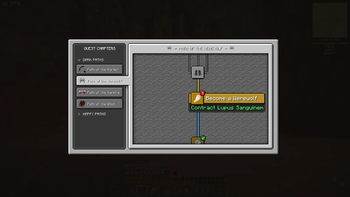
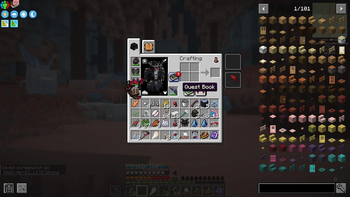
About this Mod

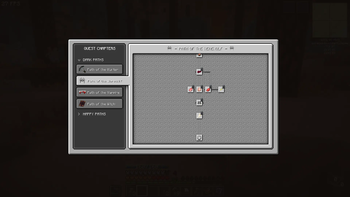
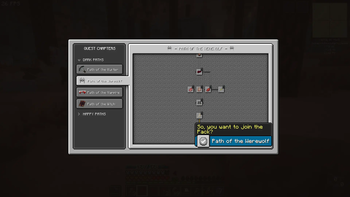
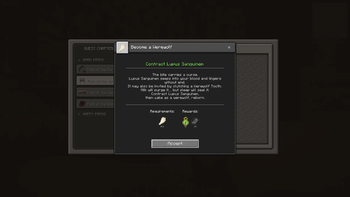
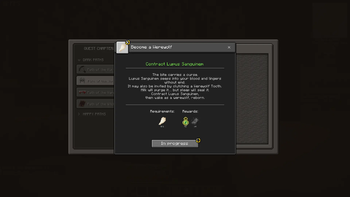
FTB Quests UI Overhaul is a client-side visual addon for FTB Quests that gives the quest system a more vanilla, RPG game-like experience, while keeping the underlying quest logic and progression intact.
Instead of changing how quests work, this mod focuses on how they feel to use. It replaces the standard quest screen with a custom interface designed to be smoother to navigate, easier to read, vanilla-friendly, and more immersive for players used to RPG video games.
ℹ️ Click the gallery section for tutorial slides! ℹ️
Features
- Simpler, more intuitive interface.
- Vanilla-like textures.
- Quest Book shortcut button in inventory - with red notifications for completable quests.
- UI tweaks that simplify starting, tracking, and completing quests.
- Creative mode activated customisation options.
- Ability to customise questline background.
- Options if questline panning scrolls in a fixed path like Advancements or is free-pan.
- Simple UI making it easy to create your own custom UI resource packs!
Icons
 Lockpad means quest isn't unlocked yet.
 Red '!' Means a quest can be completed.
- 🟡 Yellow wheel means a quest is in progress and is being tracked on your FPV screen.
 Green checkbox means quest is completed.
Hotkeys & Buttons
- F7 To cancel all active quests.
- F8 to just toggle visibility of active quests on the FPV.
- In creative mode: Press Editing Mode button to switch to default FTB quests, good for quest building.
- In creative mode: Press Clean UI mode to switch back to the overhaul UI again.
- In creative mode: Toggle free-pan or railroad pan with Free-pan button.
- In creative mode: Change the Quest tree tile background with Change Tile button.
- Press Quest Book button in your inventory to check quests quickly. Directly opens completable quests with a red "!".
If you love quests and want FTB Quests to feel more integrated into Minecraft as an RPG system, then this is the mod for you.
Dependencies
Minecraft 1.20.1 Forge. (No ports for now)
FTB Quests.
FTB Library.
FTB Teamchitectury.
Credits
Coding: R2bEEaton
Game Design/UI: richcareylol
Available Versions
How to Install FTB Quests UI Overhaul on Your Server
Order Server
Order a Minecraft Java server with at least 3 GB RAM (4 GB recommended).
Set forge Loader
In the panel under "Egg", select the forge loader and matching Minecraft version (1.20.1).
Install Mod
Open the mod browser in the dashboard and search for "FTB Quests UI Overhaul". Click "Install" – done! Alternatively, upload the .jar via SFTP to the /mods folder.
Compatibility
Mod Loaders
Minecraft Versions
1.20.1
Server-side
✗ UnsupportedRecommended RAM
4 GB(min. 3 GB)Frequently Asked Questions
FTB Quests UI Overhaul server crashes on startup – what to do?
Most common cause: wrong forge version or insufficient RAM. Check the server log (latest.log) for "OutOfMemoryError" or "Mixin" errors. With Mado Hosting: ensure at least 3 GB RAM is allocated and the loader matches the mod version (1.20.1). You can switch loaders with one click in the panel.
Is FTB Quests UI Overhaul compatible with forge?
FTB Quests UI Overhaul officially supports forge for Minecraft 1.20.1. The Mado dashboard automatically detects incompatible loader combinations.
Server lagging with FTB Quests UI Overhaul – how to optimize performance?
Recommended RAM: 4 GB (per 8 players). Use /spark profiler to check if FTB Quests UI Overhaul consumes the most tick time. Common fixes: reduce server view-distance to 8-10, install "performant" or "starlight" as supplementary mods on Forge. With Mado Hosting, your server runs on NVMe SSDs with dedicated CPU cores for minimal latency.
Similar Mods




![[ETF] Entity Texture Features](https://cdn.modrinth.com/data/BVzZfTc1/af683d206d50b05258d865b0d6e4aa2f2cee12f2_96.webp)
![[EMF] Entity Model Features](https://cdn.modrinth.com/data/4I1XuqiY/6e5bbd0d06b1741bfdab6c0cfab6de8fdaf0064c_96.webp)
Rent Modded Server
Install FTB Quests UI Overhaul with just one click on your server.