
FTBChecker
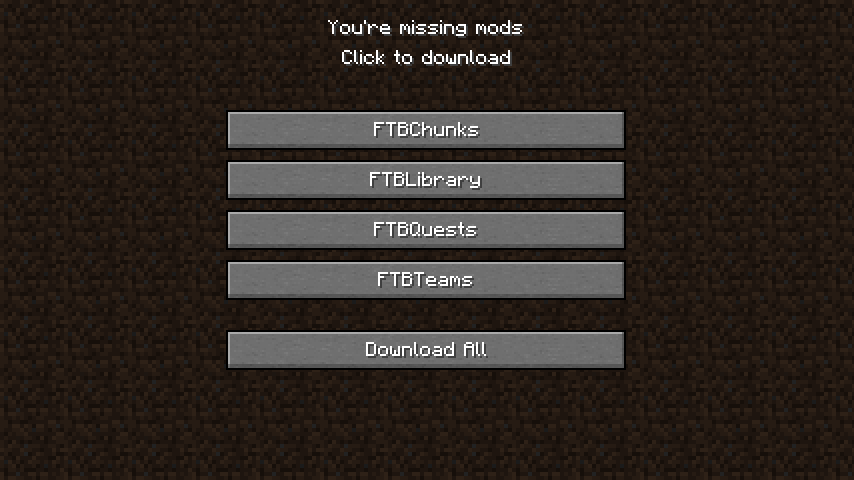
FTB Checker is a mod that ensures the presence of FTB mods in your modpack. If any of these mods are missing, a warning screen will be displayed before entering the main menu, providing download links for the missing mods.
Screenshots
About this Mod
FTB Checker
FTB Checker is a mod that ensures the presence of popular FTB mods in your modpack. It checks for FTB Chunks, FTB Library, FTB Quests, and FTB Teams. If any of these mods are missing, the mod displays a screen before entering the main menu, providing download links for the missing mods.
FTB Checker was originally created for my CreateCore Reforged modpack. The mod was developed to ensure the seamless integration of FTB mods within the modpack while adhering to the licensing requirements of the Modrinth platform.
Recognizing its potential utility for other modpack creators facing similar challenges I decided to release FTB Checker as a standalone mod. This allows other modpack creators to easily incorporate the essential FTB mods into their projects while maintaining compatibility with the Modrinth platform.
Features
- Automatic FTB mod check: FTB Checker automatically detects if any of the essential FTB mods are missing from your modpack.
- Download links: If any FTB mods are missing, the mod will display a screen with download links for the missing mods, making it easier for players to obtain them.
- Modrinth compatibility: Designed for modpack creators who want to use FTB mods and host their modpacks on the Modrinth platform. Due to licensing restrictions, FTB mods cannot be used on Modrinth directly.

Support
If you encounter any issues or have questions, please visit our GitHub repository to report issues, or join our Discord server for community support.
⚠️ Disclaimer ⚠️
FTBChecker is not affiliated with or endorsed by FTB (Feed The Beast) or Modrinth.
Available Versions
How to Install FTBChecker on Your Server
Order Server
Order a Minecraft Java server with at least 3 GB RAM (4 GB recommended).
Set fabric Loader
In the panel under "Egg", select the fabric loader and matching Minecraft version (1.21.1).
Install Mod
Open the mod browser in the dashboard and search for "FTBChecker". Click "Install" – done! Alternatively, upload the .jar via SFTP to the /mods folder.
Compatibility
Mod Loaders
Minecraft Versions
1.21.1, 1.21, 1.20.1 (+2 more)
Server-side
✗ UnsupportedRecommended RAM
4 GB(min. 3 GB)Frequently Asked Questions
FTBChecker server crashes on startup – what to do?
Most common cause: wrong fabric version or insufficient RAM. Check the server log (latest.log) for "OutOfMemoryError" or "Mixin" errors. With Mado Hosting: ensure at least 3 GB RAM is allocated and the loader matches the mod version (1.21.1). You can switch loaders with one click in the panel.
Is FTBChecker compatible with fabric and forge and neoforge and quilt?
FTBChecker officially supports fabric, forge, neoforge, quilt for Minecraft 1.21.1, 1.21, 1.20.1. Note: Forge and Fabric mods are NOT cross-compatible – pick one loader and stick with it. The Mado dashboard automatically detects incompatible loader combinations.
Server lagging with FTBChecker – how to optimize performance?
Recommended RAM: 4 GB (per 8 players). Use /spark profiler to check if FTBChecker consumes the most tick time. Common fixes: reduce server view-distance to 8-10, install "performant" or "starlight" as supplementary mods on Forge. With Mado Hosting, your server runs on NVMe SSDs with dedicated CPU cores for minimal latency.
Similar Mods




![[ETF] Entity Texture Features](https://cdn.modrinth.com/data/BVzZfTc1/af683d206d50b05258d865b0d6e4aa2f2cee12f2_96.webp)
![[EMF] Entity Model Features](https://cdn.modrinth.com/data/4I1XuqiY/6e5bbd0d06b1741bfdab6c0cfab6de8fdaf0064c_96.webp)
Rent Modded Server
Install FTBChecker with just one click on your server.