FullBlockChests
Bring back pre-Beta 1.8 full block chests
Screenshots
About this Mod
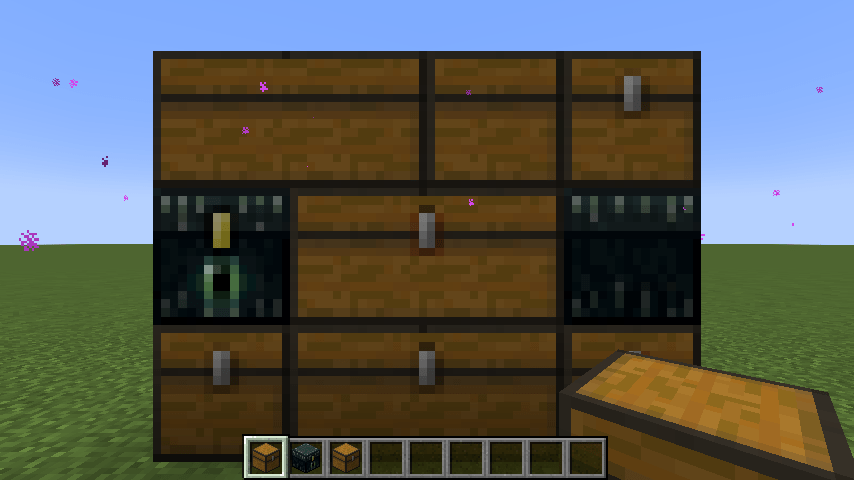
Turn chests into full blocks and make them openable even with a block above, like before Beta 1.8.
Configuration
A config file is available at config/fullblockchests.properties after first launch. It contains two options:
reskinModdedChests(defaulttrue)
Iffalse, will only turn vanilla chests, trapped chests and ender chests into full blocks.
Otherwise, all modded chests derived from the vanilla chest entity will be affected. This means you need a resourcepack to add block and item models to modded chests, otherwise they will appear as black and purple checkerboards in-world, and be invisible in item form.disableBlockedCheck(defaulttrue)
Iftruethen chests can always be opened, regardless of any solid block or cat standing on top.
Q&A
Why do chests still make the modern opening/closing sound?
This mod's purpose is to make chests into full blocks, not to customize them further.
Use a resource pack that changes assets/minecraft/sounds/block/chest/*.ogg.
Nostalgic Tweaks does the same thing!
This mod has significant overlap with (and in fact is based on) Nostalgic Tweaks's chest "Eye Candy" tweaks,
but NT limits itself to vanilla chests (see BlockEntityRenderDispatcherMixin
& ChestBlockMixin)
and does not change the behavior of chests covered by a solid block or a cat.
Christmas chest skins don't work anymore!
Yes, I know. Feel free to fork this mod and find a clean way of implementing this with regular block model predicates.
Available Versions
How to Install FullBlockChests on Your Server
Order Server
Order a Minecraft Java server with at least 3 GB RAM (4 GB recommended).
Set fabric Loader
In the panel under "Egg", select the fabric loader and matching Minecraft version (1.18.2).
Install Mod
Open the mod browser in the dashboard and search for "FullBlockChests". Click "Install" – done! Alternatively, upload the .jar via SFTP to the /mods folder.
Compatibility
Mod Loaders
Minecraft Versions
1.18.2, 1.18.1, 1.18
Server-side
✓ RequiredRecommended RAM
4 GB(min. 3 GB)Frequently Asked Questions
FullBlockChests server crashes on startup – what to do?
Most common cause: wrong fabric version or insufficient RAM. Check the server log (latest.log) for "OutOfMemoryError" or "Mixin" errors. With Mado Hosting: ensure at least 3 GB RAM is allocated and the loader matches the mod version (1.18.2). You can switch loaders with one click in the panel.
Is FullBlockChests compatible with fabric?
FullBlockChests officially supports fabric for Minecraft 1.18.2, 1.18.1, 1.18. The Mado dashboard automatically detects incompatible loader combinations.
Server lagging with FullBlockChests – how to optimize performance?
Recommended RAM: 4 GB (per 8 players). Use /spark profiler to check if FullBlockChests consumes the most tick time. Common fixes: reduce server view-distance to 8-10, install "performant" or "starlight" as supplementary mods on Forge. With Mado Hosting, your server runs on NVMe SSDs with dedicated CPU cores for minimal latency.
Similar Mods




Rent Modded Server
Install FullBlockChests with just one click on your server.