
Fuyuka's Utils
A refactorization of mod originally created for a Minecraft Bingo Event
Screenshots
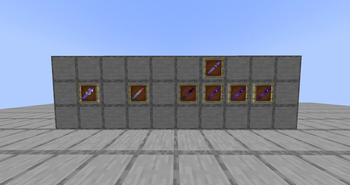
About this Mod
Wands
All the wands have in-game instructions of how to use (tooltips).
Custom
Basically a portable command block (an empty one does nothing).
- Impulse mode executes its stored command once per click.
- Repeat mode executes its stored command repeatedly when its toggled.
- Chained mode executes all its stored commands once.
TPSwap
Swaps the position of 2("normal" mode) or more(Team mode) players
Trivia
With the first toggle teleports all the players to the previously configurated position and dimension.
With the second toggle teleports all the players to their original positions and dimentions.
(You can force the execution of one if a player still on an unexpected site {this does not affect the "toggle order"}).
Commands
/fuyutils wands tpswap {true / false}
Toggles the Team Mode in the world (for tpswap wands).
/fuyutils wands trivia setpos
Sets the trivia cords to the executor's position(xyz).
/fuyutils wands impulse "{command}"
Sets a custom wand's command and sets it in "Impulse" mode if it wasn't in that mode yet
(if you dont have a custom wand on your main hand it will give a new one automatically).
/fuyutils wands repeat "{command}"
Same than the above one but with "Repeat" mode.
/fuyutils wands chained add "{command}"
Adds a command to a chained custom wand (if you have an empty one it will set it on "Chained" mode automatically).
/fuyutils wands chained edit {index} "{command}"
Replaces the command alocated in the specified index with the specified one
/fuyutils wands chained remove {index}
Removes the command alocated in the specified index
/fuyutils cloneItem {targets:players}
Gives the selected players a clone of your main hand item (this was added just as a "temporal" solution to give another player a determinated custom wand without being close)
[dont use] /fuyutils settings overridePlayerPerms {true/false}
This was just implemented if you want or not to a player without a perms could execute a command stored in a custom wand.
Xtra notes
This mod will be abandoned soon, feel free to use the source code to any other things.
Available Versions
How to Install Fuyuka's Utils on Your Server
Order Server
Order a Minecraft Java server with at least 3 GB RAM (4 GB recommended).
Set forge Loader
In the panel under "Egg", select the forge loader and matching Minecraft version (1.20.1).
Install Mod
Open the mod browser in the dashboard and search for "Fuyuka's Utils". Click "Install" – done! Alternatively, upload the .jar via SFTP to the /mods folder.
Compatibility
Mod Loaders
Minecraft Versions
1.20.1
Server-side
✓ RequiredRecommended RAM
4 GB(min. 3 GB)Frequently Asked Questions
Fuyuka's Utils server crashes on startup – what to do?
Most common cause: wrong forge version or insufficient RAM. Check the server log (latest.log) for "OutOfMemoryError" or "Mixin" errors. With Mado Hosting: ensure at least 3 GB RAM is allocated and the loader matches the mod version (1.20.1). You can switch loaders with one click in the panel.
Is Fuyuka's Utils compatible with forge?
Fuyuka's Utils officially supports forge for Minecraft 1.20.1. The Mado dashboard automatically detects incompatible loader combinations.
Server lagging with Fuyuka's Utils – how to optimize performance?
Recommended RAM: 4 GB (per 8 players). Use /spark profiler to check if Fuyuka's Utils consumes the most tick time. Common fixes: reduce server view-distance to 8-10, install "performant" or "starlight" as supplementary mods on Forge. With Mado Hosting, your server runs on NVMe SSDs with dedicated CPU cores for minimal latency.
Similar Mods




![[ETF] Entity Texture Features](https://cdn.modrinth.com/data/BVzZfTc1/af683d206d50b05258d865b0d6e4aa2f2cee12f2_96.webp)
![[EMF] Entity Model Features](https://cdn.modrinth.com/data/4I1XuqiY/6e5bbd0d06b1741bfdab6c0cfab6de8fdaf0064c_96.webp)
Rent Modded Server
Install Fuyuka's Utils with just one click on your server.