
GameplayEssentials Babric
Fixes gameplay bugs and adds some gameplay features. Special thanks to Dany for helping with many of the changes and fixes!
Screenshots
About this Mod
GameplayEssentials for Minecraft Beta 1.7.3
A babric mod for Minecraft Beta 1.7.3 that fixes gameplay bugs and adds a few gameplay features.
- Mod works on Multiplayer with GlassConfigAPI version 3.0+ used to sync configs!
- StationAPI is optional and used for recipe configs
Gameplay Bugfixes
- Fix bucket being consumed when lava bucket is used in furnace
- Fix slimes not dropping slimeballs when an attack brings them below zero health
- Fix minecarts stopping on items/arrows
- Fix mobs jittering in multiplayer
- Fix fish flying above player head (default: false)
- Default false because during multiplayer testing it was found that vanilla behavior is more correct
Gameplay Features
- Change bed behavior: vanilla, disable nightmares, set spawn-point only, or disable entirely
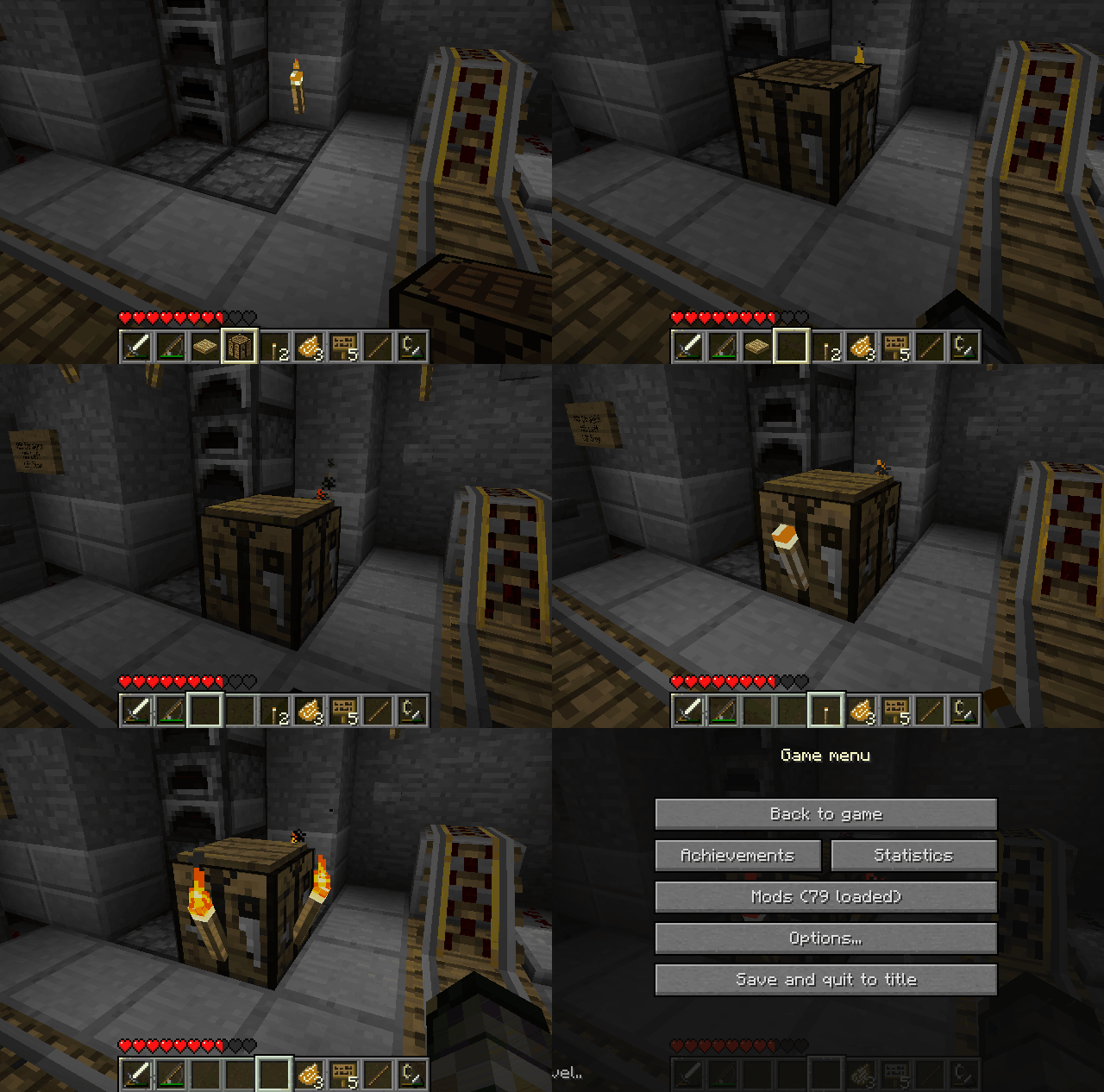
- Allow disabling block interactions with a keybind (thereby allowing things like placing torches on crafting tables)
- Allow disabling eating when at max health (default: false)
- Allow pressure plates to be placed on fences
- Allow sugar cane to be placed on sand
- Allow trapdoors to be placed without support
- Change jack-o'-lantern recipe to be shapeless
- Change stairs recipe output (output: 1-16, default: 4)
- Requires StationAPI to be installed
- Change trapdoor recipe output (output: 1-8, default: 2)
- Requires StationAPI to be installed
- Add ability to equip/swap pieces of armor with
right-click
Installation using Prism Launcher
- Download an instance of Babric for Prism Launcher: https://github.com/babric/prism-instance
- Install Java 17 and set the instance to use it: https://adoptium.net/temurin/releases/
- Add GlassConfigAPI 3.0.2+ to the mod folder for the instance: https://modrinth.com/mod/glass-config-api
- Add Glass Networking to the mod folder for the instance: https://modrinth.com/mod/glass-networking
- (Optional) Add StationAPI to the mod folder for the instance: https://modrinth.com/mod/stationapi
- (Optional) Add Mod Menu to the mod folder for the instance: https://modrinth.com/mod/modmenu-beta
- Add this mod to the mod folder for the instance: https://github.com/telvarost/GameplayEssentials-StationAPI/releases
- Run and enjoy! 👍
Feedback
Got any suggestions on what should be added next? Feel free to share it by creating an issue. Know how to code and want to do it yourself? Then look below on how to get started.
Contributing
Thanks for considering contributing! To get started fork this repository, make your changes, and create a PR.
If you are new to StationAPI consider watching the following videos on Babric/StationAPI Minecraft modding: https://www.youtube.com/watch?v=9-sVGjnGJ5s&list=PLa2JWzyvH63wGcj5-i0P12VkJG7PDyo9T
Available Versions
How to Install GameplayEssentials Babric on Your Server
Order Server
Order a Minecraft Java server with at least 3 GB RAM (4 GB recommended).
Set babric Loader
In the panel under "Egg", select the babric loader and matching Minecraft version (b1.7.3).
Install Mod
Open the mod browser in the dashboard and search for "GameplayEssentials Babric". Click "Install" – done! Alternatively, upload the .jar via SFTP to the /mods folder.
Compatibility
Mod Loaders
Minecraft Versions
b1.7.3
Server-side
✓ RequiredRecommended RAM
4 GB(min. 3 GB)Frequently Asked Questions
GameplayEssentials Babric server crashes on startup – what to do?
Most common cause: wrong babric version or insufficient RAM. Check the server log (latest.log) for "OutOfMemoryError" or "Mixin" errors. With Mado Hosting: ensure at least 3 GB RAM is allocated and the loader matches the mod version (b1.7.3). You can switch loaders with one click in the panel.
Is GameplayEssentials Babric compatible with babric and fabric?
GameplayEssentials Babric officially supports babric, fabric for Minecraft b1.7.3. The Mado dashboard automatically detects incompatible loader combinations.
Server lagging with GameplayEssentials Babric – how to optimize performance?
Recommended RAM: 4 GB (per 8 players). Use /spark profiler to check if GameplayEssentials Babric consumes the most tick time. Common fixes: reduce server view-distance to 8-10, install "performant" or "starlight" as supplementary mods on Forge. With Mado Hosting, your server runs on NVMe SSDs with dedicated CPU cores for minimal latency.
Similar Mods




Rent Modded Server
Install GameplayEssentials Babric with just one click on your server.