
gamerule-gui
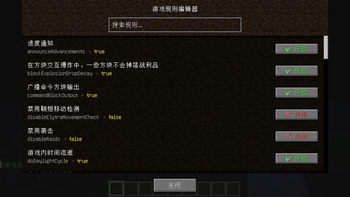
add a gui for gamerules,use /gamerule-gui
Screenshots
About this Mod
Gamerule GUI Mod
🤖 AI-assisted creation — This mod was created by Gaobaiawa with DeepSeek V4-Flash
A Fabric mod that opens a graphical interface via /gamerule-gui to view and modify all game rules.
Features
- Graphical interface: Type
/gamerule-guito open the rule editor — no need to memorize commands - Visual toggles: Boolean rules display as buttons, click to switch true/false
- Number input: Integer rules display as input fields, type values directly
- Live search: Search by English rule names or Chinese translations
- Multi-language: UI and chat messages follow Minecraft language settings (EN/ZH)
- No permission barrier: Anyone can open the GUI to view rules; editing requires OP rights
- Mod Menu integration: Config entry point when Mod Menu is installed
- Chat log control:
/gamerule-gui showlog falseto disable operation feedback
Commands
| Command | Description |
|---|---|
/gamerule-gui |
Open the game rule editor |
/gamerule-gui showlog <true/false> |
Enable/disable chat feedback |
How to Use
- Install Fabric Loader and Fabric API
- Put the mod jar into
.minecraft/mods/ - Join a world and type
/gamerule-gui(requires OP level 2) - Click buttons to toggle rules or type values into input fields
Non-OP players can open the GUI to view rules but cannot modify them.
Requirements
- Minecraft 1.20.1
- Fabric Loader >=0.14.24
- Fabric API (recommended, not required)
FAQ
Q: Does the server need this mod?
A: Yes. The mod has both client and server components — the command won't work without it on the server.
Q: Does it conflict with other mods?
A: No. It doesn't modify any vanilla classes, purely event-driven.
Q: Are rule changes saved?
A: Yes. Changes are saved to the world file, just like using the /gamerule command.
Download
License
Available Versions
How to Install gamerule-gui on Your Server
Order Server
Order a Minecraft Java server with at least 3 GB RAM (4 GB recommended).
Set fabric Loader
In the panel under "Egg", select the fabric loader and matching Minecraft version (1.20.6).
Install Mod
Open the mod browser in the dashboard and search for "gamerule-gui". Click "Install" – done! Alternatively, upload the .jar via SFTP to the /mods folder.
Compatibility
Mod Loaders
Minecraft Versions
1.20.6, 1.20.5, 1.20.4 (+3 more)
Server-side
~ OptionalRecommended RAM
4 GB(min. 3 GB)Frequently Asked Questions
gamerule-gui server crashes on startup – what to do?
Most common cause: wrong fabric version or insufficient RAM. Check the server log (latest.log) for "OutOfMemoryError" or "Mixin" errors. With Mado Hosting: ensure at least 3 GB RAM is allocated and the loader matches the mod version (1.20.6). You can switch loaders with one click in the panel.
Is gamerule-gui compatible with fabric?
gamerule-gui officially supports fabric for Minecraft 1.20.6, 1.20.5, 1.20.4. The Mado dashboard automatically detects incompatible loader combinations.
Server lagging with gamerule-gui – how to optimize performance?
Recommended RAM: 4 GB (per 8 players). Use /spark profiler to check if gamerule-gui consumes the most tick time. Common fixes: reduce server view-distance to 8-10, install "performant" or "starlight" as supplementary mods on Forge. With Mado Hosting, your server runs on NVMe SSDs with dedicated CPU cores for minimal latency.
Similar Mods




![[ETF] Entity Texture Features](https://cdn.modrinth.com/data/BVzZfTc1/af683d206d50b05258d865b0d6e4aa2f2cee12f2_96.webp)
![[EMF] Entity Model Features](https://cdn.modrinth.com/data/4I1XuqiY/6e5bbd0d06b1741bfdab6c0cfab6de8fdaf0064c_96.webp)
Rent Modded Server
Install gamerule-gui with just one click on your server.