
Gamma for NeoForge
Increases screen brightness with 2 different modes
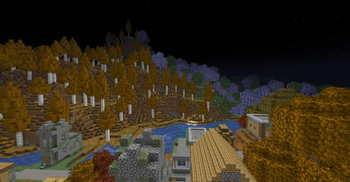
Screenshots
About this Mod
Gama
Client-side brightness and fullbright toggle for Minecraft 1.21.1 on NeoForge.
Gama gives you a quick way to brighten dark caves, night areas, and shader-heavy scenes without opening Minecraft's video settings every time. Toggle it with a key, switch between Brightness and Night Vision modes, and adjust the behavior through a client-side config file. No server-side installation is required.
What It Does
Gama adds a configurable brightness toggle to your client. It is useful for mining, exploring, building, screenshots, and playing with shaderpacks where the normal brightness slider may not be enough.
You can use it to:
- Toggle fullbright without opening video settings.
- Use a lightmap-based Brightness mode.
- Optionally boost the vanilla Minecraft brightness/gamma value safely.
- Apply Night Vision as a dedicated mode without vanilla's ending flicker during normal use.
- Switch modes while playing.
- Restore your previous brightness when Gama is disabled.
Features
- Client-side fullbright toggle.
- Two brightness modes.
- Lightmap-based Brightness mode.
- Optional vanilla gamma boost in Brightness mode.
- Night Vision mode.
- Configurable brightness values.
- Configurable default mode.
- Optional enabled-on-startup setting.
- Optional actionbar status messages.
- Works without a server-side mod.
Modes
Brightness
Forces the vanilla lightmap brightness and can also set Minecraft's vanilla brightness/gamma value to max. This is the main fullbright mode.
Night Vision
Applies a normal visible Night Vision effect and refreshes it before vanilla's ending flicker starts.
Usage
- Press G to toggle Gama on or off.
- Press H to cycle between Brightness and Night Vision.
- Change the keybinds in Options -> Controls -> Gama if needed.
- Edit the client config if you want different default values.
Configuration
After launching the game once, open:
config/gama-client.toml
Available settings include:
- Enable Gama on startup.
- Default mode.
- Brightness gamma value.
- Night Vision refresh duration.
- Actionbar messages.
- Restore previous brightness when disabled.
- Remove Gama's own Night Vision effect when disabled.
Requirements
| Requirement | Version |
|---|---|
| Minecraft | 1.21.1 |
| Loader | NeoForge 21.1.x |
Compatibility Notes
This mod is client-side. It should not need to be installed on servers.
Shader behavior can vary depending on the shaderpack. Brightness mode affects shaderpacks that still use Minecraft's vanilla lightmap.
📩 For questions and bug reports: Telegram / Discord — @b1nt1n
Available Versions
How to Install Gamma for NeoForge on Your Server
Order Server
Order a Minecraft Java server with at least 3 GB RAM (4 GB recommended).
Set neoforge Loader
In the panel under "Egg", select the neoforge loader and matching Minecraft version (1.21.1).
Install Mod
Open the mod browser in the dashboard and search for "Gamma for NeoForge". Click "Install" – done! Alternatively, upload the .jar via SFTP to the /mods folder.
Compatibility
Mod Loaders
Minecraft Versions
1.21.1
Server-side
✗ UnsupportedRecommended RAM
4 GB(min. 3 GB)Frequently Asked Questions
Gamma for NeoForge server crashes on startup – what to do?
Most common cause: wrong neoforge version or insufficient RAM. Check the server log (latest.log) for "OutOfMemoryError" or "Mixin" errors. With Mado Hosting: ensure at least 3 GB RAM is allocated and the loader matches the mod version (1.21.1). You can switch loaders with one click in the panel.
Is Gamma for NeoForge compatible with neoforge?
Gamma for NeoForge officially supports neoforge for Minecraft 1.21.1. The Mado dashboard automatically detects incompatible loader combinations.
Server lagging with Gamma for NeoForge – how to optimize performance?
Recommended RAM: 4 GB (per 8 players). Use /spark profiler to check if Gamma for NeoForge consumes the most tick time. Common fixes: reduce server view-distance to 8-10, install "performant" or "starlight" as supplementary mods on Forge. With Mado Hosting, your server runs on NVMe SSDs with dedicated CPU cores for minimal latency.
Similar Mods




Rent Modded Server
Install Gamma for NeoForge with just one click on your server.