
Gateway Gun
An edit/rebranding of the Immersive Portal Gun mod
Screenshots
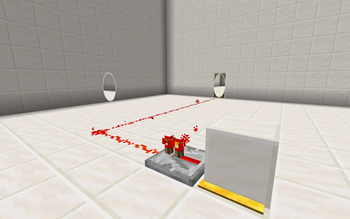
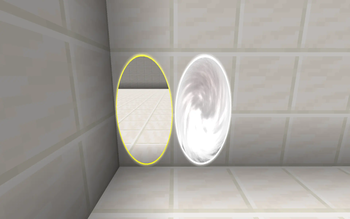
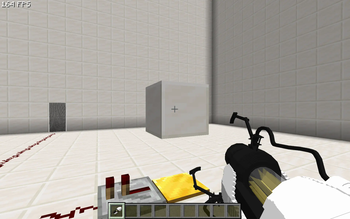
About this Mod
An edit of the Immersive Portal Gun mod with lots of new features and a rebranding!
Gateway Core
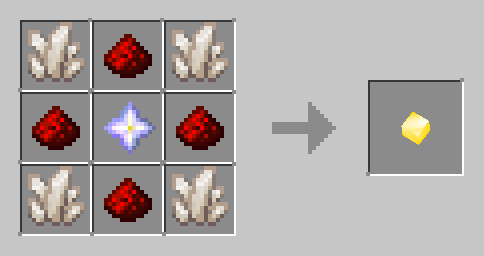
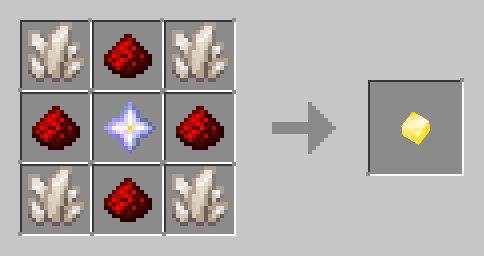
The heart of the mod, it is a basic item that contains all the data needed to create Gateways.
The data that the core stores is as follows:
- Gateway Code: A number that identifies which Gateways will link. Gateways with the same Gateway Code will overwrite and link with each other. If set to 0, will be randomized when in the player's inventory. Can be modified with
/core code <code> - Colors: The colors of the Gateways, in hex format (eg. ffffff or ffd700). Can be modified with
/core color1/color2 <hex> - Gravity Transform: Whether the Gateways will transform gravity. Requires a fork of gravity api (just search it on Modrinth, any should work) if enabled. Can be modified with
/core gravity true/false - Allowed Blocks: A list of blocks the Gateways can be placed on. If empty, all solid blocks are considered valid. To view the allowed blocks, use
/core blocks list. To add a block, use/core blocks add <block>. To remove a block, use/core blocks remove <block>. - Entity Pickup: Whether the Gateway Gun can grab entities. Can be modified with
/core pickup true/false. - Size: Determines the size of the Gateways in blocks. Can be modified with
/core width/height <size>. - Side: Determines which side(s) can be placed. If blank, both sides can be placed, but if specified then only that side can be placed. Can be modified with
/core side NONE/ONE/TWO.
Gateway Gun (Entropy Corps Handheld Quantum Gateway Gun, or ECHQ gun)
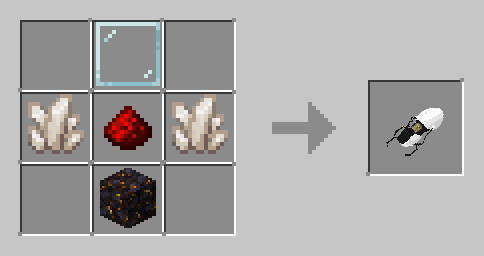
A handheld tool used to place Gateways. Does nothing without a Gateway Core installed - to install a Gateway Core, hold the gun in the main hand and the core in the offhand, then press the Swap Core keybind (default G) to insert the core into the gun. To take the core out of the gun, press the Swap Core keybind while holding the gun. Once the gun has a core, using the attack keybind will place the first Gateway, while using the interact keybind will place the second Gateway. If the core's side is set, then the gun will only be able to place the specified Gateway and it will always use the attack keybind. Pressing the Clear Gateways keybind (default R) will close the gateways the gun placed. If the core allows for entity pickup, pressing the Grab Entity keybind (default V) will grab the targeted entity, or drop the currently held entity.
Gategrid (Entropy Corps Quantum Gateway Control Grid)
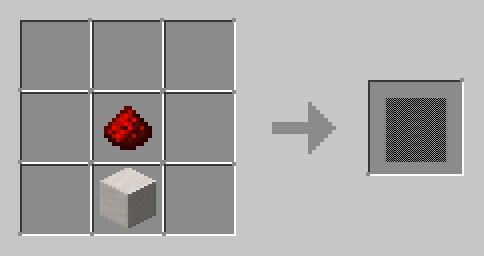
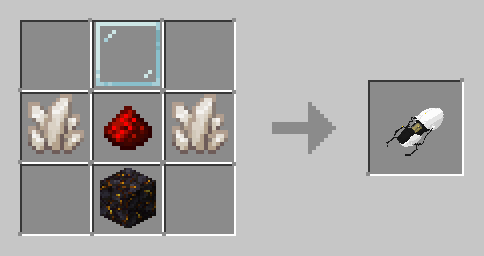
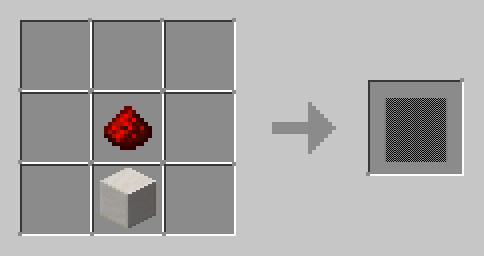
Note the crafting recipe is shapeless.
The Gategrid allows for redstone automation of Gateway placement. Much like the Gateway Gun, the Gategrid requires a Gateway Core to function. Interacting with the Gategrid while holding a Gateway Core will place the core into the Gategrid, or if the Gategrid has a core it will take it out. When the Gategrid receives a redstone signal, if it has a core then it will place the specified Gateway side (defaulting to the second if none is specified). When the redstone signal is turned off, the Gateway will close.
Weighted Cube
The weighted cube is an entity that is affected by gravity and can be pushed around, and looks like a slightly smaller block. It is immune to most types of damage, but will die if it is damage by kill, void, fire, or lava damage. It's main purpose is to be picked up by the Gateway Gun to be placed on pressure plates. Can be summoned using /cube <block>, where the block is an identifier such as "minecraft:dirt", or using a Cube Dispenser.
Cube Dispenser
The cube dispenser is a block that can be activated with redstone to spawn a weighted cube. Interacting with the dispenser while holding a block will set the cube to that block. When activated, it will kill the previous cube if it exists, then spawn a new one. If the cube dies and the dispenser is powered, it will spawn a new one.
Quantum Field
The Quantum Field is a glass pane-like block with no collision. When touched, all Gateway guns in the player's inventory will clear their portals, but only if the field is not being powered by redstone.
Other stuff
Air resistance: Using /airResistance, you can change the horizontal air resistance for all entities. Default is 90, but can be set to anywhere from -1000 to 1000.
Clearing Gateways: The /cleargateways command can be used with command blocks to kill Gateways. The syntax is /cleargateways <code> <side> where code is the Gatecode to clear, and the side is which side to clear (can be ONE, TWO, or BOTH).
Configuration using Mod Menu.
Static Gateway Rendering: Renders Gateways with a static texture rather than a render layer. Only recommended if there are issues with the overlay not showing.
Static Quantum Field Rendering: Same as Static Gateway Rendering but with the Quantum Fields.
Credits:
Portal gun model: SirBenet on Sketchfab - https://sketchfab.com/3d-models/minecraft-portal-gun-de4746c01b07467db30750a4fc0daf84
Portal shader: iChun from Portal Gun mod, modified - https://www.curseforge.com/minecraft/mc-mods/portal-gun
Available Versions
How to Install Gateway Gun on Your Server
Order Server
Order a Minecraft Java server with at least 3 GB RAM (4 GB recommended).
Set fabric Loader
In the panel under "Egg", select the fabric loader and matching Minecraft version (1.21.1).
Install Mod
Open the mod browser in the dashboard and search for "Gateway Gun". Click "Install" – done! Alternatively, upload the .jar via SFTP to the /mods folder.
Compatibility
Mod Loaders
Minecraft Versions
1.21.1, 1.20.4
Server-side
✓ RequiredRecommended RAM
4 GB(min. 3 GB)Frequently Asked Questions
Gateway Gun server crashes on startup – what to do?
Most common cause: wrong fabric version or insufficient RAM. Check the server log (latest.log) for "OutOfMemoryError" or "Mixin" errors. With Mado Hosting: ensure at least 3 GB RAM is allocated and the loader matches the mod version (1.21.1). You can switch loaders with one click in the panel.
Is Gateway Gun compatible with fabric?
Gateway Gun officially supports fabric for Minecraft 1.21.1, 1.20.4. The Mado dashboard automatically detects incompatible loader combinations.
Server lagging with Gateway Gun – how to optimize performance?
Recommended RAM: 4 GB (per 8 players). Use /spark profiler to check if Gateway Gun consumes the most tick time. Common fixes: reduce server view-distance to 8-10, install "performant" or "starlight" as supplementary mods on Forge. With Mado Hosting, your server runs on NVMe SSDs with dedicated CPU cores for minimal latency.
Similar Mods




Rent Modded Server
Install Gateway Gun with just one click on your server.