
Genesis - World Previewer & Pregenerator
Preview any seed before you create the world. Pre-generate chunks before you enter it.
Screenshots
About this Mod
Genesis - World Previewer & Pregenerator
Preview any seed before you create the world. Pre-generate chunks before you enter it.
The Create New World screen has always been a black box. You pick a seed, you generate the world, you spawn in, you look around, and… it's the wrong biome. Delete. Try again. Lose an hour.
Genesis turns the Create New World screen into a real seed-picking experience. Click the GENESIS button and the world opens up in front of you before a single chunk has been generated.
See Your Seed Before You Commit
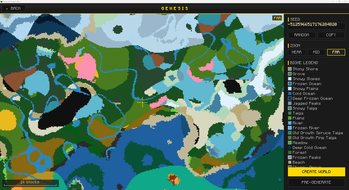
A full-screen biome map renders live as you adjust the seed. Pan, zoom, hover any tile to read its coordinates and biome name. The map is sampled from the actual world generator, so it accounts for every worldgen mod you have installed. What you see is what you'll spawn into.
Type a new seed and the map redraws in seconds, courtesy of a multi-pass spiral that paints a rough layout first and then refines to full detail. Pressing R randomizes the seed instantly. The COPY button puts the current seed on your clipboard, ready to paste into your modpack notes or drop in a Discord.
The right-hand legend updates as you pan, showing only the biomes currently in view. When you've found a seed you love, CREATE WORLD carries it back to the vanilla screen automatically.
Find the Seed You Actually Want
The map color-codes biomes by family so the world is readable at a glance: light green plains, dark green forests, sandy gold deserts, slate gray windswept hills, deep navy deep oceans. Modded biomes get their own colors derived from grass tint or registry name, so nothing ever shows up as a generic gray blob.
Three zoom presets (NEAR, MID, FAR) let you flip between scanning the spawn area and scoping out a 1,024-block radius. A scale bar in the corner always tells you exactly how far you're looking.
Skip the First-Session Stutter
Big modpacks lag the first time you enter a world. Every chunk has to be generated on demand, and your CPU is doing all of it while you're trying to walk in a straight line.
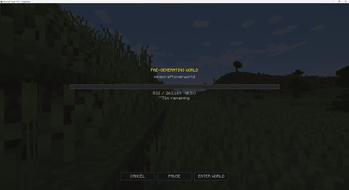
Genesis has a PRE-GENERATE button right next to CREATE WORLD. Tell it how far to generate from spawn (default 128 chunks) and how many CPU threads to throw at it. Hit start. A progress screen shows the world building with a live chunk count and rolling ETA.
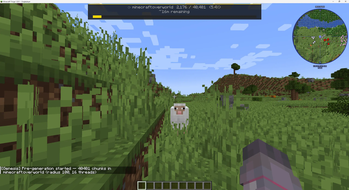
You can PAUSE, RESUME, or CANCEL at any time. Click ENTER WORLD and you go straight into your freshly-baked world while pre-generation continues silently in the background. A compact HUD at the top of the screen keeps you posted on chunks remaining and ETA, and disappears the moment it's done.
Works With Your Worldgen Mods
Genesis samples your world through the actual generator, so anything that changes how biomes get placed shows up correctly on the map. Tectonic, Terralith, TerraBlender, custom biome packs, all of them. Custom dimensions and Superflat fall back gracefully without breaking the screen.
If you also use GeoGradient, the latitude-based climate bands are visible right on the preview map. You can see the poles, the equator, and everything in between before you ever spawn in.
The biome preview is purely client-side, so you can run it on the client only if your server doesn't have Genesis installed. Pre-generation needs Genesis on the server (or the integrated server for singleplayer) since that's where the chunks actually get built.
Power User Stuff
Pre-generation is also available through commands once you're in-world. The most useful is /genesis pregen <dimension> <radius> [threads] to start generating a specific dimension from your position. There are subcommands for queueing every dimension, running from an explicit coordinate, pausing, resuming, and checking status. Type /genesis in chat to discover them.
Almost nobody will need to touch the config, but if you want to: preview thread count, initial sample radius, default pre-gen settings, and a handful of other knobs are exposed in your in-game mod options menu (on Fabric, via Cloth Config) or the config file (on NeoForge).
Compatibility
Genesis is built for Minecraft 1.21.1 on Fabric and NeoForge.
If you're on Forge 1.20.1, an earlier release of Genesis still works for you. Forge support has not continued past 1.20.1.
License
Alkeari License Agreement (ALA v2.2)
Issues & Feedback
Found a bug or have a suggestion? Open an issue on GitHub.
Available Versions
How to Install Genesis - World Previewer & Pregenerator on Your Server
Order Server
Order a Minecraft Java server with at least 4 GB RAM (6 GB recommended).
Set fabric Loader
In the panel under "Egg", select the fabric loader and matching Minecraft version (1.21.1).
Install Mod
Open the mod browser in the dashboard and search for "Genesis - World Previewer & Pregenerator". Click "Install" – done! Alternatively, upload the .jar via SFTP to the /mods folder.
Compatibility
Mod Loaders
Minecraft Versions
1.21.1, 1.20.1
Server-side
✓ RequiredRecommended RAM
6 GB(min. 4 GB)Frequently Asked Questions
Genesis - World Previewer & Pregenerator server crashes on startup – what to do?
Most common cause: wrong fabric version or insufficient RAM. Check the server log (latest.log) for "OutOfMemoryError" or "Mixin" errors. With Mado Hosting: ensure at least 4 GB RAM is allocated and the loader matches the mod version (1.21.1). You can switch loaders with one click in the panel.
Is Genesis - World Previewer & Pregenerator compatible with fabric and forge and neoforge?
Genesis - World Previewer & Pregenerator officially supports fabric, forge, neoforge for Minecraft 1.21.1, 1.20.1. Note: Forge and Fabric mods are NOT cross-compatible – pick one loader and stick with it. The Mado dashboard automatically detects incompatible loader combinations.
Server lagging with Genesis - World Previewer & Pregenerator – how to optimize performance?
Recommended RAM: 6 GB (per 5 players). Use /spark profiler to check if Genesis - World Previewer & Pregenerator consumes the most tick time. Common fixes: reduce server view-distance to 8-10, install "performant" or "starlight" as supplementary mods on Forge. With Mado Hosting, your server runs on NVMe SSDs with dedicated CPU cores for minimal latency.
Similar Mods


Rent Modded Server
Install Genesis - World Previewer & Pregenerator with just one click on your server.