
GetSpawners
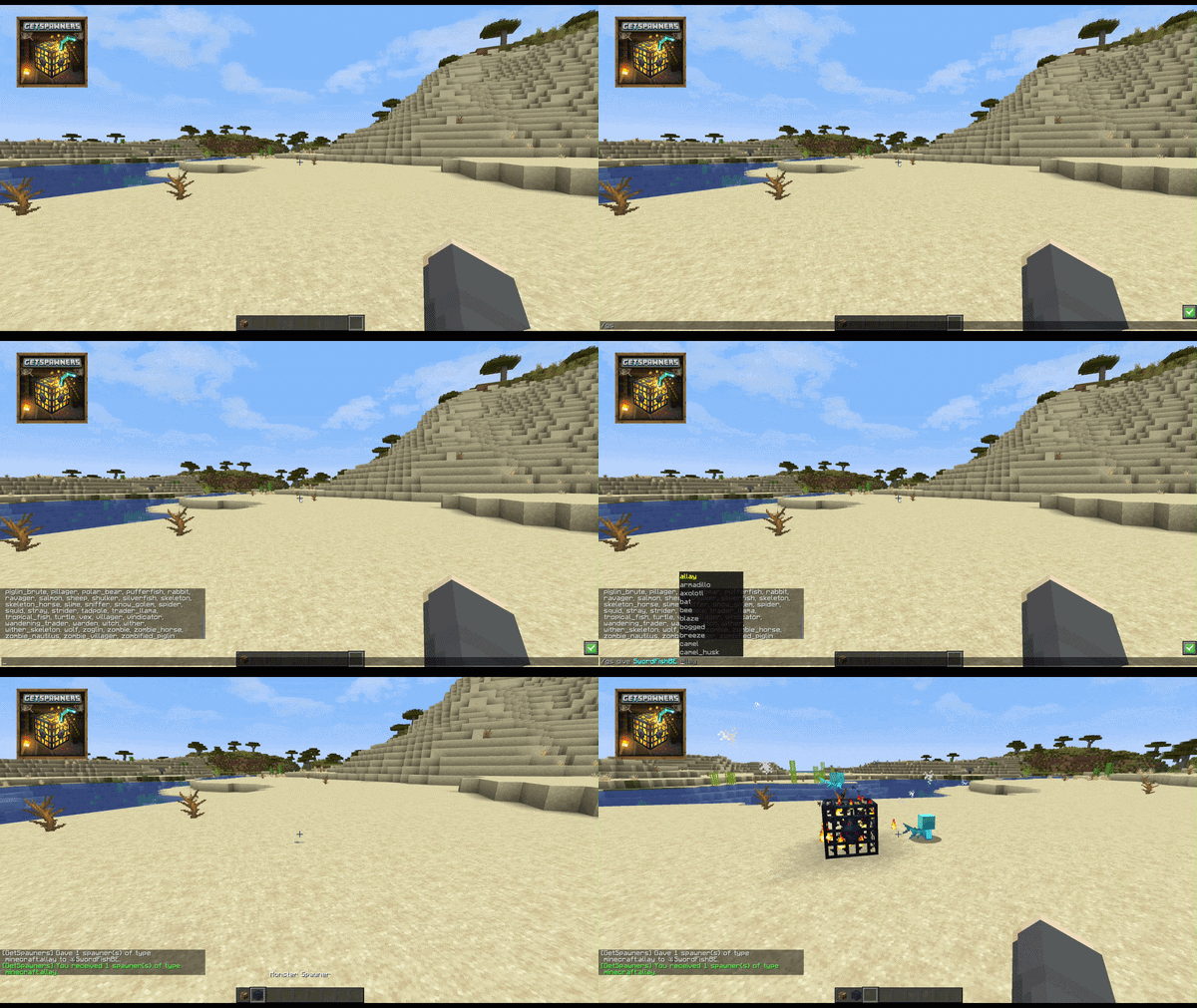
Move mob spawners in survival with Silk Touch. Give yourself any type of spawner with just one command.
Screenshots




About this Mod

GetSpawners
Ever wanted to move a mob spawner? With GetSpawners, you can now pick up and move monster spawners.
When a player mines a spawner with a Silk Touch pickaxe, the spawner drops as an item and keeps its mob type.
With this mod, you can give yourself a spawner containing any mob that has a spawn egg in Minecraft using a simple command.
✨ Features
- Mine and move spawners.
- Spawner item keeps its mob type.
/gs givegives working spawners with a selected type./gs setretunes the spawner stack in your active slot to a selected type./gs typeslists all available types.- Optional LuckPerms integration (config toggle).
- Optional Mod Menu + Cloth Config integration for an in-game config screen on the client.
⚙️ Configuration
Config path:
config/getspawners.json
Options:
useLuckPerms(default:false)noSilkTouchSpawners(default:false)allowEveryoneGiveCommand(default:false)allowEveryoneTypesCommand(default:false)allowEveryoneSetCommand(default:false)
If you install Mod Menu and Cloth Config API on the client, GetSpawners exposes a full config screen in-game.
Behavior:
useLuckPerms=false: Everyone can mine/place spawners with Silk Touch.noSilkTouchSpawners=false: Without Silk Touch, spawners break with normal vanilla behavior (destroyed + XP).noSilkTouchSpawners=true: Bypass the Silk Touch requirement for everyone.allowEveryoneGiveCommand=true: Everyone can use/gs givewhen LuckPerms is disabled or unavailable.allowEveryoneTypesCommand=true: Everyone can use/gs typeswhen LuckPerms is disabled or unavailable.allowEveryoneSetCommand=true: Everyone can use/gs setwhen LuckPerms is disabled or unavailable.useLuckPerms=true: Permission nodes are checked with LuckPerms.getspawners.nosilkcontrols the Silk Touch bypass.getspawners.givecontrols/gs give.getspawners.typescontrols/gs types.getspawners.setcontrols/gs set.
- If LuckPerms is not installed, GetSpawners automatically falls back to the non-LuckPerms config behavior and logs a warning.
Example config:
{
  // When true, GetSpawners checks LuckPerms permission nodes if LuckPerms is installed.
  // If false, GetSpawners uses the config-based behavior instead.
  "useLuckPerms": false,

  // When true, everyone can bypass the Silk Touch requirement and still collect spawners.
  // When false, mining a spawner without Silk Touch uses normal vanilla behavior.
  "noSilkTouchSpawners": false,

  // When true and LuckPerms is disabled or unavailable, everyone can use /gs give.
  // When false, /gs give stays OP-only in config mode.
  "allowEveryoneGiveCommand": false,

  // When true and LuckPerms is disabled or unavailable, everyone can use /gs types.
  // When false, /gs types stays OP-only in config mode.
  "allowEveryoneTypesCommand": false,

  // When true and LuckPerms is disabled or unavailable, everyone can use /gs set.
  // When false, /gs set stays OP-only in config mode.
  "allowEveryoneSetCommand": false
}
🎮 Commands
Main command aliases:
/getspawners/gs
Subcommands:
/gs give <player> <type> [amount]/gs set <type>/gs types/gs reload
Notes:
amountdefaults to1- max
amountis64 typeincludes all mobs with a spawn egg
🔨 Server-side
This mod runs fully server-side. Clients do not need to install the mod.
Also works in single-player (without LuckPerms support).
Without active LuckPerms permission checks, /gs give, /gs types, and /gs set are OP-only unless their config toggles are enabled.
🔄 LuckPerms permissions
| Node | Description |
|---|---|
getspawners.give |
Access to /gs give |
getspawners.mine |
Mine and place spawners |
getspawners.nosilk |
Bypass Silk Touch requirement |
getspawners.set |
Access to /gs set |
getspawners.types |
Access to /gs types |
getspawners.reload |
Access to /gs reload |
🌍 LuckPerms quick start
If useLuckPerms is enabled, assign nodes like this:
/lp user <player> permission set getspawners.mine true
/lp user <player> permission set getspawners.types true
/lp user <player> permission set getspawners.give true
/lp user <player> permission set getspawners.set true
/lp user <player> permission set getspawners.nosilk true
/lp user <player> permission set getspawners.reload true
LuckPerms docs:
- Official wiki: https://luckperms.net/wiki
- Command usage: https://luckperms.net/wiki/Command-Usage
- GitHub wiki mirror: https://github.com/LuckPerms/LuckPerms/wiki/Command-Usage
🏜️ Test Server
Feel free to join my Minecraft server to test my mods: play.swordfishbe.eu
Available Versions
How to Install GetSpawners on Your Server
Order Server
Order a Minecraft Java server with at least 3 GB RAM (4 GB recommended).
Set fabric Loader
In the panel under "Egg", select the fabric loader and matching Minecraft version (26.1.2).
Install Mod
Open the mod browser in the dashboard and search for "GetSpawners". Click "Install" – done! Alternatively, upload the .jar via SFTP to the /mods folder.
Compatibility
Mod Loaders
Minecraft Versions
26.1.2, 26.1.1, 26.1 (+1 more)
Server-side
✓ RequiredRecommended RAM
4 GB(min. 3 GB)Frequently Asked Questions
GetSpawners server crashes on startup – what to do?
Most common cause: wrong fabric version or insufficient RAM. Check the server log (latest.log) for "OutOfMemoryError" or "Mixin" errors. With Mado Hosting: ensure at least 3 GB RAM is allocated and the loader matches the mod version (26.1.2). You can switch loaders with one click in the panel.
Is GetSpawners compatible with fabric?
GetSpawners officially supports fabric for Minecraft 26.1.2, 26.1.1, 26.1. The Mado dashboard automatically detects incompatible loader combinations.
Server lagging with GetSpawners – how to optimize performance?
Recommended RAM: 4 GB (per 8 players). Use /spark profiler to check if GetSpawners consumes the most tick time. Common fixes: reduce server view-distance to 8-10, install "performant" or "starlight" as supplementary mods on Forge. With Mado Hosting, your server runs on NVMe SSDs with dedicated CPU cores for minimal latency.
Similar Mods




Rent Modded Server
Install GetSpawners with just one click on your server.