
GhastTopia
Adds Happy Ghast Variants to the game over 20+ will you collect them all?
Screenshots
About this Mod
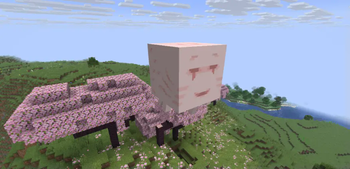
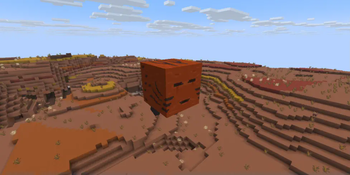
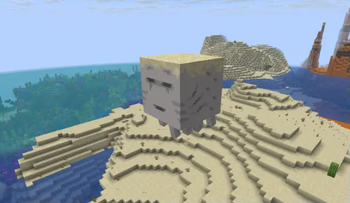
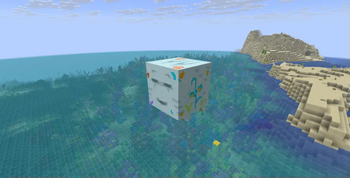
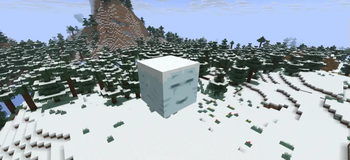
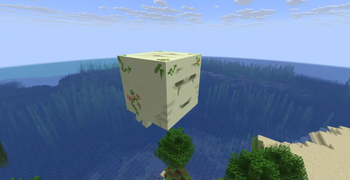
This mod aims to add many new happy ghast variants to your world. Each biome could give you a new happy ghast that looks like the environment it was Hydrated in.
The Mod has 21 unique variants, all biomes supported are below plus their respective variants such as savanna_plateu or any others.
- Plains, Meadows(vanilla minecraft texture)
- All the Ocean variants, warm ocean + lukewarm, differ from the rest
- Snow Biomes, such as Ice Spikes and snowy taiga
- End dimension
- Cherry Grove
- Mushroom island
- Forests and Birch Forests
- Dark Oak Forest
- Jungle
- Taiga, and Old Growth Taiga
- Pale Garden
- Deep Dark, along with Lush Caves
- Desert and Badlands
- Plus some hidden textures
All these happy Ghast Variants are able to be obtained in survival, even the hidden ones, if any ghasts are spawned in in a biome not on the list they will be assigned the vanilla texture. I plan on adding more if any new biomes are added into the game or come up with a fancy design for a new one/
Available Versions
How to Install GhastTopia on Your Server
Order Server
Order a Minecraft Java server with at least 3 GB RAM (4 GB recommended).
Set neoforge Loader
In the panel under "Egg", select the neoforge loader and matching Minecraft version (1.21.8).
Install Mod
Open the mod browser in the dashboard and search for "GhastTopia". Click "Install" – done! Alternatively, upload the .jar via SFTP to the /mods folder.
Compatibility
Mod Loaders
Minecraft Versions
1.21.8
Server-side
✓ RequiredRecommended RAM
4 GB(min. 3 GB)Frequently Asked Questions
GhastTopia server crashes on startup – what to do?
Most common cause: wrong neoforge version or insufficient RAM. Check the server log (latest.log) for "OutOfMemoryError" or "Mixin" errors. With Mado Hosting: ensure at least 3 GB RAM is allocated and the loader matches the mod version (1.21.8). You can switch loaders with one click in the panel.
Is GhastTopia compatible with neoforge?
GhastTopia officially supports neoforge for Minecraft 1.21.8. The Mado dashboard automatically detects incompatible loader combinations.
Server lagging with GhastTopia – how to optimize performance?
Recommended RAM: 4 GB (per 8 players). Use /spark profiler to check if GhastTopia consumes the most tick time. Common fixes: reduce server view-distance to 8-10, install "performant" or "starlight" as supplementary mods on Forge. With Mado Hosting, your server runs on NVMe SSDs with dedicated CPU cores for minimal latency.
Similar Mods
![[EMF] Entity Model Features](https://cdn.modrinth.com/data/4I1XuqiY/6e5bbd0d06b1741bfdab6c0cfab6de8fdaf0064c_96.webp)


Rent Modded Server
Install GhastTopia with just one click on your server.