
Gimme That Gimmick
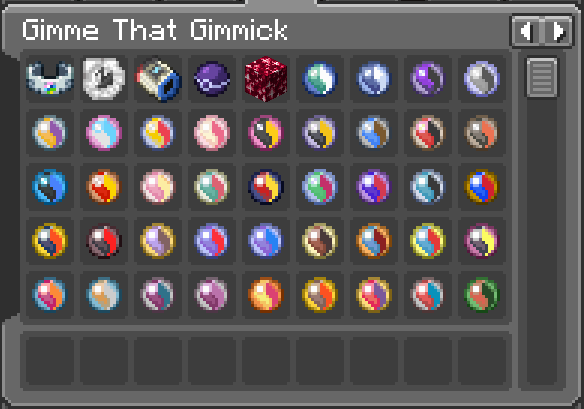
Adds server-side generational gimmicks to Cobblemon.
Screenshots
About this Mod
Gimme That Gimmick is a fully server-sided mod that implements generational gimmicks, related items, and data-driven form changes for Cobblemon.
Note that the items are only implemented, GTG does not make any items obtainable through gameplay nor does it create the associated visuals.
Server owners are expected to create or obtain acquisition methods and gimmick visuals for their own servers.
Gimme That Gimmick made specifically for Fabric servers and ports functionality from Mega Showdown
where necessary. If playing on single-player, a smaller private server, or on NeoForge, you should use
Mega Showdown instead for a complete and fully-integrated experience.
Attribution
Gimme That Gimmick relies on art assets, Showdown scripts, and mixins provided by Mega Showdown.
Please support the original as Gimme That Gimmick would not exist without their efforts.
Resource Authors from Mega Showdown
- YajatKaul
- Mixins
- Treynami
- Showdown scripts
- Sanji
- Mega Stones assets
- Z-Crystal assets
- Tera Shard assets
- Dynamax Band asset
- Max Candy asset
- Blue
- Mega Bracelet asset
- Z-Ring asset
- Tera Orb asset
- Max Mushroom asset
- Beibeihulis
- Max Soup asset
Items
Key Items
- Mega Bracelets, Z-Rings, Dynamax Bands, and Tera Orbs are added as polymer items.
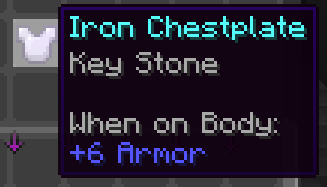
- Four enchantments: Key Stone, Z-Power, Dynamax, and Terastal allow enchanted items to act as key items.
- Four data-components corresponding to the gimmicks also exist, allowing applied items to act as key items.
Mixin Convenience
Mega Stones, Z-Crystals for types, and Z-Crystal for species are all given dedicated classes for convenience.
Dependent mods can mixin into these classes to apply custom functionality as required.
Tera Shards
Tera shards are used in groups of 50 and change the tera type of a Pokemon. The type can be checked by using a Tera Orb on the Pokemon.
Forme Changes
Gimme That Gimmick has a comprehensive and fully data-driven forme change system for battles. Check the wiki for a comprehensive guide.
Mod developers can also use the datagen API to produce their datapack files more efficiently.
Available Versions
How to Install Gimme That Gimmick on Your Server
Order Server
Order a Minecraft Java server with at least 3 GB RAM (4 GB recommended).
Set fabric Loader
In the panel under "Egg", select the fabric loader and matching Minecraft version (1.21.1).
Install Mod
Open the mod browser in the dashboard and search for "Gimme That Gimmick". Click "Install" – done! Alternatively, upload the .jar via SFTP to the /mods folder.
Compatibility
Mod Loaders
Minecraft Versions
1.21.1
Server-side
✓ RequiredRecommended RAM
4 GB(min. 3 GB)Frequently Asked Questions
Gimme That Gimmick server crashes on startup – what to do?
Most common cause: wrong fabric version or insufficient RAM. Check the server log (latest.log) for "OutOfMemoryError" or "Mixin" errors. With Mado Hosting: ensure at least 3 GB RAM is allocated and the loader matches the mod version (1.21.1). You can switch loaders with one click in the panel.
Is Gimme That Gimmick compatible with fabric?
Gimme That Gimmick officially supports fabric for Minecraft 1.21.1. The Mado dashboard automatically detects incompatible loader combinations.
Server lagging with Gimme That Gimmick – how to optimize performance?
Recommended RAM: 4 GB (per 8 players). Use /spark profiler to check if Gimme That Gimmick consumes the most tick time. Common fixes: reduce server view-distance to 8-10, install "performant" or "starlight" as supplementary mods on Forge. With Mado Hosting, your server runs on NVMe SSDs with dedicated CPU cores for minimal latency.
Similar Mods




Rent Modded Server
Install Gimme That Gimmick with just one click on your server.