
GLForcer
This Mod forces Modern OpenGl contexts supported by user drivers instead of Minecraft's default OpenGL 3.3 context.
Screenshots


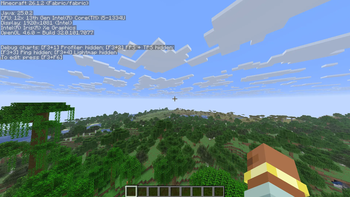
About this Mod
GLForcer
GLForcer is a lightweight rendering optimization mod that updates the game engine to utilize modern OpenGL contexts for better hardware efficiency.
By modernizing legacy platform constraints, GLForcer allows the game to communicate with your GPU using the highest context your hardware supports (up to OpenGL 4.6). This can result in faster geometry processing, smoother shader compilation, and a more optimized rendering pipeline.
Under the Hood
Smart Context Selection: GLForcer doesn't guess your specs. At launch, it safely probes your hardware—starting at OpenGL 4.6 and stepping down intelligently to find your GPU's exact supported version. You always get the most efficient version your machine can handle.
Fallback Protection: If you are running on older hardware that cannot handle modern 4.x contexts, the mod automatically catches the failure and falls back to the stable OpenGL 3.3 baseline used by vanilla Minecraft.
⚠️ Disclaimer
While GLForcer includes strict fallback protections and is designed to be safe for daily use, it modifies low-level window creation (GLFW). It is provided "as is," and while rare, it may cause unexpected rendering behavior on certain highly specific hardware configurations. Please report any issues on the tracker!
Available Versions
How to Install GLForcer on Your Server
Order Server
Order a Minecraft Java server with at least 3 GB RAM (4 GB recommended).
Set fabric Loader
In the panel under "Egg", select the fabric loader and matching Minecraft version (26.1.2).
Install Mod
Open the mod browser in the dashboard and search for "GLForcer". Click "Install" – done! Alternatively, upload the .jar via SFTP to the /mods folder.
Compatibility
Mod Loaders
Minecraft Versions
26.1.2
Server-side
✗ UnsupportedRecommended RAM
4 GB(min. 3 GB)Frequently Asked Questions
GLForcer server crashes on startup – what to do?
Most common cause: wrong fabric version or insufficient RAM. Check the server log (latest.log) for "OutOfMemoryError" or "Mixin" errors. With Mado Hosting: ensure at least 3 GB RAM is allocated and the loader matches the mod version (26.1.2). You can switch loaders with one click in the panel.
Is GLForcer compatible with fabric?
GLForcer officially supports fabric for Minecraft 26.1.2. The Mado dashboard automatically detects incompatible loader combinations.
Server lagging with GLForcer – how to optimize performance?
Recommended RAM: 4 GB (per 8 players). Use /spark profiler to check if GLForcer consumes the most tick time. Common fixes: reduce server view-distance to 8-10, install "performant" or "starlight" as supplementary mods on Forge. With Mado Hosting, your server runs on NVMe SSDs with dedicated CPU cores for minimal latency.
Similar Mods


Rent Modded Server
Install GLForcer with just one click on your server.