
Glomphosche
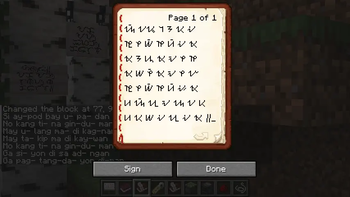
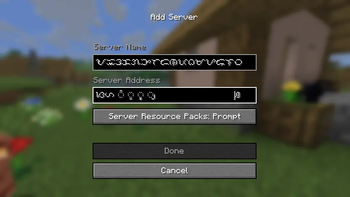
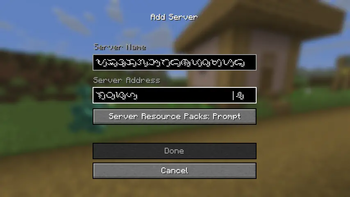
View composed glyphs or ligatures in Minecraft. (Alpha)
Screenshots

About this Mod
Glomphosche
Glomphosche is a simple mod that visually ligates or compose supported character or Unicode code point sequences into supported ligatures.
Alpha Usage
This mod is currently in Alpha testing. The composition system is already
working, though needing polishing and possibly improved capabilities that can be
built on top with.
Characters
| Item | Pre-composed Unicode | Unifont Extension | Custom Font | Notes |
|---|---|---|---|---|
| Tagalog Block | N/A | WIP | ✅ | Since 0.1.0. To display characters with vowel markers, viramas, and pamudpod, a custom font is used. The base characters are also replaced, overriding the default from Unifont. |
| Modern Hangul Jamo | ✅ | TBD | ❌ | Since 0.2.0. Visually handles valid jamo sequence as pre-composed syllable, which the in-game Unifont supports. |
| Hanuno'o Block | N/A | WIP | ✅ | Since 0.2.1. Custom font relacement and to support displaying vowel markers and pamudpod. |
Technicals
The internals are still being polished. You can check the first few lines of
the GlomphoscheImpl class and even the mentioned Node classes there that you
may find of interest.
import io.github.startsmercury.glomphosche.impl.client.GlomphoscheImpl;
import io.github.startsmercury.glomphosche.impl.client.node.DiscreteNode;
import io.github.startsmercury.glomphosche.impl.client.node.hangul_jamo.composable.ComposableHangulJamoNode;
import net.minecraft.network.chat.FontDescription;

class Example
{

void initialize()
{
// register modern Hangul Jamo handler, or your own handler
// for a different use, if you implemented one
GlomphoscheImpl.ROOT
    .inner()
    .add(new ComposableHangulJamoNode());

// the letter 'f'
DiscreteNode node1 = GlomphoscheImpl.LOOKUP.withDiscrete('f');
// the theoretical glyph 'fi'
DiscreteNode node2 = node1.withDiscrete('i');
// register the font that retextures 'f' as the glyph representing 'fi'
node2.fontOverride(FontDescription.DEFAULT); // replace with your own

// This one is for 'ffi' by retexturing 'f'
GlomphoscheImpl.ROOT
    .withDiscrete('f')
    .withDiscrete('f')
    .withDiscrete('i')
    // replace with your own
    .fontOverride(FontDescription.DEFAULT);
}

}
The shortest path to test with an editable text box is through the Add Server
screen found in Title Screen > Multiplayer > Add Server.
Available Versions
How to Install Glomphosche on Your Server
Order Server
Order a Minecraft Java server with at least 3 GB RAM (4 GB recommended).
Set fabric Loader
In the panel under "Egg", select the fabric loader and matching Minecraft version (1.21.10).
Install Mod
Open the mod browser in the dashboard and search for "Glomphosche". Click "Install" – done! Alternatively, upload the .jar via SFTP to the /mods folder.
Compatibility
Mod Loaders
Minecraft Versions
1.21.10
Server-side
✗ UnsupportedRecommended RAM
4 GB(min. 3 GB)Frequently Asked Questions
Glomphosche server crashes on startup – what to do?
Most common cause: wrong fabric version or insufficient RAM. Check the server log (latest.log) for "OutOfMemoryError" or "Mixin" errors. With Mado Hosting: ensure at least 3 GB RAM is allocated and the loader matches the mod version (1.21.10). You can switch loaders with one click in the panel.
Is Glomphosche compatible with fabric?
Glomphosche officially supports fabric for Minecraft 1.21.10. The Mado dashboard automatically detects incompatible loader combinations.
Server lagging with Glomphosche – how to optimize performance?
Recommended RAM: 4 GB (per 8 players). Use /spark profiler to check if Glomphosche consumes the most tick time. Common fixes: reduce server view-distance to 8-10, install "performant" or "starlight" as supplementary mods on Forge. With Mado Hosting, your server runs on NVMe SSDs with dedicated CPU cores for minimal latency.
Similar Mods




![[ETF] Entity Texture Features](https://cdn.modrinth.com/data/BVzZfTc1/af683d206d50b05258d865b0d6e4aa2f2cee12f2_96.webp)
![[EMF] Entity Model Features](https://cdn.modrinth.com/data/4I1XuqiY/6e5bbd0d06b1741bfdab6c0cfab6de8fdaf0064c_96.webp)
Rent Modded Server
Install Glomphosche with just one click on your server.