
Glow Cubes
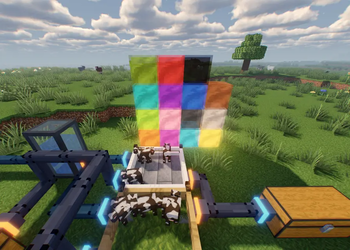
Utilizing the power of bees we can create these bigger glow cubes for even more light. Comes in 17 colours.
Screenshots
About this Mod

Glow Cubes
Bright, full-block light sources in every color.
Glow Cubes adds 17 decorative glowcubes — an undyed base plus all 16 dye colors. Each is a full block that glows at light level 13 (just shy of glowstone), with a translucent outer shell and a soft inner glow. Clean, colorful lighting and building blocks in one.
Features
- Every dye color — white through black, plus an undyed base. 17 in total, in their own creative tab.
- Bright — light level 13: enough to keep mobs away and light up your builds.
- Easy to craft — surround a glowstone dust with honeycomb for the base, then combine it with any dye to color it. Re-dye anytime.
- Glass-soft — breaks fast, full-block shape, no redstone or fuss. Just light.
- Lightweight — pure decoration, no performance overhead, works in singleplayer and on servers.
Compatibility
- Minecraft: 26.2 (also available for 26.1)
- Loaders: Fabric and NeoForge
- Fabric builds require Fabric API.
Part of the Hydrofarm family
Glow Cubes started life inside Hydrofarm — a water-tech, farming, and automation mod (hydroponic beds, fluid & item pipes, energy, sprinklers, and a lot more). If you want the full toolkit, grab Hydrofarm — it's on Modrinth and CurseForge.
Run both and they fit together seamlessly: Hydrofarm steps aside on its glowcubes so you get a single set — no duplicates, no clutter.
Just want the glowcubes? You're in the right place.
Available Versions
How to Install Glow Cubes on Your Server
Order Server
Order a Minecraft Java server with at least 3 GB RAM (4 GB recommended).
Set fabric Loader
In the panel under "Egg", select the fabric loader and matching Minecraft version (26.2).
Install Mod
Open the mod browser in the dashboard and search for "Glow Cubes". Click "Install" – done! Alternatively, upload the .jar via SFTP to the /mods folder.
Compatibility
Mod Loaders
Minecraft Versions
26.2, 26.1.2, 26.1.1 (+1 more)
Server-side
✓ RequiredRecommended RAM
4 GB(min. 3 GB)Frequently Asked Questions
Glow Cubes server crashes on startup – what to do?
Most common cause: wrong fabric version or insufficient RAM. Check the server log (latest.log) for "OutOfMemoryError" or "Mixin" errors. With Mado Hosting: ensure at least 3 GB RAM is allocated and the loader matches the mod version (26.2). You can switch loaders with one click in the panel.
Is Glow Cubes compatible with fabric and neoforge?
Glow Cubes officially supports fabric, neoforge for Minecraft 26.2, 26.1.2, 26.1.1. The Mado dashboard automatically detects incompatible loader combinations.
Server lagging with Glow Cubes – how to optimize performance?
Recommended RAM: 4 GB (per 8 players). Use /spark profiler to check if Glow Cubes consumes the most tick time. Common fixes: reduce server view-distance to 8-10, install "performant" or "starlight" as supplementary mods on Forge. With Mado Hosting, your server runs on NVMe SSDs with dedicated CPU cores for minimal latency.
Similar Mods

![[ETF] Entity Texture Features](https://cdn.modrinth.com/data/BVzZfTc1/af683d206d50b05258d865b0d6e4aa2f2cee12f2_96.webp)
![[EMF] Entity Model Features](https://cdn.modrinth.com/data/4I1XuqiY/6e5bbd0d06b1741bfdab6c0cfab6de8fdaf0064c_96.webp)



Rent Modded Server
Install Glow Cubes with just one click on your server.