
Glue
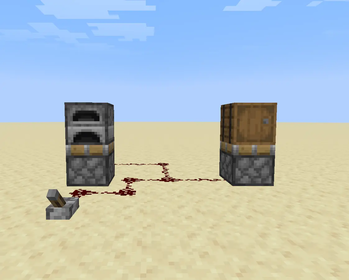
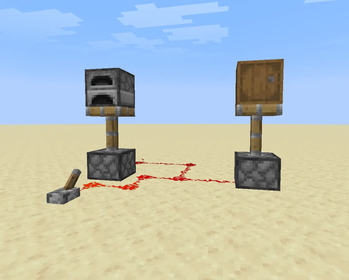
Pistons can move chests, hoppers, and more. Use Glue to lock them in place — remove it with an axe.
Screenshots
About this Mod
Glue
Move block entities with pistons — lock them in place when you don’t want them to move.
Glue allows pistons to push and pull supported block entities such as chests, barrels, hoppers, and more. This opens up new redstone possibilities, mobile storage systems, and compact automation builds.
To keep things under control, you can apply Glue to a block entity to prevent it from being moved. If you change your mind, simply use an axe to remove the glue — just like scraping wax off copper.
Features
Pistons can move supported block entities
Block entities retain their data when moved (inventory, names, etc.)
Glue item locks block entities in place
Axes remove glue quickly and intuitively
Designed for redstone builds and automation systems
Supported Blocks (v1)
Chests (including trapped chests)
Barrels
Hoppers
Droppers
Dispensers
Furnaces, Smokers, and Blast Furnaces
Crafters
Notes
Movement is restricted in situations that could cause issues (such as active use or invalid positions)
Some special or complex blocks may not be supported yet
Additional compatibility and features may be added in future updates
Requirements
Fabric API
Fabric Language Kotlin
Available Versions
How to Install Glue on Your Server
Order Server
Order a Minecraft Java server with at least 3 GB RAM (4 GB recommended).
Set fabric Loader
In the panel under "Egg", select the fabric loader and matching Minecraft version (1.21.11).
Install Mod
Open the mod browser in the dashboard and search for "Glue". Click "Install" – done! Alternatively, upload the .jar via SFTP to the /mods folder.
Compatibility
Mod Loaders
Minecraft Versions
1.21.11
Server-side
✓ RequiredRecommended RAM
4 GB(min. 3 GB)Frequently Asked Questions
Glue server crashes on startup – what to do?
Most common cause: wrong fabric version or insufficient RAM. Check the server log (latest.log) for "OutOfMemoryError" or "Mixin" errors. With Mado Hosting: ensure at least 3 GB RAM is allocated and the loader matches the mod version (1.21.11). You can switch loaders with one click in the panel.
Is Glue compatible with fabric?
Glue officially supports fabric for Minecraft 1.21.11. The Mado dashboard automatically detects incompatible loader combinations.
Server lagging with Glue – how to optimize performance?
Recommended RAM: 4 GB (per 8 players). Use /spark profiler to check if Glue consumes the most tick time. Common fixes: reduce server view-distance to 8-10, install "performant" or "starlight" as supplementary mods on Forge. With Mado Hosting, your server runs on NVMe SSDs with dedicated CPU cores for minimal latency.
Similar Mods




Rent Modded Server
Install Glue with just one click on your server.